©2016 Cradlepoint. All Rights Reserved. | +1.855.813.3385 | cradlepoint.com
12
User Manual / AER2100
4/19/16
QUICK START
BASIC SETUP
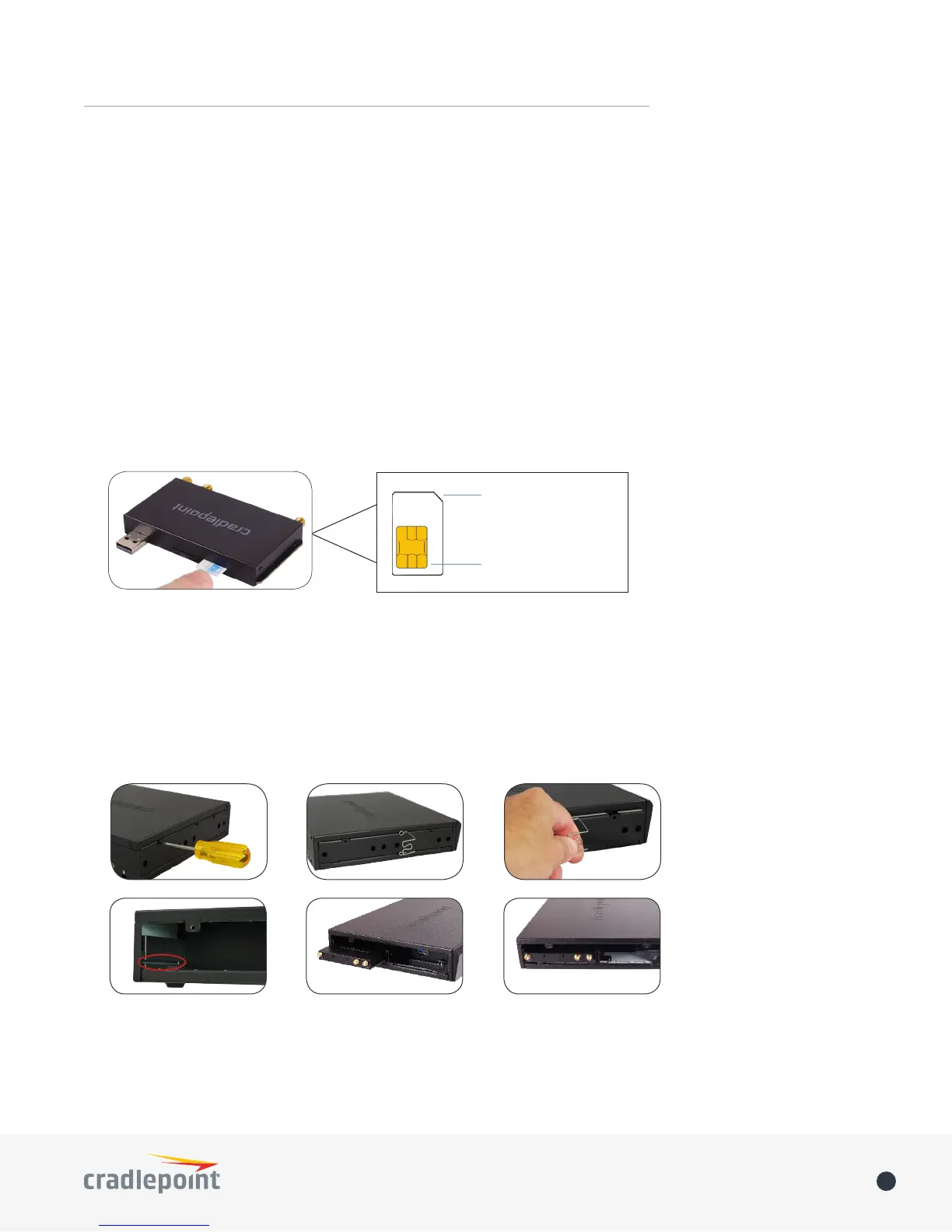
1. Insert an activated SIM
available from wireless carriers such as Verizon, AT&T, Sprint, EE, and Vodafone. The SIM must be provisioned
SIM 1 (use the other slot, SIM 2
Notch-end goes in first
Gold contacts face down
2. Insert the removable modem
Follow these steps to insert the removable modem(s):
1. Remove the left side panel cover from the router. Use a Phillips screwdriver to remove the screws, and use
the Multipurpose Retaining Tool (included in the router package) to remove the cover.
2.
the groove.
3. Reattach the modem cover. If desired, use a Phillips screwdriver to secure modem door screws to bottom
side of the router near the front.














 To Next Page