©2016 Cradlepoint. All Rights Reserved. | +1.855.813.3385 | cradlepoint.com
70
User Manual / AER2100
4/19/16
Network Settings > WiFi / Local Networks.
Select the network and click Edit. You can
change the IP address under IPv4 Settings.
0.1 to
192.168.1.1.
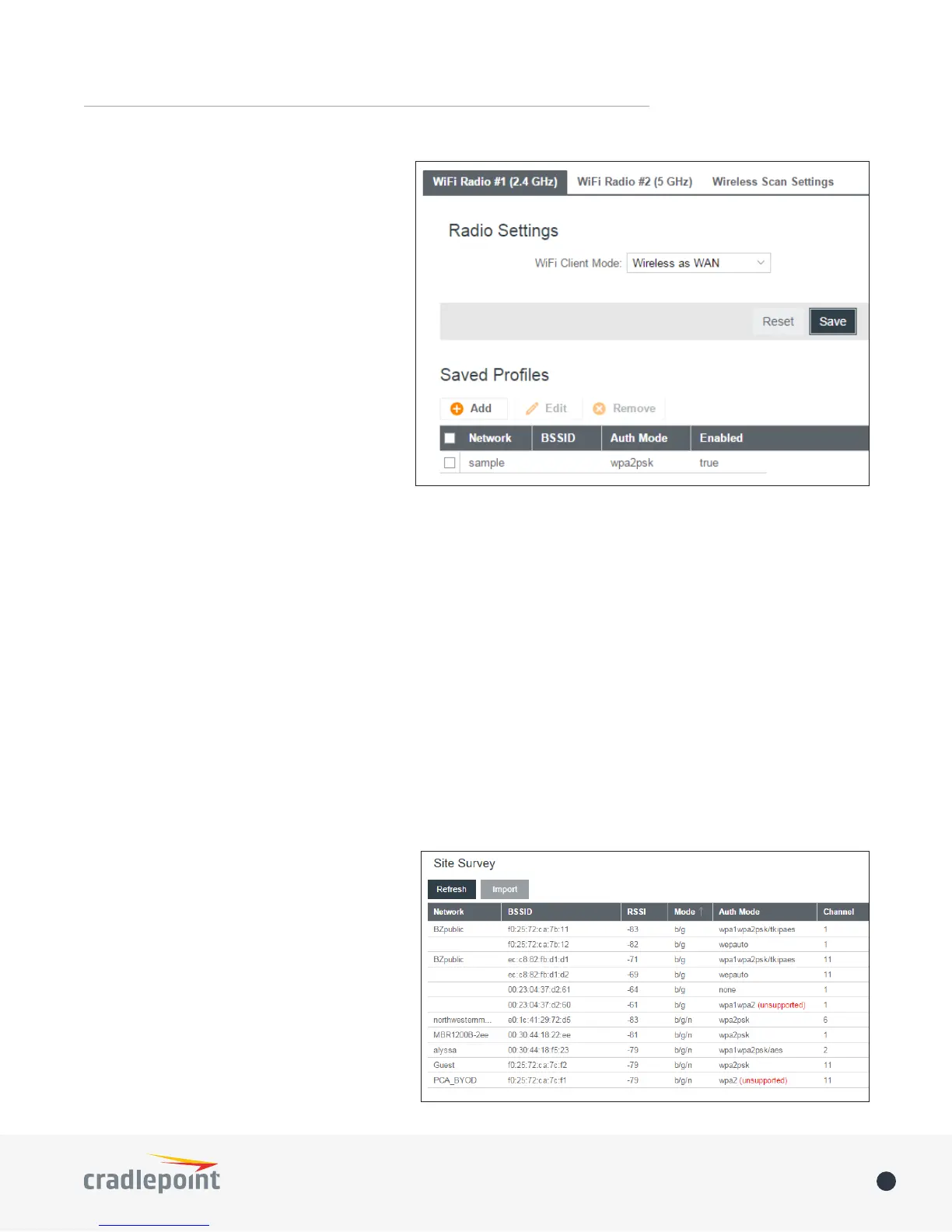
Saved Proles
This is a list of WiFi networks that have
point is in range, then the router will connect
Network: The name (SSID, or Service Set
point.
BSSID: The numeric ID of the network (Basic
access point that matches the given SSID.
Auth Mode
• None
• WEP Auto
• WEP Open
• WEP Shared
• WPA1 Personal
• WPA2 Personal
• WPA1 & WPA2 Personal
• Automatic – Select a WiFi network in Site Survey and click Import
• Manual – Click on Add under Saved Profiles and input the required information.
Site Survey
This is a list of WiFi networks that the router
about the network such as its mode and
want to connect to is not listed. You can sort
Site Survey,
most of the information about the network
the password (if there is one) and then click






 To Next Page