- 14 -
- 15 -
Software Operation
CreatWare Setup Quick Print UI
Software Operation
Download CreatWare installation package from the CD-ROM or
www.CreatBot.com, follow the prompts to install the software, try
using the default installation path as well.
Please associated common 3D file format.
Installation path can not contain non-Latinn characters.
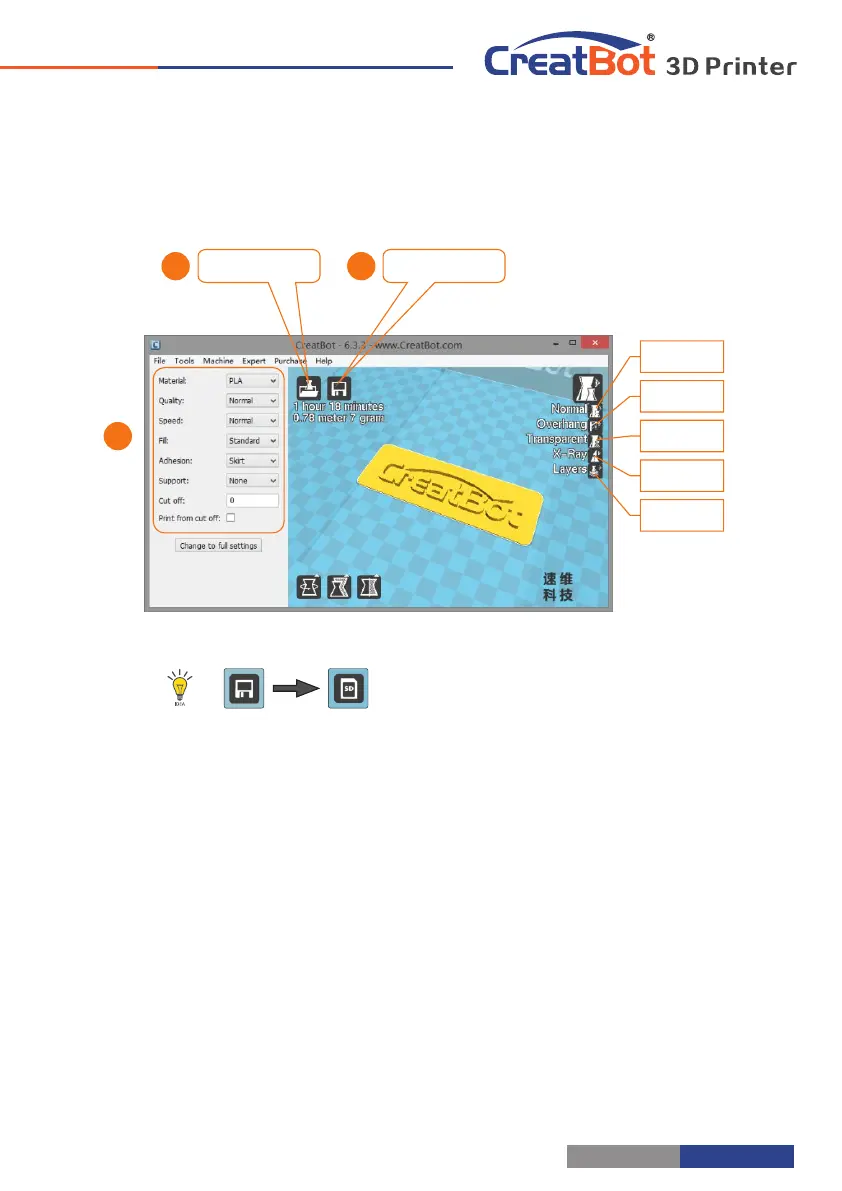
Insert SD card to the card reader, open the CreatWare, load 3D
model file , choose correct filament and option , finally click [1] [2]
save button , you can now finish slice model.[3]
Insert SD card to the printer, browse and select the Gcode file
you just saved, the printer will automatically start to heating, when
the temperature reaches, the printing will start.
When insert SD card, the toolpath will saved
to the SD card.
The file name can not contain non-Latinn
characters.
Print Your First Model
Please associated common 3D file format.
When there is a driver digital signature, please choose to agree. When
finished the driver folder will locate at installation directory.
The software will select the correct language according to your OS,
please select the right machine type and number of nozzles and ignore the
other option and guide.
Load model
Save toolpath
31
2
Normal
Overhang
Transparent
X-Ray
Layers



 To Next Page