Software Operation
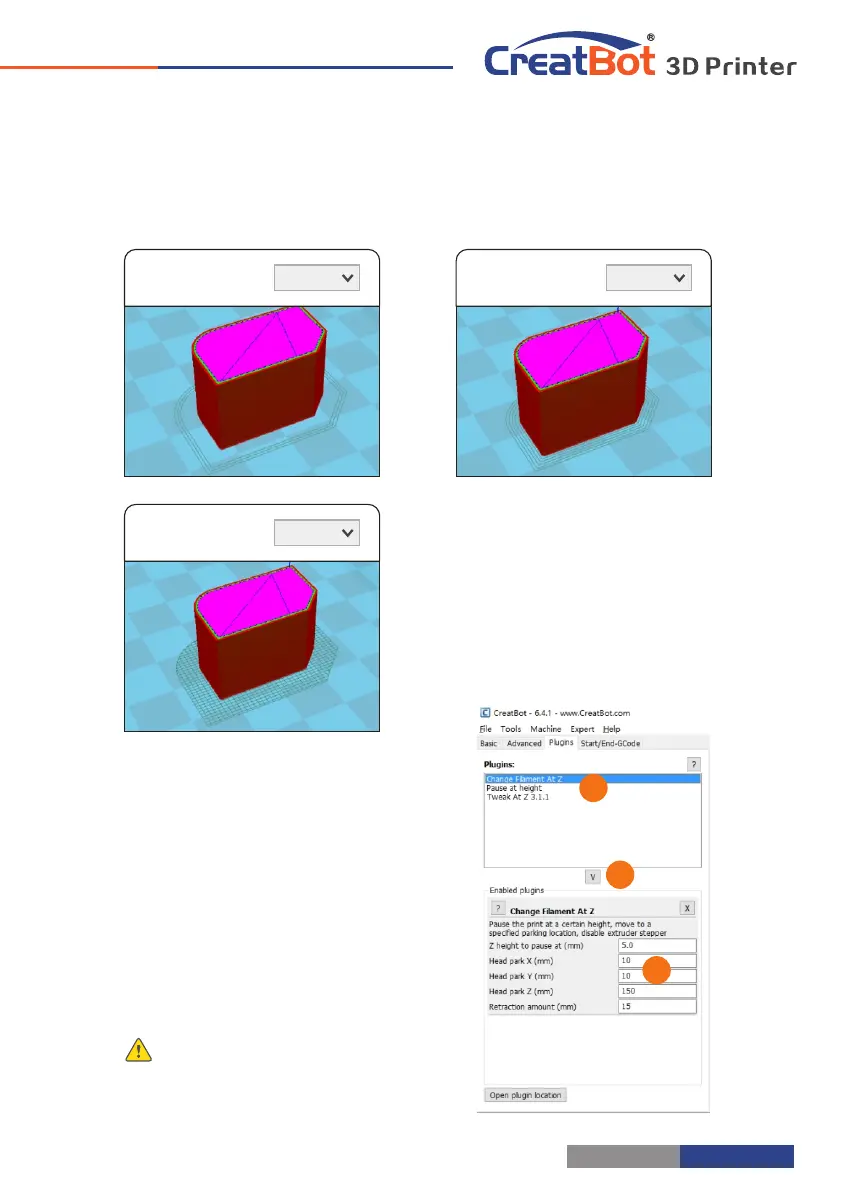
Skirt · Brim · Raft
Adhesion type:
None
Adhesion type:
Brim
Adhesion type:
Raft
Plugins
Plugin enable you to easily include
your own features, without having to
modify the source code or Gcode. In
the screen shot above, these can be
enabled by clicking on the arrow down
button, then you can configure the
plugin.
Notice: Please remove the plugin
before you close the software.
1
2
3
1
2
3
- 31 -
Export Setting
Software Operation
Notice: Most of the setting have been optimized, If you want
restore default configuration,use the menu "Tools"->"Reset
profile to default".
Nozzle size: Set the nozzle
size.
Diameter: Accurate
measurement of your
filament gives better
quality prints.
Minimum travel: The
minimum distance
which can trigger
filament retract.
Minimum extrusion: The
minimal amount of
extrusion that needs to
be done before
retracting.
Enable combing: Combing
is the act of avoiding
holes in the print for the
head to travel over.
Wipe tower: Is a small
tower next to your
print where the nozzle
wipes itself clean when
switching nozzles.
Dual extrusion switch amount: Amount of retraction when switching nozzle with dual-
extrusion, a value of 15mm seems to generate good results.
Cooling fan: The extra cooling fan is essential while printing small model, but when print
ABS material, the max fan speed should not more than 50%.
Skirt: The skirt is a line drawn around the model at the first layer. This helps to prime your
extruder, and to see if the model fits on your platform.
Brim: The amount of lines used for a brim, more lines means a larger brim which sticks better.
- 30 -



 To Next Page