- 33 -
Software Operation
Align Dual Head Horizontal
There are alignment problem while printing dual color model, this is
because the small difference in multi-nozzle assembly, CreatWare built
fine-tuning features.
Click menu "Machine">"Machine settings", default X offset is: 73.0,
default Y offset is: 0.0, adjustment method as shown below:
Offset X:
72.7
Offset Y:
-0.3
Extruder 2
Extr. 1
Extr. 2
Offset X:
73.3
Offset Y:
0.3
Extruder 2
Extr. 1
Extr. 2
Start / End GCode
Software Operation
A B C
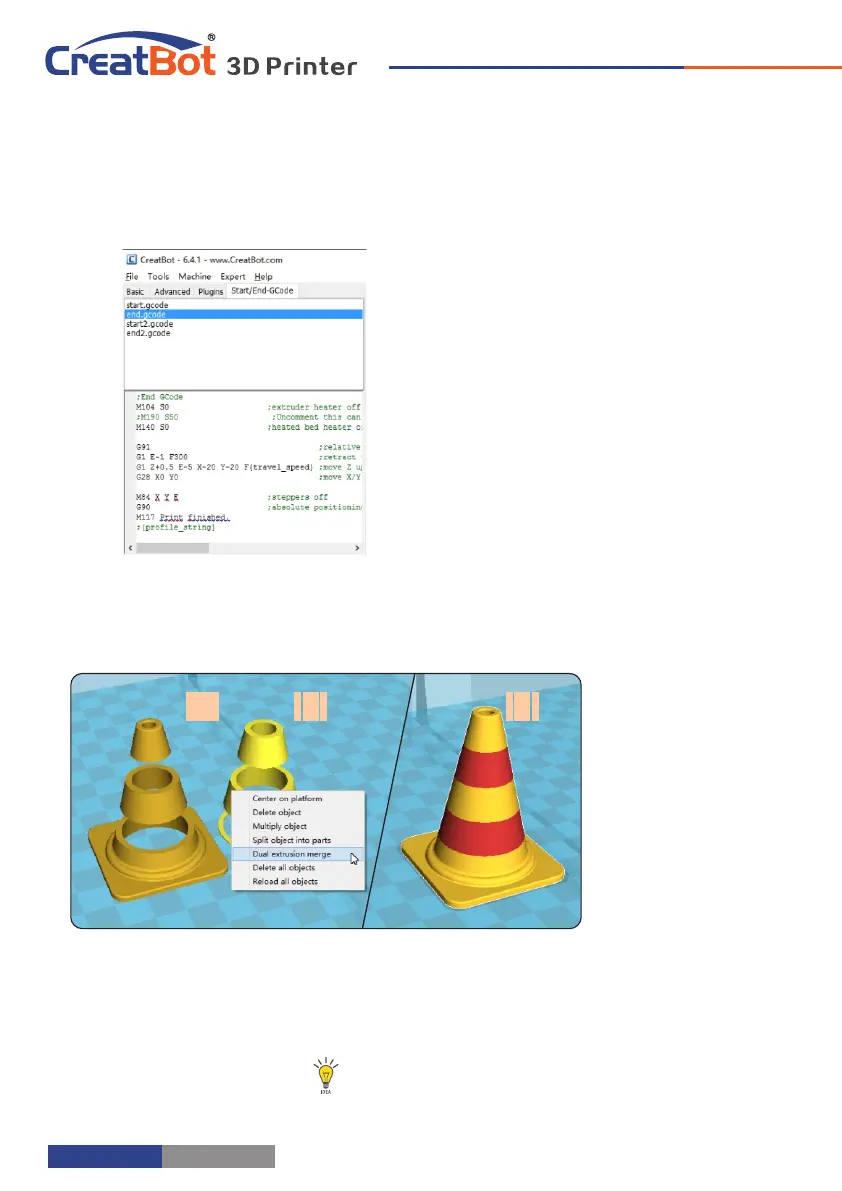
Step 1: Load 2 models
you want as
shown in figure [A]
and [B].
Step 2: , Fist click [A]
then right click on
[B], you will get
the option dual :
extrusion merge ,
this will merge
both models into
one model . [C]
Step 3: Set parameters like ordinary single color model and save the GCode.
Tip: The model select first will print by main extruder,
the right clicked one by second extruder.
Dual Head Printing
The start and end gcode are the startup
and end procedure of the print, editing this
requires knowledge of GCode.
If you want to set the automatic heating
station after printing, you can remove the ";"
in the code ";M190 S50".
start.gcode is the start code of single
extruder, start2.gcode is the start code of
double extruder, and so on.
- 32 -



 To Next Page