Using Your NOMAD Jukebox 3-4
Viewing Details
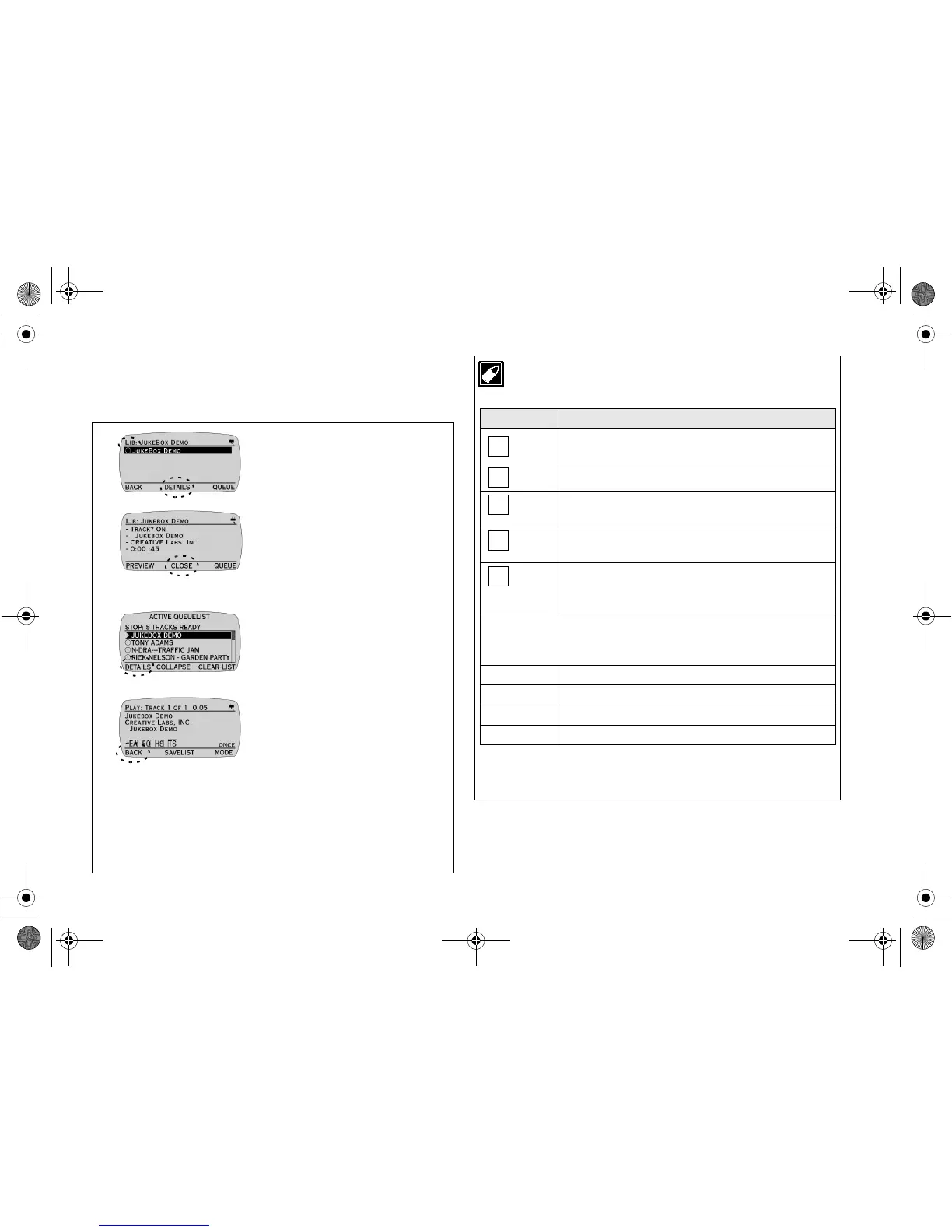
There are two types of DETAILS screens. The first type is accessed
from the TRACKS screen and the second type is accessed from the
ACTIVE QUEUE LIST screen.
The following Playback settings will be shown on the LCD if
they have been turned on.
Viewing DETAILS accessed
from the TRACKS screen
1. Press
DETAILS
.
The DETAILS screen displays
the Track Order, Album, Artist
and duration of the track.
2. Press
CLOSE
to return to the
LIBRARY CATEGORIES
screen.
Viewing DETAILS accessed
from the ACTIVE QUEUE
LIST screen
1. Press
DETAILS
.
The DETAILS screen displays
the Track Title, Artist and
Album together with Audio
Playback settings (see note
below) and Play Mode (see
“Setting Play Mode” on page
3-6 ).
2. Press
BACK
to return to the
ACTIVE QUEUE LIST screen.
Icon What it means
You have applied an Environmental Preset such as
Concert Hall.
You have applied Parametric EQ.
You have applied Headphone Spatialization such as
Full effects.
You have adjusted to a different playback speed
(faster or slower) using Time Scaling.
You have applied spatialization (4-Channel
Speaker Sound) to your four speaker system. This
icon appears only if speakers are connected).
Note: You can adjust all the above settings in the EAX and System
Menu. For details, refer to “What You can Do in EAX and System
Menu” on page 3-7 onwards.
ONCE Plays the current track or play list once.
SHUFFLE Play once in random order.
RANDOM Plays continuously in a random way.
REPEAT Repeats the playback.













 To Next Page