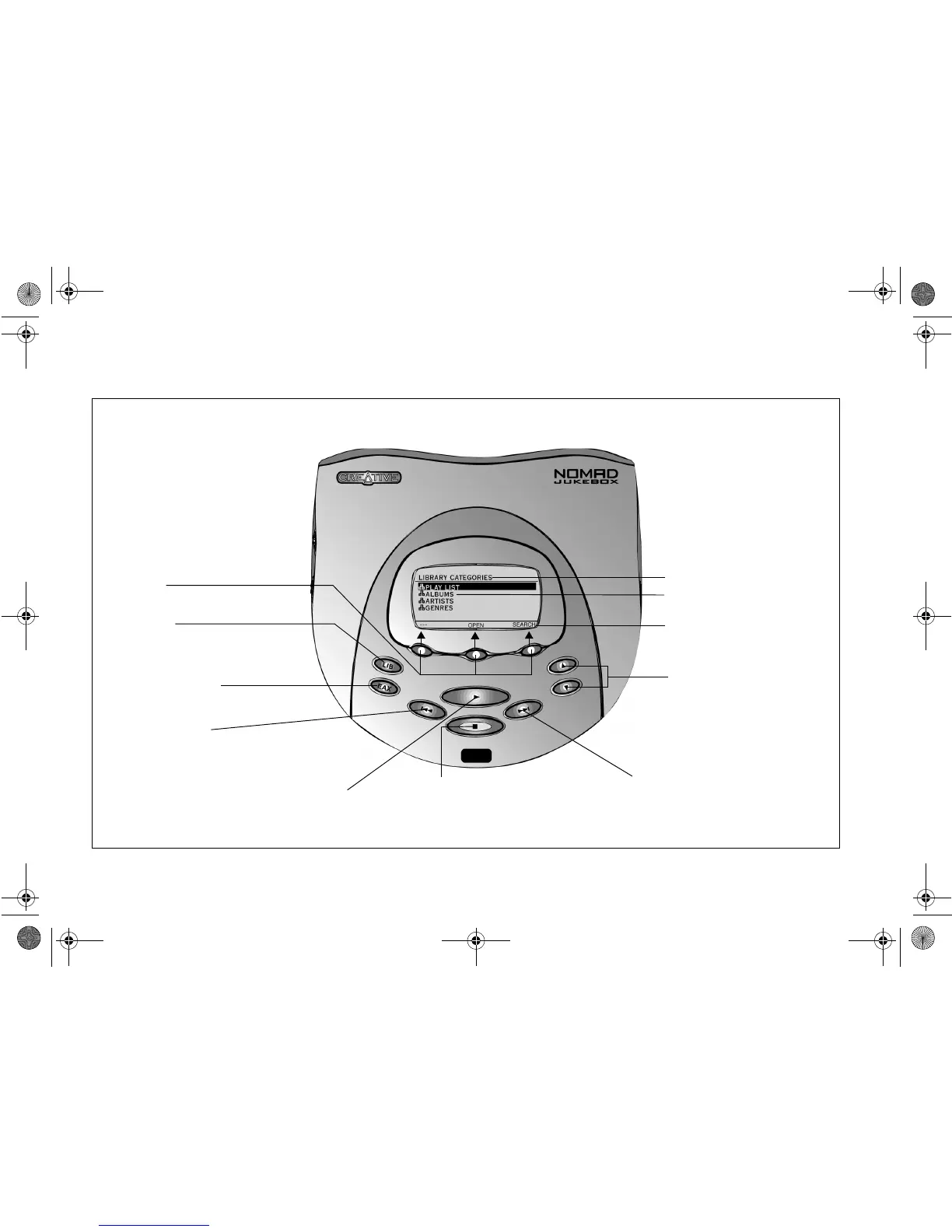
Screen Title
Main Info
Soft button functions
Scroll Up/Down buttons
These buttons are used for screen
navigation e.g. press to move up or
down through the items or press and
hold to increase the speed of
movement through the list. They are
also used to move the letter entry
position to the left or right indicated by
a ^.
Skip Forward button
Restarts audio at the start of
the
next
track in the Play List.
Stop button/PAUSE/OFF
Press once to
pause
playback. Press again to
stop
playback. The PlayPointer returns to the
beginning of the track. Press the Play button
to resume playback.
Play button/ON
Press to
immediately
play any item selected. A track selected
from the Music Library is placed at the top of the ACTIVE
QUEUE LIST; a track selected from the ACTIVE QUEUE
LIST advances the list to that track and begins playback.
Skip Backward button
Press to restart audio at the start of the
previous
track in the Play List. The PlayPointer
icon indicates the playing track.
EAX and System button
Press to display the full list of EAX & System
Settings which can be adjusted.
Library button
This is the “Home” key. Press to switch
between the LIBRARY CATEGORIES screen
and the ACTIVE QUEUE LIST screen.
Soft buttons
Press to execute the labels directly above
them in the LCD.
NJb.book Page 2 Friday, August 11, 2000 10:08 AM













 To Next Page