Using Your NOMAD Jukebox 3-10
Listening to an Audio Recording
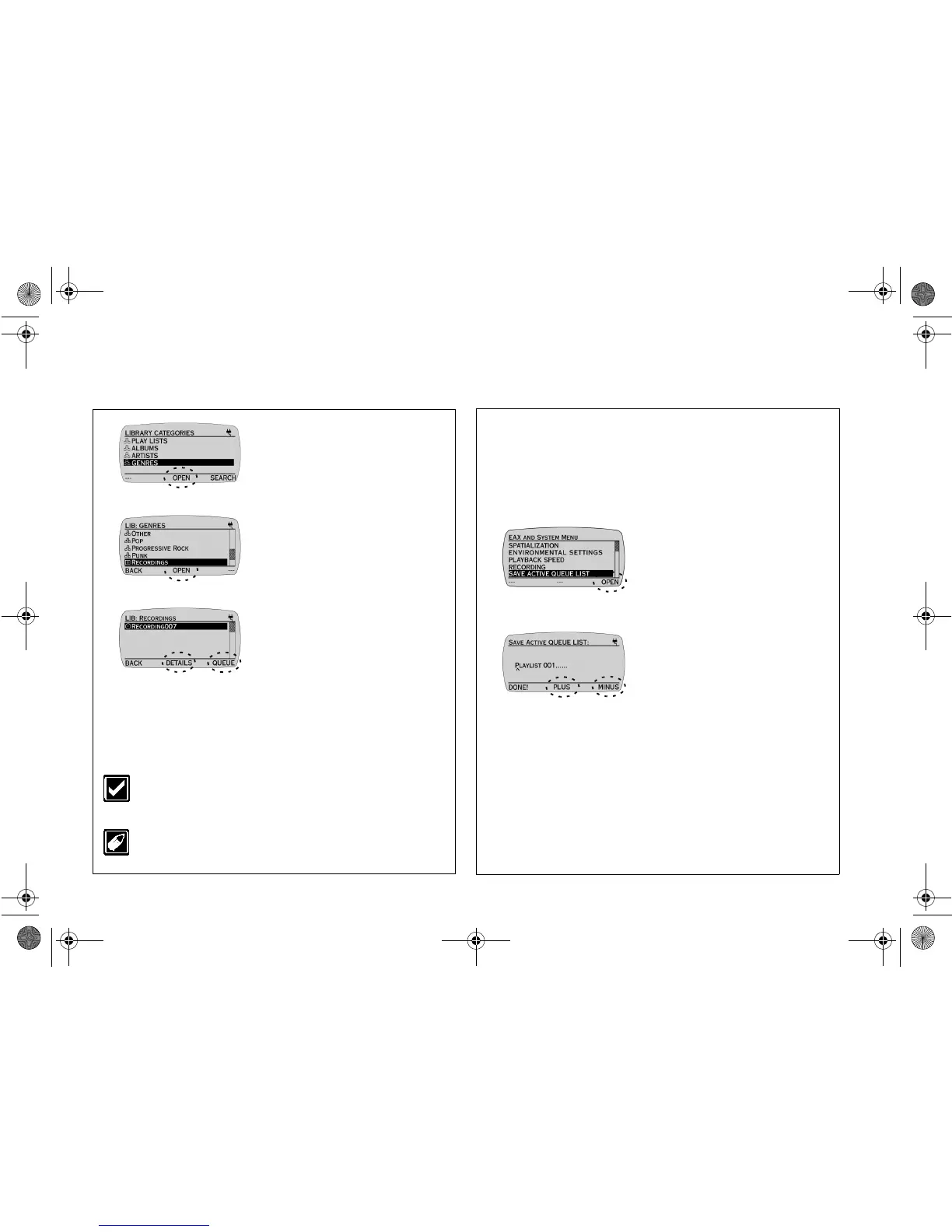
To listen to your saved audio recording, ensure that you are in the
LIBRARY CATEGORIES screen.
Saving an Active Queue List
This feature allows an active queue list to be saved on the Jukebox.
1. Press the
SCROLL
UP
/
DOWN
buttons to select
GENRES.
2. Press
OPEN
.
3. Press the
SCROLL
UP
/
DOWN
buttons to select
RECORDINGS.
4. Press
OPEN
.
5. Press the
SCROLL
UP
/
DOWN
buttons to select
the recording you have saved.
6. Press the
PLAY
button to
listen.
Press
DETAILS
to view
information on the track.
Press
QUEUE
to place the
track on in the active queue list.
Use PlayCenter 2 to encode your recording to an MP3 track
to reduce its file size or to fill in the track details. Refer to its
online Help for instructions.
You can use Playback Speed (refer to “Using Playback
Speed” on page 3-8) to slow down or speed up the playback
speed of your audio recording.
1. After you have created an active
queue list, press
EAX
to access
EAX AND SYSTEM MENU
screen.
Note:
For details on how to create an
active queue list, refer to“Saving a Play
List in DETAILS screen” on page 3-6.
2. Press the
SCROLL
UP
/
DOWN
buttons to select
SAVE ACTIVE QUEUE LIST.
3. Press
OPEN
.
4. Press
PLUS
or
MINUS
to
change the letter and then press
the
SCROLL UP
/
DOWN
buttons to move the letter entry
position indicated by a caret.
5. Press
DONE!
to save the play
list.
NJb.book Page 10 Friday, August 11, 2000 10:08 AM













 To Next Page