Using Your NOMAD Jukebox 3-11
Deleting Library Items
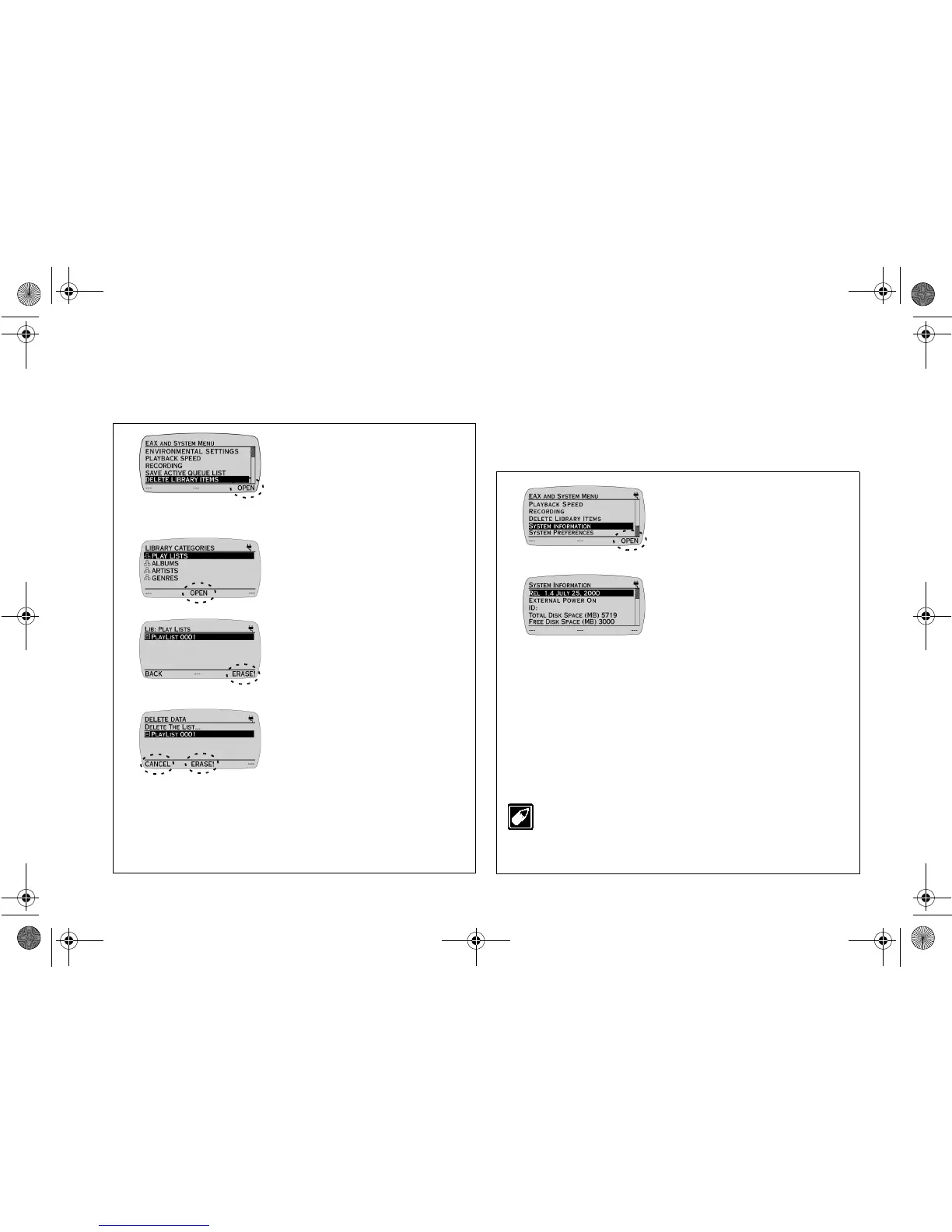
This feature allows a play list, track or album to be deleted completely
from NOMAD Jukebox.
Ensure that you are in EAX AND SYSTEM
MENU before proceeding.
Viewing System Information
The SYSTEM INFORMATION screen provides useful data on your
Jukebox's power consumption, disk space and number of audio tracks
and albums stored. The release number and date of your Jukebox is also
shown. You can also view your Jukebox's ID if you have created one
using Creative's PlayCenter 2.
Ensure that you are in EAX AND SYSTEM MENU before proceeding.
1. Press the
SCROLL
UP
/
DOWN
buttons to select
DELETE LIBRARY ITEMS.
2. Press
OPEN
to access
LIBRARY CATEGORIES
screen.
3. Press the
SCROLL
UP
/
DOWN
buttons to select
PLAY LISTS.
4. Press
OPEN
.
5. Press the
SCROLL
UP
/
DOWN
buttons to select
the play list you would like to
delete.
6. Press
ERASE!
.
7. Verify again the play list to be
deleted. Press
ERASE!
to
delete. Press
CANCEL
to
cancel the deletion.
Note:
Using this feature will stop
playback and clear the current playlist.
If a play list is selected for deletion,
only the list is deleted - the tracks or
albums remain on the Jukebox.
1. Press the
SCROLL
UP
/
DOWN
buttons to select
SYSTEM INFORMATION.
2. Press
OPEN
.
3. Press
LIB
to return to the
LIBRARY CATEGORIES
screen.
Press
EAX
to return to the EAX
and System Menu screen.
The System Information screen is for display only. You will
not be able to adjust any of the settings except the ID. To
change the ID, start PlayCenter 2, open the
Transfer
Window
, and click
Settings
on the toolbar. Type a new ID
and click
OK
.
NJb.book Page 11 Friday, August 11, 2000 10:08 AM













 To Next Page