56 • TSS-770 and TSS-1070 Product Manual — Doc. 8745C
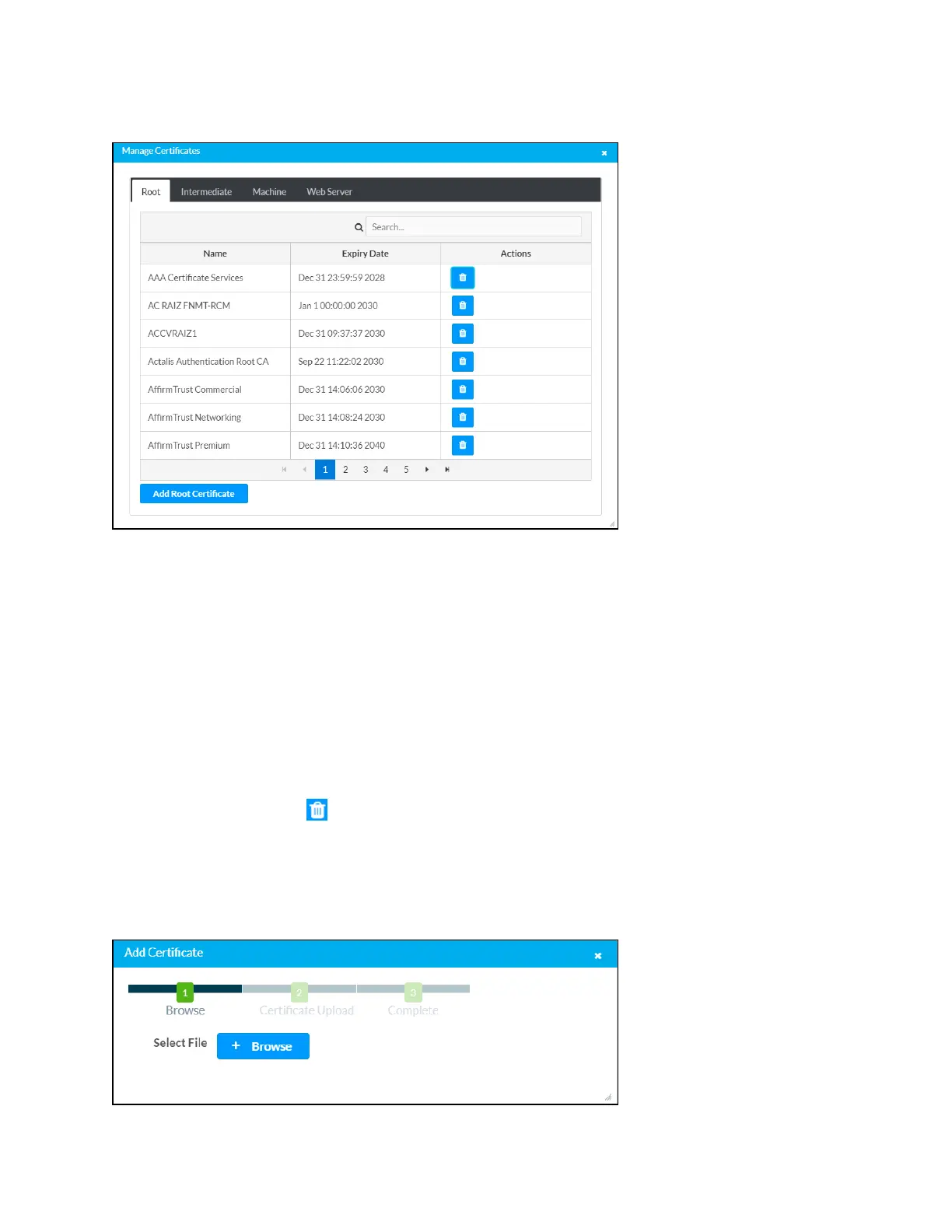
Manage Certificates Dialog Box - Root Tab
Click the tabs near the top of the page to switch between the different types of CAs (Root,
Intermediate, Machine, or Web Server). The same settings are provided for each type of CA.
Type a search term into the Search… text field to search for and display CAs that match the
search term.
The following information is provided for each type of CA:
l Name: The CA name
l Expiry Date: The date and time that the CA is set to expire
If the CAs span multiple pages, use the navigation arrows on the bottom of the page to move
forward or backward through the pages, or select a page number to navigate to that page.
Click the trashcan button in the Actions column for a CA to delete it. A pop-up dialog box is
displayed asking if the CA should be deleted. Click Yes to delete the certificate or No to cancel.
Click Add [Type] Certificate to add a CA of one of the four available types (Root, Intermediate,
Machine, or Web Server) to the list of CAs. The Add Certificate pop-up dialog box is displayed.
Add Certificate Dialog Box










 To Next Page