26
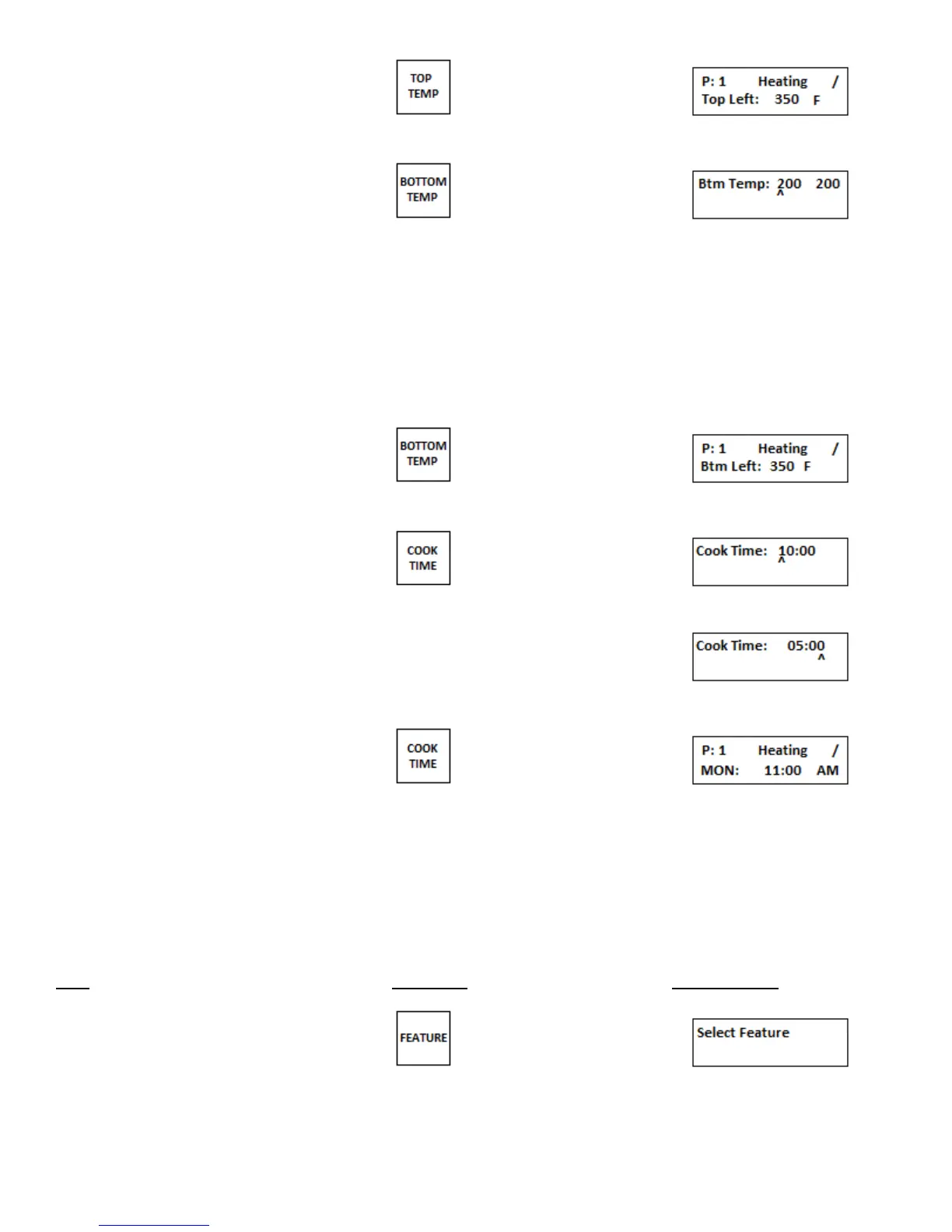
4.Press TOP TEMP key
5.Press BOTTOM TEMP key
6.Using the numeric keypad enter the new bottom left temperature.
As the cursor moves to the right enter the new bottom right temperature.
NOTE: If both bottom left and bottom right temperatures are the same
entering in the bottom left temperature and then pressing the BOTTOM TEMP
button will lock in the same value for the bottom right temperature
as set on the bottom left side.
7.Press BOTTOM TEMP key
8.Press COOK TIME key
9.Using the numeric keypad enter the new cook time.
10.Press COOK TIME key
11. Repeat Steps 1 – 10 to program the remaining presets.
Note: If only using one time and temperature, set all presets to the same time and temp. This way if anyone presses
another preset it will not change to a different time and temp.
d. Setting the Clock
The clock sets the day of the week, the time, and AM or PM.
Step Press Key Display Reads
1. Press FEATURE key


 To Next Page