27
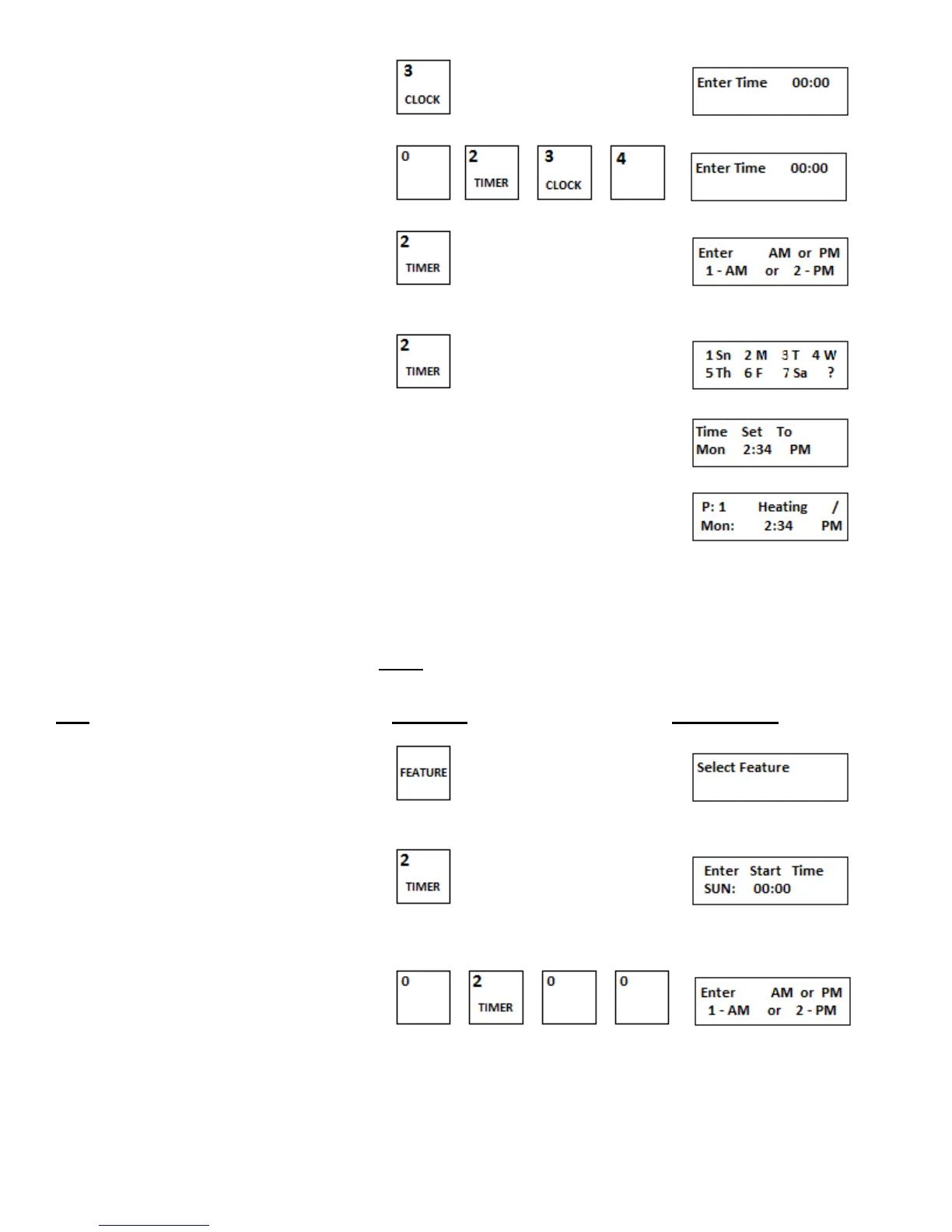
2.Press CLOCK key
3.Using the numeric keypad enter the time , , ,
4.Enter either 1 or 2 for appropriate selection
For AM or PM
5.Enter selection 1 through 7 for correct day
6.After 2 seconds the display reverts to
d. Set the Timer
The timer can be set to turn the oven ON and OFF automatically. The timer cycle runs for seven days and
then repeats itself. The times set for the oven to turn ON can be the same or different for each day as can
the times set for the oven to turn OFF. The timer program allows only one ON and one OFF per 24 hour
day, midnight to midnight. Refer to the chart (Figure 3-6) to assist in choosing ON/OFF times.
Note: When using the timer you MUST program every day of the week, if there is a day you do not want the
oven to turn ON you can program the oven to come on for one (1) minute only.
Step Press Key Display Reads
1.Press FEATURE key
2. Select TIMER key
3.Using the numeric key pad enter the time , , ,


 To Next Page