GB
11
Preparation
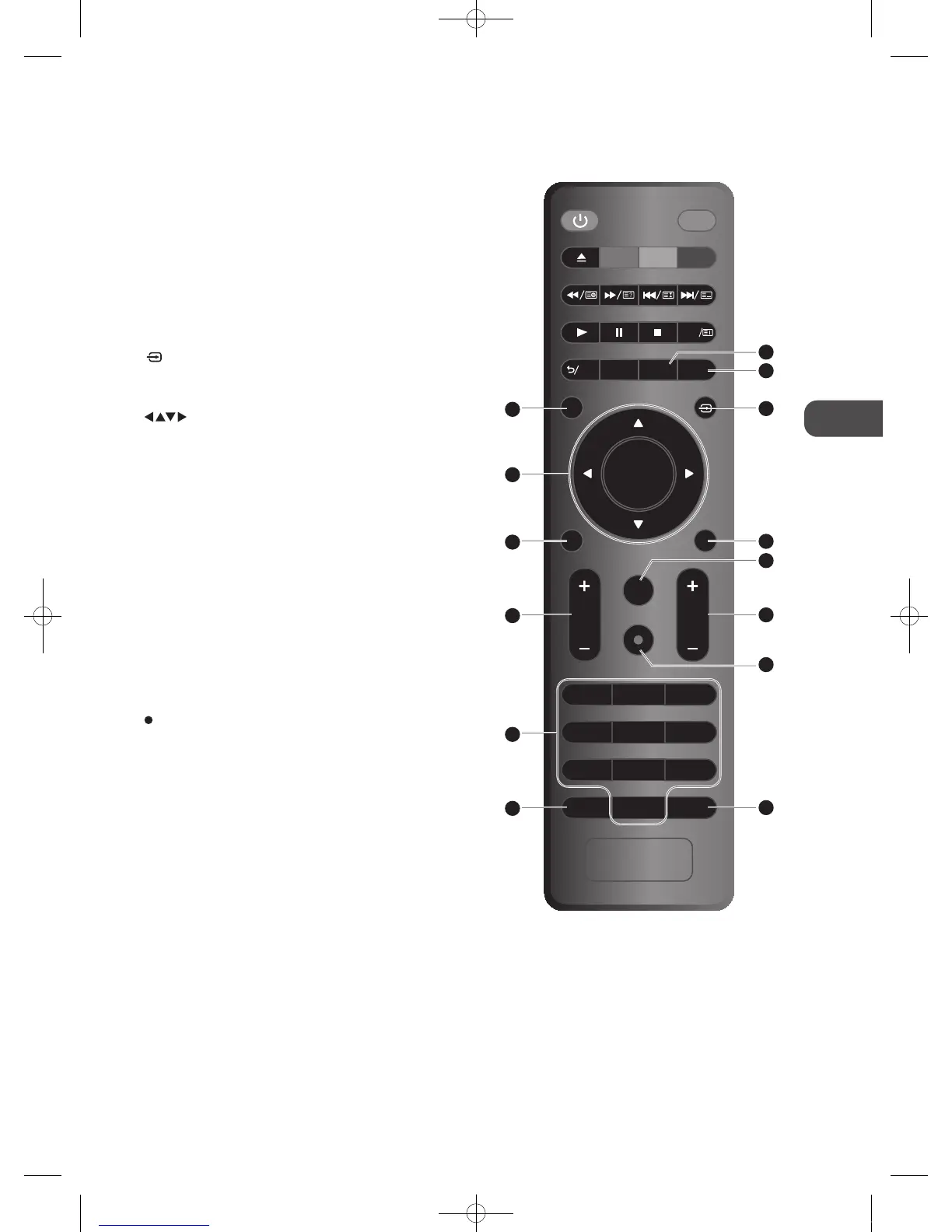
14. D.MENU
Display the DVD menu. (DVD mode)
15. INFO
• Display the present screen information such as the
current channel on ATV / DTV mode and the input
source except ATV / DTV mode.
• Display the present screen information such as the
current title / chapter. (DVD mode)
16. MENU
• Display the OSD (On Screen Display) menu.
• Return to the main menu in the OSD menu.
17.
(INPUT)
Select among the dierent input signal sources:
DTV / ATV / SCART / YPbPr / PC / HDMI1 / HDMI2 / AV /
DVD / DMP
18.
Allows you to navigate the OSD menus and adjust the
system settings to your preference.
OK
• Conrm the selection in the OSD menus.
• Display the channel list. (ATV / DTV mode)
19. GUIDE
Displays the EPG electronic Programme guide. (DTV
mode)
20. Exit
Exit the OSD menu.
21. VOL + / –
Adjusts the volume.
22. FAV
Display the favourite channel list. (ATV / DTV mode)
REP
Select between dierent repeat modes. (DVD mode)
23. CH + / –
Select a channel.
24.
REC
Record the current programme. (DTV mode).
25. 0-9 Number Button
• Press to select a programme.
• Select numbered items in a menu. (DVD mode)
26. AD (Audio Description)
• Switches between the audio languages (only
applicable when the TV programme has this feature).
(DTV mode)
• Select Stereo / Dual Sound Reception (ATV mode)
27. RECALL
Return to the previous viewing channel. (ATV / DTV
mode)
GOTO
To skip to a specic location on a DVD / CD. (DVD mode)
MUTE
TITLE A-BD.SETUP
ANGLE
TEXT S D.MENU
MENU
INFO
GUIDE
VOL
1 2 3
FAV/REP
EXIT
OK
CH
4 5 6
7 8 9
0
AD RECALL/GOTO
25
26
21
16
19
18
15
27
23
17
20
14
22
24
C16LDVB11_IB_110404_Annie.indd 11 11年4月4日 下午6:04


 To Next Page