GB
9
Preparation
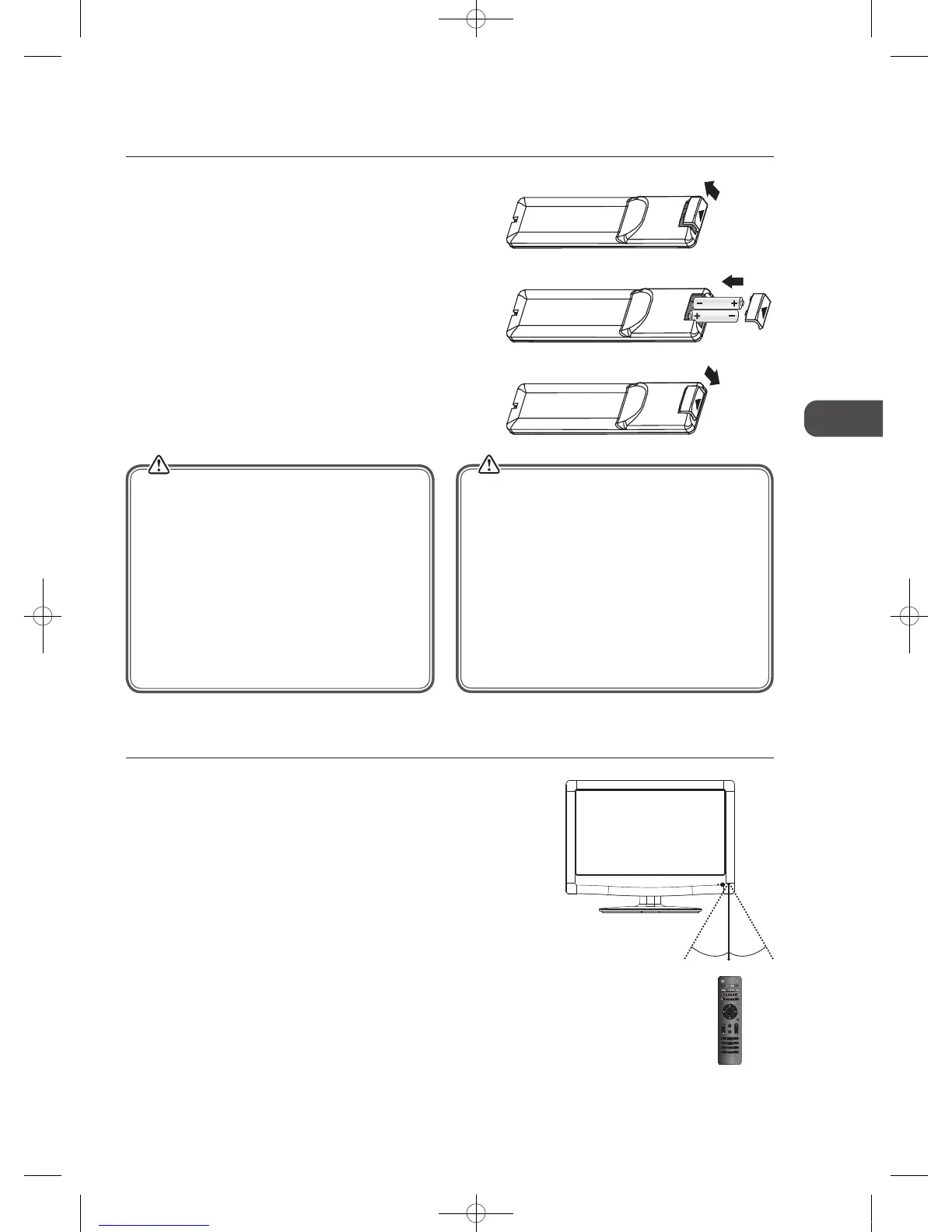
3. Close the battery compartment cover.
Handling the Batteries
• Improper or incorrect use of batteries may cause
corrosion or battery leakage, which could cause
fire, personal injury or damage to property.
• Only use the battery type indicated in this manual.
• When the batteries are exhausted, the remote will
not function. Replace both batteries at the same
time with new ones.
• Do not install new batteries with used ones and do
not mix different types of batteries.
• Do not dispose of used batteries as domestic
waste. Dispose of them in accordance with local
regulations.
Handling the Remote Control
• Take care of your fingernails when you press and
hold the battery release tab.
• Do not drop or cause impact to the remote control.
• Do not spill water or any liquid on the remote
control.
• Do not place the remote control on a wet object.
• Do not place the remote control under direct
sunlight or near sources of excessive heat.
• Remove the battery from the remote control when
not in use for a long period of time, as it could cause
corrosion or battery leakage and may result in physical
injury and/or property damage including fire.
MUTE
TITLE A-BD.SETUP
ANGLE
TEXT S D.MENU
MENU
INFO
GUIDE
VOL
1 2 3
FAV/REP
EXIT
OK
CH
4 5 6
7 8 9
0
AD RECALL/GOTO
Remote Control Operation Range
Point the remote control at the TV no more than 5 metres from the
remote control sensor on the TV and within 60° in front of the TV.
The operating distance may vary depending on the brightness of the
room.
Installing Batteries in the Remote Control
1. Slide the back cover to open the battery compartment of the remote
control.
2. Insert two AAA size batteries. Make sure to match the (+) and ( - ) ends
of the batteries with the (+) and ( - ) ends indicated in the battery
compartment.
30° 30°
5M
C16LDVB11_IB_110404_Annie.indd 9 11年4月4日 下午6:04


 To Next Page