24
GB
Using the Features
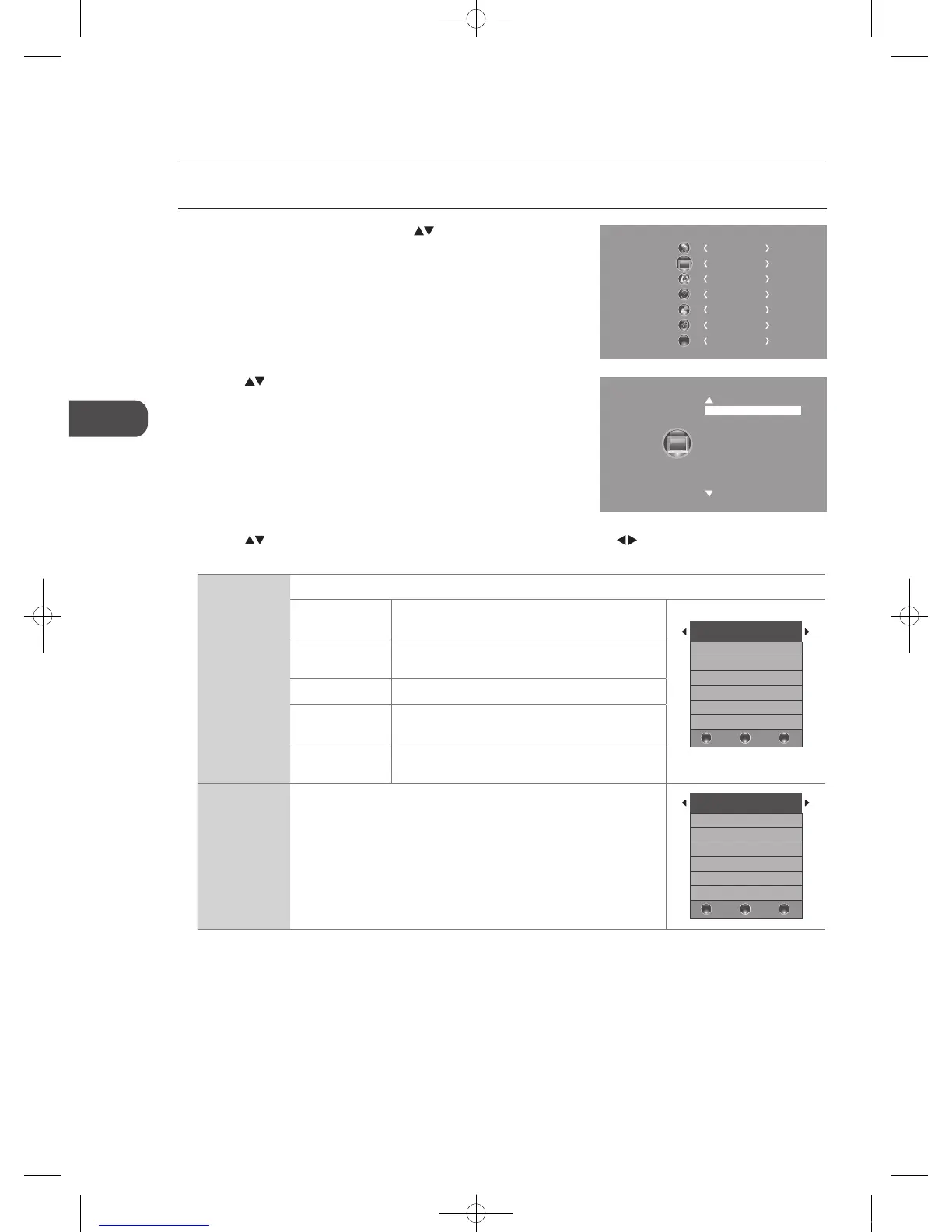
2. Press the buttons to select the following picture options and then
press the OK button.
3. Press the
buttons to select the options. Press the OK button and then press the buttons to adjust each option’s
setting.
Picture Mode Cycles among picture mode: Standard / Mild / User / Dynamic.
Contrast Adjusts the difference between light and dark levels
in the picture. (for User mode)
Picture Mode Standard
Contrast 82
Brightness 50
Colour 50
Sharpness 50
Tint 50
BAC K MEN U
EXI T
Brightness Increases or decreases the amount of white in the
picture. (for User mode)
Colour Controls the colour intensity. (for User mode)
Sharpness Adjusts the level of crispness in the edges between
light and dark areas of the picture. (for User mode)
Tint (For NTSC
format)
Adjusts the balance between red and green levels.
(Tint is only available for NTSC signal reception.)
Colour
Temperature
Cycles among colour temperature: Medium / Cool / User / Warm.
Adjusts the colour components independently to achieve a warm or cool.
(for User mode)
• Red: Increases red tint
• Green: Increases green tint
• Blue: Increases blue tint
Colour Temperature Medium
Red 40
Green 31
Blue 50
BAC K MEN U
EXI T
Customising the Picture Setting
Allows you to set your preferred picture mode.
1. Press the MENU button and then press the
buttons to select the
PICTURE menu and then press the OK button.
CHANNEL
PICTURE
SOUND
TIME
OPTION
LOCK
EXIT
EXIT
Picture Mode Standard
Colour Temperature
Aspect Ratio
Noise Reduction
Screen
C16LDVB11_IB_110404_Annie.indd 24 11年4月4日 下午6:05


 To Next Page