43
GB
PVR (Personal Video Recorder)
Time Shift Function
This function allows the TV to virtually record the live viewing broadcast programme.
Using the Remote Control
You can shift playback to any point of the virtually recorded programme.
or
When playing,
• Press the
button repeatedly to speed up x 2 / x 4 / x 8 / x 16.
• Press the
button repeatedly to speed up x 2 / x 4 / x 8 / x 16.
• During fast forward / fast backward state, press the
PLAY button to return to normal playback.
or • Press the button to jump about 10% forward.
• Press the
button to jump about 10% back.
PLAY or • During playback, press the button to display a still screen and then press the PLAY button
again to resume playback.
• During fast forward / fast backward state, press the
PLAY button to return to normal playback.
If you want to exit the PVR Time Shift progress bar and return to the current live broadcast, press the
button.
PVR (Personal Video Recorder)
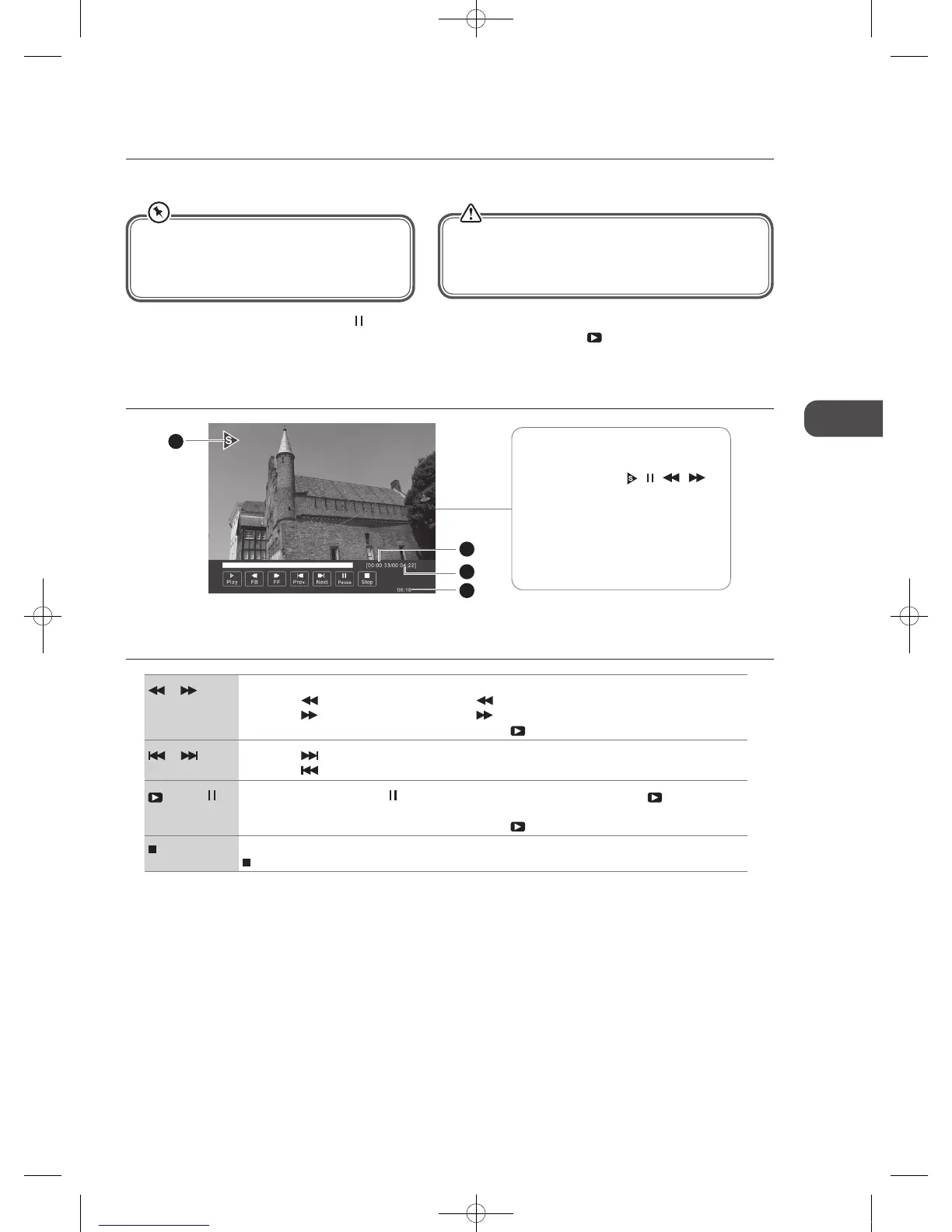
The ‘PVR Time Shift Progress Bar’
1 Indicates the status of the currently
displayed video (
/ / / )
2 Indicates the time lagging behind
the live broadcast (DVR reviewing)
3 Indicates the available recording
time on your USB storage device
4 Indicates the current time
2
3
4
1
During normal TV viewing, you may press the button to virtually pause the live viewing broadcast programme if you want to
go out for a while (e.g. going to the bathroom / kitchen). When you have returned, press the
PLAY button to play the missed
broadcast programme. The PVR Time Shift progress bar will be displayed on the screen.
The video and sound may have a little bit of delay or be out-of-sync for a few seconds when the unit starts to playback the missed
broadcast programme. It will soon turn to normal.
• Time Shift Mode and Recording functions may
not work if the signal strength is weak.
• Stop the time-shift function before switching to
another input source.
If the transfer rate of the USB storage device is too slow for
recording or time shift function, a warning statement will
be shown on the screen. If this happens, please upgrade
your USB storage device.
C16LDVB11_IB_110404_Annie.indd 43 11年4月4日 下午6:05


 To Next Page