16
GB
Initial Setup
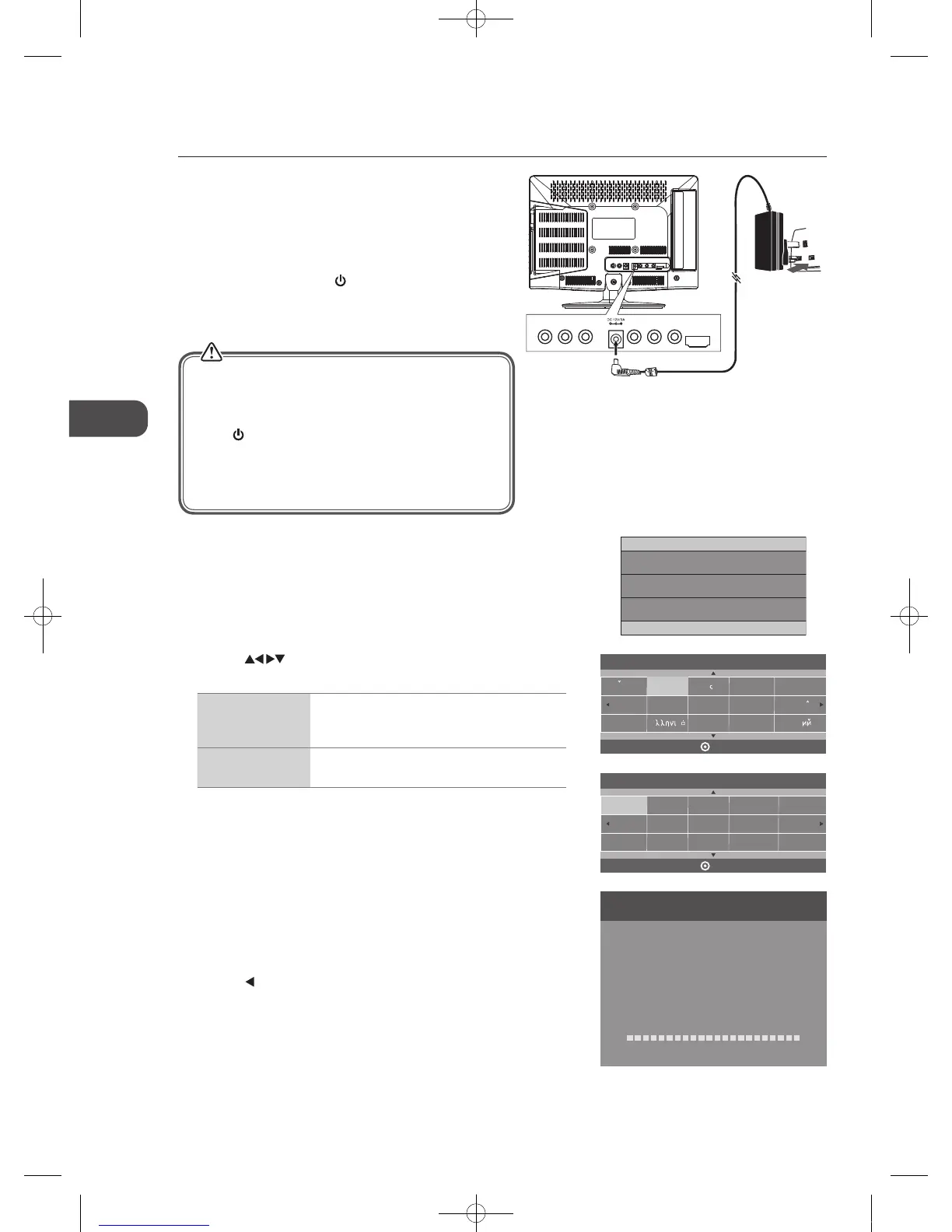
6. Channel tuning will commence. This operation may take up to 6
minutes. The display will show the progress of the tuning and the
number of channels found.
7. If you want to skip the ATV tuning, press the MENU button to
interrupt the tuning half way. A pop-up screen will be displayed,
press the
button to select YES to confirm. You will then go
straight to DTV tuning. You may repeat the above step if you also
want to skip the DTV tuning. An installation reminder will appear
the next time you turn on the TV.
8. After tuning is complete, the channels are arranged in a preset
order. If you wish to skip channels, modify the preset order or
rename channels, select Channel Edit under the Channel menu
(refer to page 20-21 for details).
Channel Tuning
TV : 3 Channel(s)
DTV : 0 Channel(s)
Radio : 0 Channel(s)
Data : 0 Channel(s)
36%... 668.75MHz (TV)
Please press MENU to skip.
5. Press the buttons to navigate the menu and change the
settings. Press the OK button to confirm.
OSD Language Select your desired language to be displayed on
the menu. The default on-screen menu language
is set as English.
Country Select the country where you will operate the TV.
The default country is set as UK.
Dansk
Deutsch
Hrvatski
Italiano
OSD Language
OK
Magyar
Nederlands
Norsk
PolskiEnglish
Cesky
E k
Espanol
~
Fran ais
Portugues
Pycck
France
Greece
UK
Australia
Austria
Czech
Denmark
Finland
Country
OK
Belgium
Bulgaria
Croatia
Hungary
Italy
Luxembourg
Germany
Turning the TV On for the First Time
1. Connect the mains adapter to the mains adapter socket located
at the rear right bottom side of your TV and then connect to the
mains socket after you have completed all the connections.
2. At this stage, the TV switches to standby mode. The red LED
indicator will illuminate on the front panel of the TV.
3. In standby mode, press the
button on the right
side panel of the TV or on the remote control to
turn the TV on. The red LED indicator will turn
green.
4. The first time you turn the TV on, it will go straight into the First
Time Installation menu. Please ensure the aerial is plugged
in and then press the OK button. (If you have already installed
the TV using the Quick Start Guide, please go to the next step
“Selecting the Input Source” on the next page.)
First Time Installation
Please ensure aerial is plugged in!
Then press OK button.
Initial Setup
• Only use the included mains adapter. Do not use it with
any other equipment.
• Always disconnect the TV from the mains socket when
not in use for a long period of time.
• The
button on the right side panel of the TV or on
the remote control is only used for switching the TV into
standby, it does not disconnect the TV from the mains
power. To completely disconnect the mains power,
please remove the mains adapter from the mains socket.
VIDEO L R Y
Pb
Pr
HDM I2
To the mains socket
Mains Adapter
(included)
C16LDVB11_IB_110404_Annie.indd 16 11年4月4日 下午6:04


 To Next Page