88D-Link DSL-4320L User Manual
Section 4 - Conguration
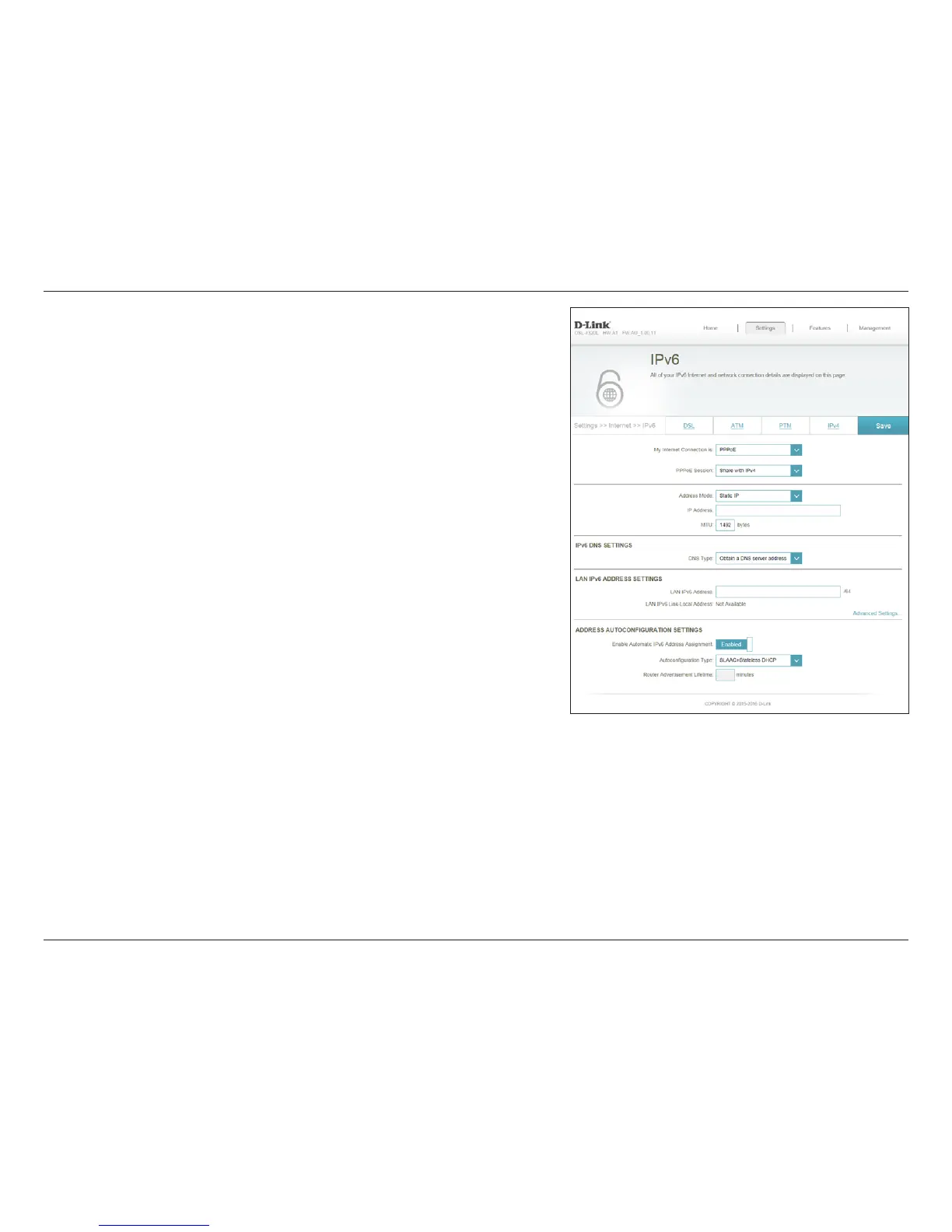
Enter the LAN (local) IPv6 address for the router.
Displays the router’s LAN link-local address.
Enable or disable the Automatic IPv6 Address Assignment feature.
Enable or disable DHCP-PD for other IPv6 routers connected to the
LAN interface.
Note: This feature requires a smaller subnet prex than /64 (i.e. allowing
for a larger address allocation), such as /63. Contact your ISP for more
information.
Select Stateful (DHCPv6), SLAAC + RDNSS or SLAAC + Stateless
DHCPv6.
Enter the IPv6 address lifetime (in minutes).
Click Save when you are done.
LAN IPv6 Address:
LAN IPv6 Link-
Local Address:
Enable Automatic
IPv6 Address
Assignment:
Enable Automatic
DHCP-PD in LAN:
Autoconguration
Type:
Router
Advertisement
Lifetime:












 To Next Page