D2D Technologies
FLEX 3000 V5.2-2301
24
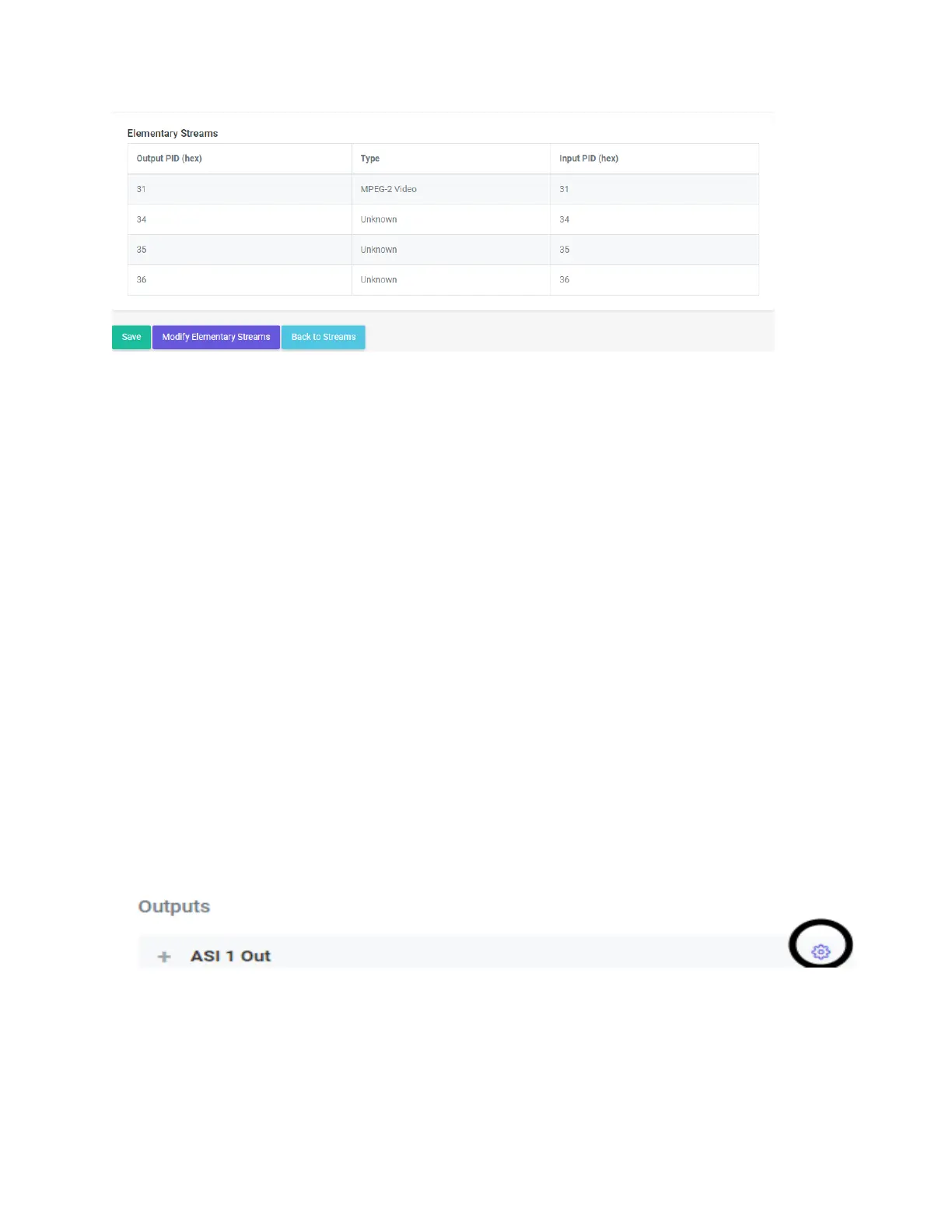
That will take you to the Modify Elementary Streams page. From there, you can change the
PIDS as needed. BE CAREFUL, every PID needs to have a unique number in Hexadecimal. If
you accidentally number 2 PIDS the same, you will create a “PID collision” which will cause
severe on-air implications. If you do not want or need a particular video or audio PID to go
through, you can simply change it to “Inactive”.
4. Using the GUIDE Feature to add dynamic PSIP and update the EPG
8. Adding PSIP via TitanTV or Gracenote.
1. Click on the gear icon on the appropriate output.
2. That will bring you to the Edit Stream ASI (x) (OUT 1) menu.
3. Set your FCC issued TSID.
4. Leave the Version Number at 0.
5. Set tables to ATSC.
6. Set the PSIP mode to Automated.
7. Enter in your TitanTV or Gracenote credentials.
8. Set your Egress rate to 19392000.
9. Click “Save”.
9. Passing EPG tables (Dynamic PSIP)
5. If you insert dynamic PSIP upstream, you will need to tell the Flex 3000 where to get it from.
1. Go to Transport Streams and click on the gear for the ASI 1 out.
2. Scroll down to the PSIP Settings.


 To Next Page