D2D Technologies
FLEX 3000 V5.2-2301
25
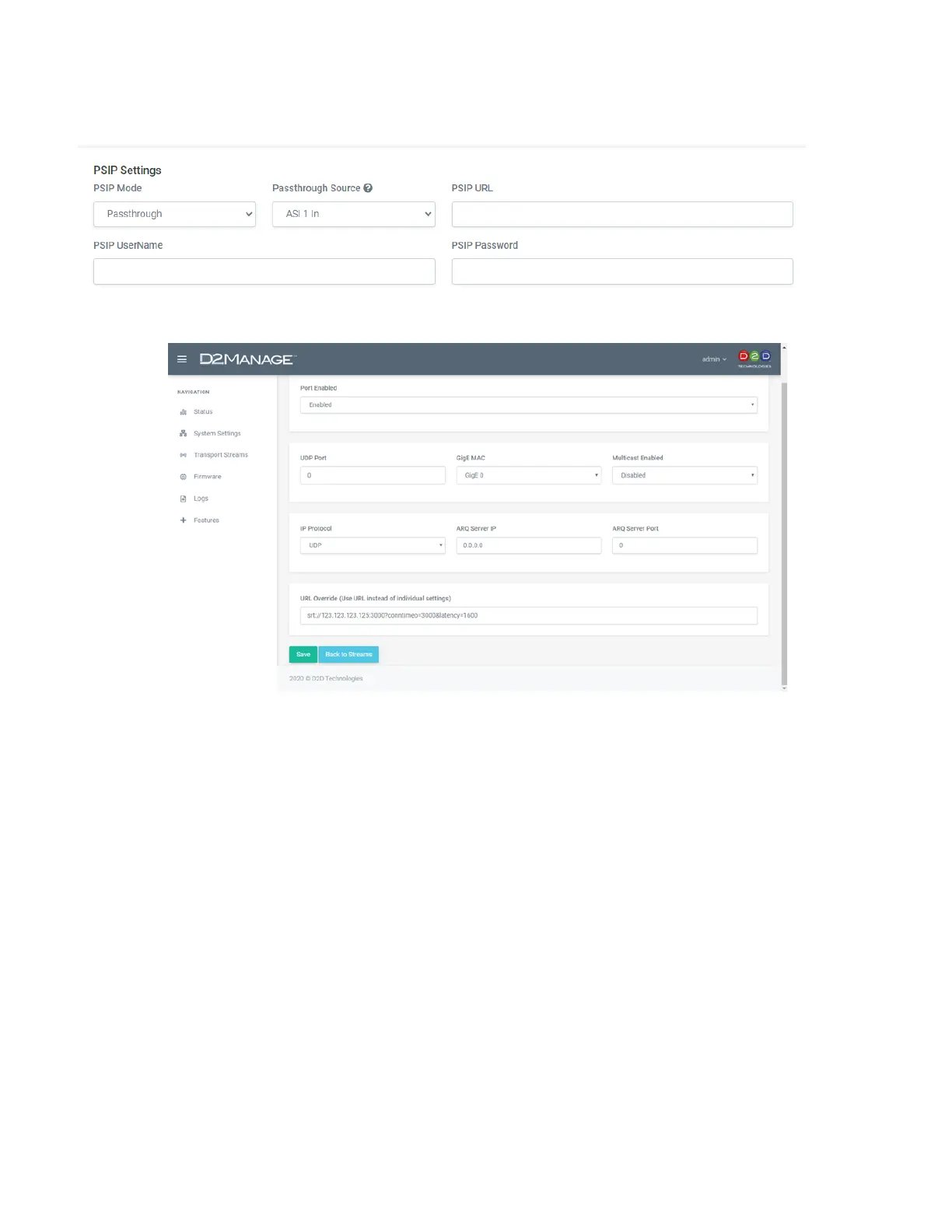
3. Select PSIP – Passthrough an select ASI 1.
1. Adding EPG tables manually with a spreadsheet:
1. Click on the gear icon on the appropriate output.
2. That will bring you to the Edit Stream ASI (x) (OUT 1) menu.
3. Set your FCC issued TSID → THIS IS IMPORTANT!
4. Leave the Version Number at 0.
5. Set tables to ATSC.
6. Set the PSIP mode to Automated.
7. No need to set any credentials.
8. Set your Egress rate to 19392000.
9. Click Save.
1. Building and formatting the spreadsheet
Plan on designing your EPG / PSIP file with the following formats:
• air_date(YYYYMMDD) Or, 0 – 7 (See #1 below).
• air_time(HHMM) IN UTC time.
• duration(HHMM).
• Event ID.
• Event Title (EIT).
• Event Description (ETT).
• Entire Audience.


 To Next Page