D2D Technologies
FLEX 3000 V5.2-2301
7
4. D2Manage Browser
3. Input Status Tab
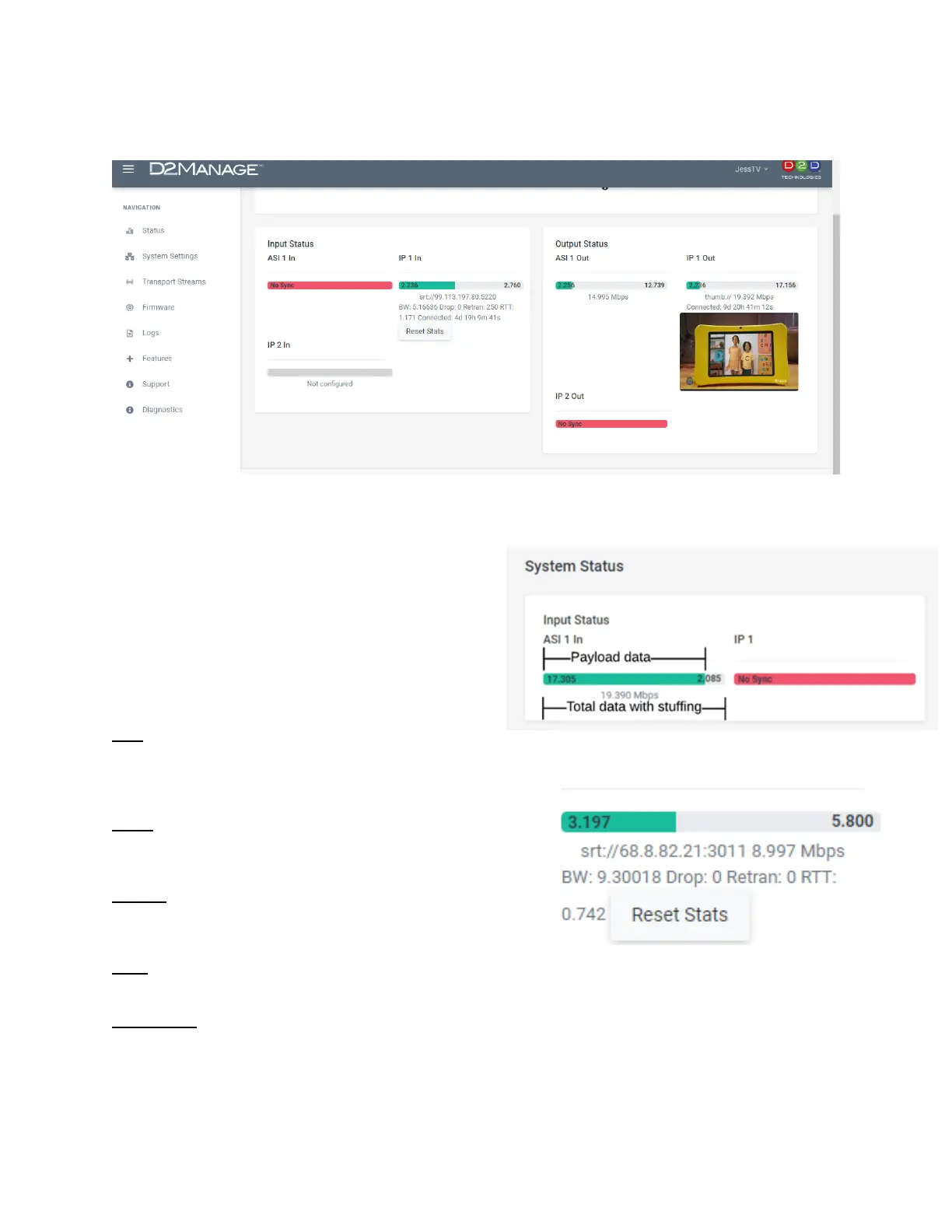
The status page lists the incoming payload data rate in
green and the total aggregate data rate including null
packets (Stuffing) in grey. This allows for you to
glance at the incoming signal for confidence.
4. SRT Stats
BW: The overall bandwidth needed to transmit the
signal including overhead.
If this number is abnormally high as compared to the status bar bit rate, then the SRT needs extra
bandwidth to retransmit packets due to network conditions.
Drop: The number of packets that have been dropped.
These packets could not be delivered in time due to network
conditions.
Retran: The number of packets that have been retransmitted
due to network conditions. A low (or zero) value indicates
good network conditions.
RTT: Round-Trip Time indicates the length of time (milliseconds) for a packet to traverse the network.
This value can be used as a guide to set SRT latency to compensate for a high RTT.
Reset Stats: Reset statistics to zero.


 To Next Page