D2D Technologies
FLEX 3000 V5.2-2301
34
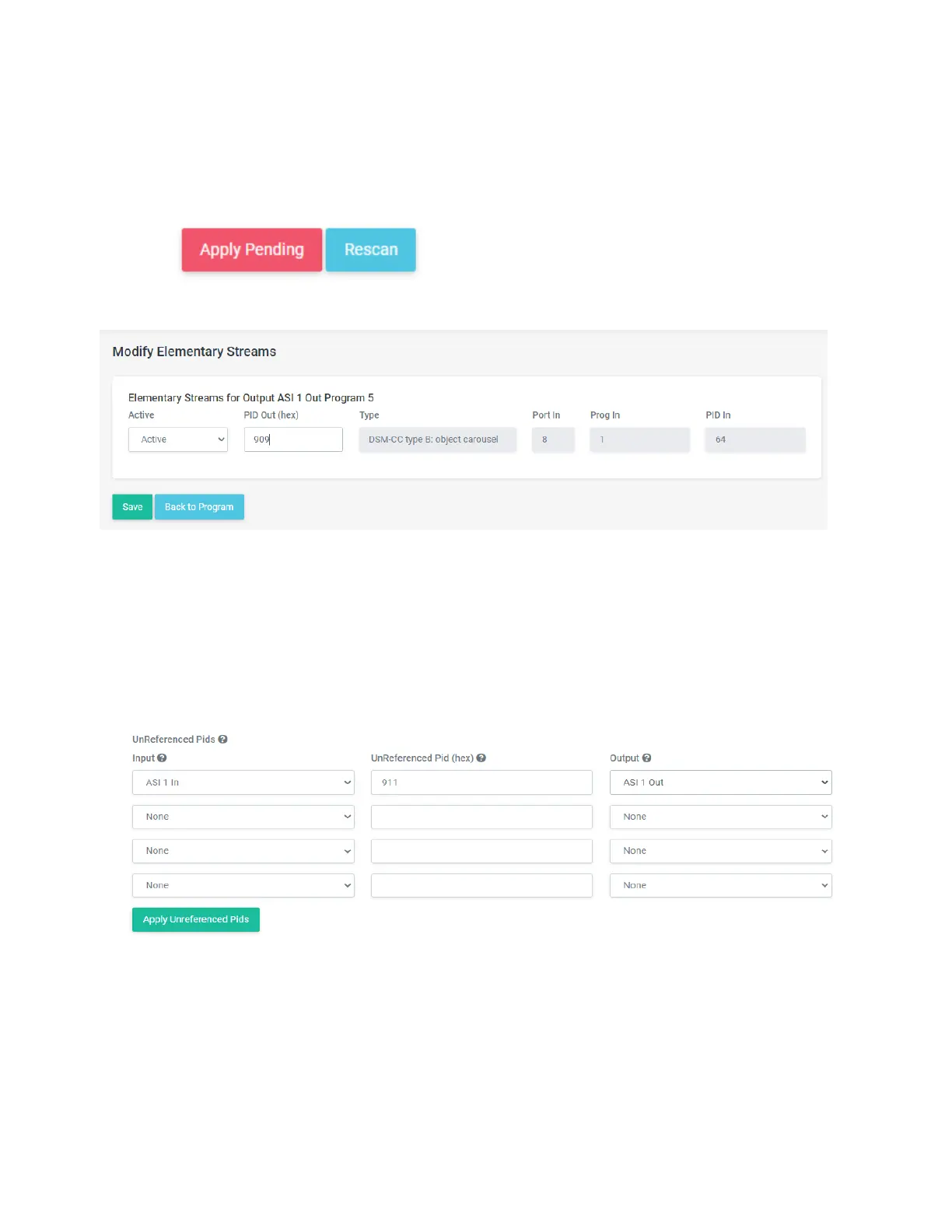
22. Once you are in the Modify Elementary Streams box, you can change the PID to something out
range of the other PIDS.
23. Click Save, then back to Program.
24. Then click on Back to Streams
25. Be sure to press Apply Pending and rescan so your changes are saved.
1. Adding PID 0x911 (WEA) to pass through
If you have a WARN system upstream of the Flex 3000, you will need to setup the
911 PID to pass through.
1. In the Transport Streams page, under the inputs, you will see a “Unreferenced PIDS section”
2. Setup the incoming ASI 1 to pass through the 911 PID to ASI 1 Out.
3. Click on Apply Unreferenced PIDS.
4. Click on Apply and Rescan under the Inputs on the same page.


 To Next Page