- 36 -
10. OPERATION (continued)
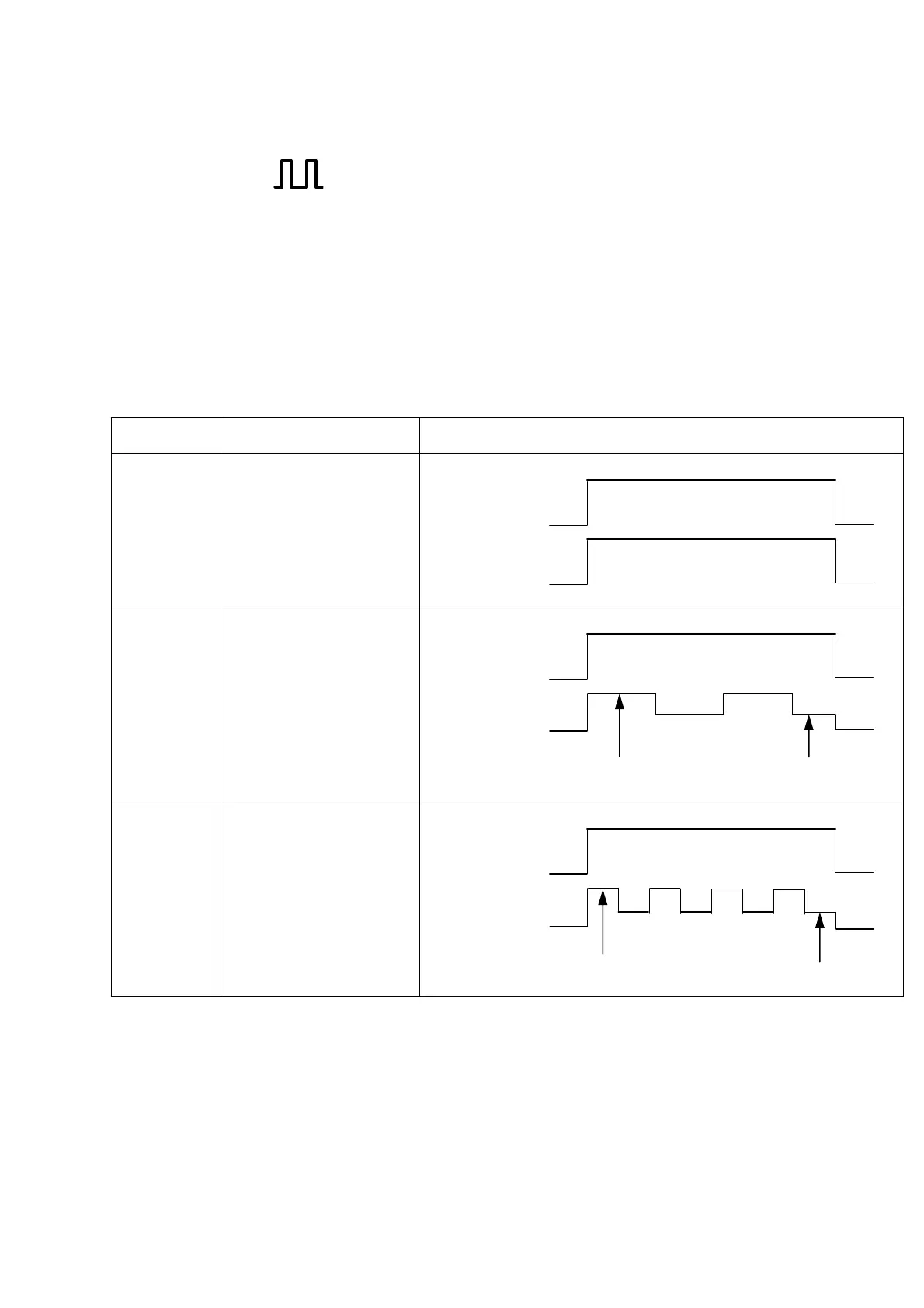
10.1.10 Pulse setting ( )
Pulsing is a technique to cyclically vary the welding current for stabilized arcing, controlled
penetration geometry and/or controlled heat input, where arcing may be rigidified during high
current period for improved stability, and penetration geometry and heat input may be
controlled with the high/low current period ratio varied.
Pulse setting “ON” and “OFF” may be selected with the PULSE selection key [12]. The LED
located on the upper left corner of the selection key indicates the status of pulse setting “ON”
and “OFF” when it is turned ON and OFF respectively. If the pulse setting is “ON, the
parameters “pulse current” and “pulse frequency” may be selected with the parameter
selection key [3]. And the welding current becomes the base current.
Further, in case where the welding process used is “AC-DC TIG”, no pulse selection key can
be selected.
Subject Timinng Chart
Pulse
OFF
Tack welding
Repeat of short welding
Thin plate welding
ON
Torch Switch
Welding Current
Pulse
ON
Low Pulse
frequency
(0.1Hz -15Hz)
Preventing bead hanging
down in URANAMI
welding or in fillet
welding in vertical
position.
ON
Torch Switch
Welding Current
Pulse Current Base Current
Pulse
ON
High Pulse
frequency
(15Hz - 500Hz)
Thin plate welding
ON
Torch Switch
Welding Current
Pulse Current Base Current
The standard pulse peak ratio is 50%, which may be adjusted with the internal function.
Furthermore, in the case of DC TIG welding, the internal function also makes changing to a
soft pulse possible.
See Section 10.1.17, “Internal Functions” for further details.


 To Next Page