BRC2E52C7 / BRC3E52C7 Operation manual
4P368042-1 - 2014.02
12
1
1/2
Airflow Direction
Individual Air Direction
Quick Start
Ventilation
Energy Saving Options
Schedule
SettingReturn
Main Menu
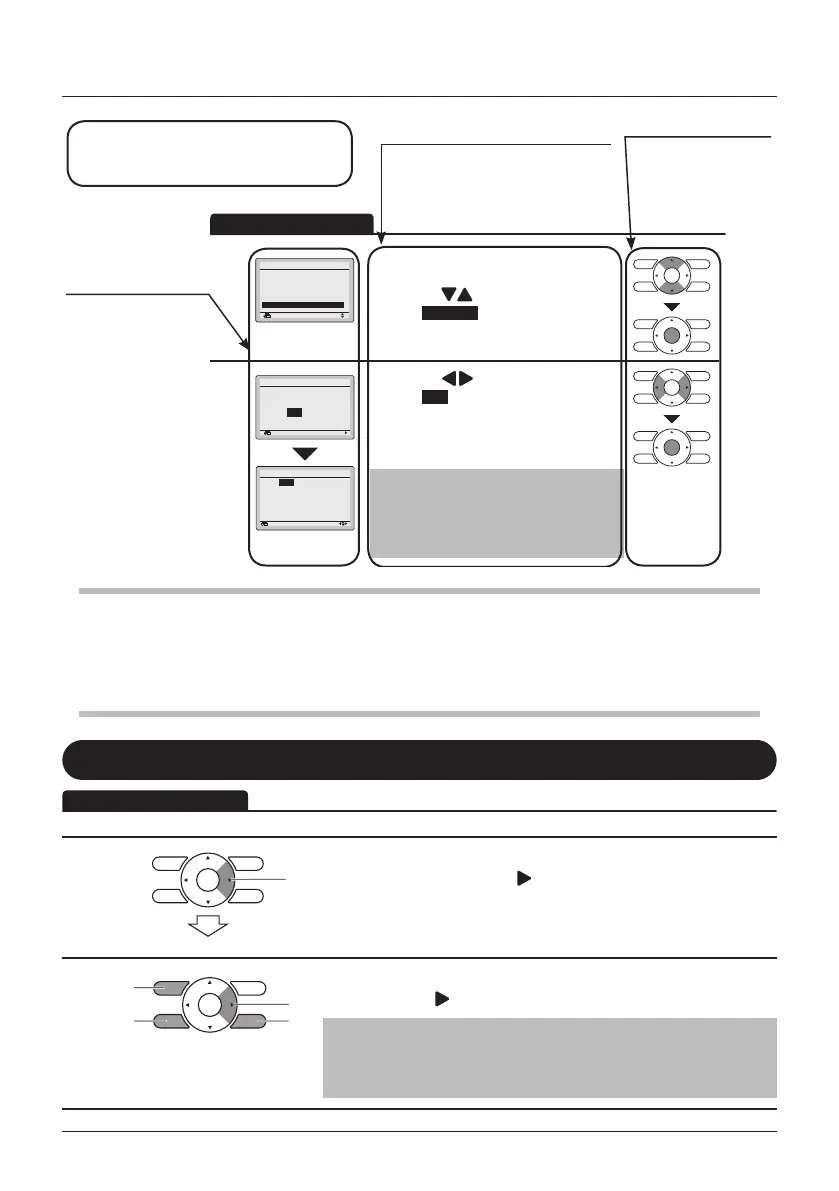
• Display the Main Menu. (See "Manipulating
the Main Menu" on page 27).
• Press the
(Up/Down) buttons to
select Schedule and press the Menu/Enter
button.
2
NoYes
Schedule
Clock has not been set.
Would you like to set it now?
SettingReturn
0:00
Wednesday
1Day
1Month
2014Year
Setting
Date & Time
Return
• Press the (Left/Right) buttons to
select Yes and press the Menu/Enter
button.
• The Date & Time screen will appear.
• Set the current year, month, day, and time.
(See "Clock & Calendar" on page 55).
Note
• Before setting the schedule, the clock must
be set.
• If the clock has not been set, a screen like
the one on the left will appear.
Remote Controller
Functions
Operation procedure
Operate the buttons according to
the procedure.
Button display
Displays the positions
of the buttons to be
operated.
Screen display
Screens that will be
displayed on the
remote controller.
Preparation
• For mechanical protection purposes, turn ON the system at least 6 hours before starting the
operation of the system.
• Do not turn OFF the system in season in order to ensure the smooth starting of the system.
Enable/disable the Menu/Enter and Cancel button
By default, the Menu/Enter and Cancel button are disabled.
1
1
• To enable/disable the Menu/Enter and
Cancel button, keep the (Right) button
pressed in the Basic Screen.
2
• Press the 3 keys simultaneously while
keeping the (Right) button pressed.
Note
Don’t forget to disable the buttons again after installation or
maintenance is done.
Basic Operation Method



 To Next Page