BRC2E52C7 / BRC3E52C7 Operation manual
4P368042-1 - 2014.02
44
Menu Manipulation
Schedule
Enable/Disable
Operation Method
The schedule is not visible and disabled when a centralized controller or
the BRP7A51 Digital Input Adapter is connected.
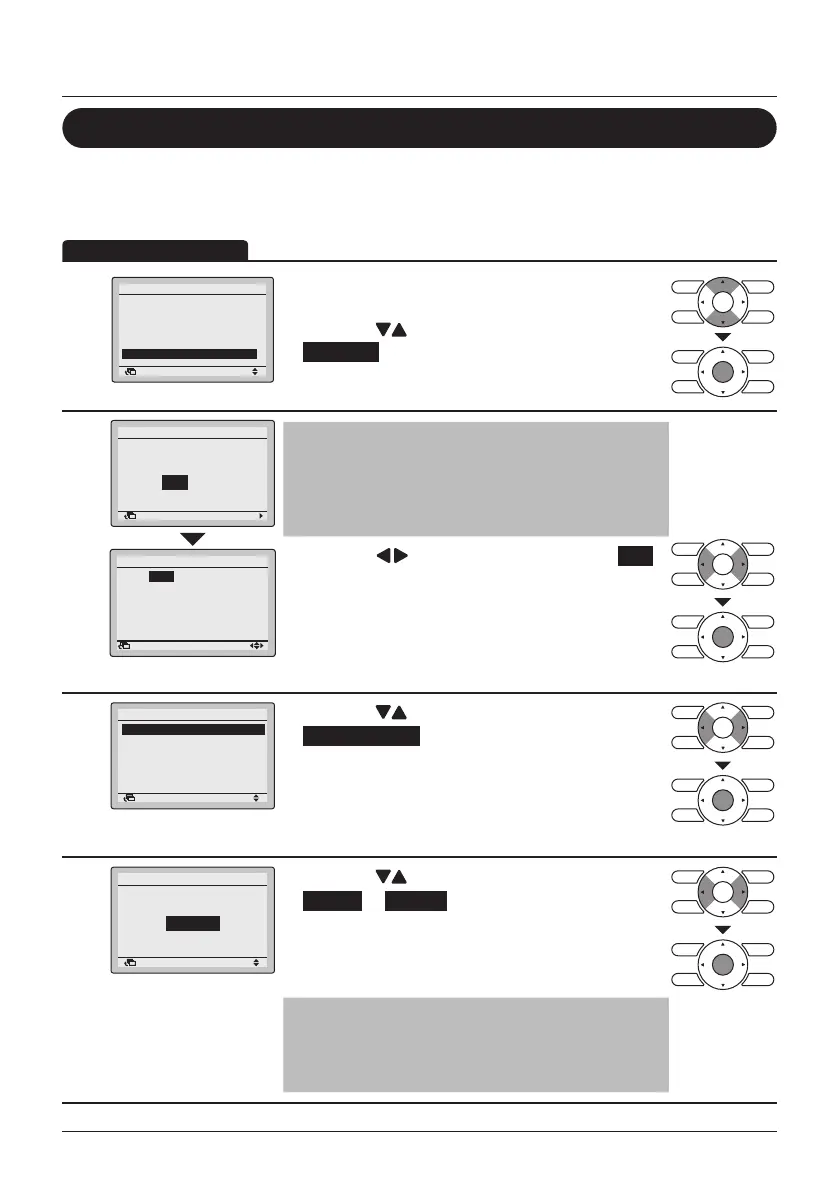
1
1/2
Airflow Direction
Individual Air Direction
Quick Start
Ventilation
Energy Saving Options
Schedule
SettingReturn
Main Menu
• Display the Main Menu.
(See "Manipulating the Main Menu" on page 27).
• Press the
(Up/Down) buttons to select
Schedule and press the Menu/Enter button.
2
NoYes
Schedule
Clock has not been set.
Would you like to set it now?
SettingReturn
0:00
Wednesday
1Day
1Month
2014Year
Setting
Date & Time
Return
Note
• Before setting the schedule, the clock must be
set.
• If the clock has not been set, a screen like the
one on the left will appear.
• Press the (Left/Right) buttons to select Yes
and press the Menu/Enter button.
• The Date & Time screen will appear.
• Set the current year, month, day and time. (See
"Clock & Calendar" on page 55).
3
2/2
Enable/Disable
Select Schedule
Holidays
Settings
Schedule
SettingReturn
• Press the (Up/Down) buttons to select
Enable/Disable and press the Menu/Enter button.
4
Disable
Schedule
Enable/Disable
SettingReturn
• Press the (Up/Down) buttons to select
Enable or Disable .
• The conrmation screen will appear when the
Menu/Enter button is pressed.
Note
The Schedule is enabled. To modify the Selected
schedule number see "Select Schedule" on
page 45.



 To Next Page