Operation manual BRC2E52C7 / BRC3E52C7
29
4P368042-1 - 2014.02
Menu Manipulation
Individual Air Direction
Individual Setting
1
1/2
Airflow Direction
Individual Air Direction
Quick Start
Ventilation
Energy Saving Options
Schedule
SettingReturn
Main Menu
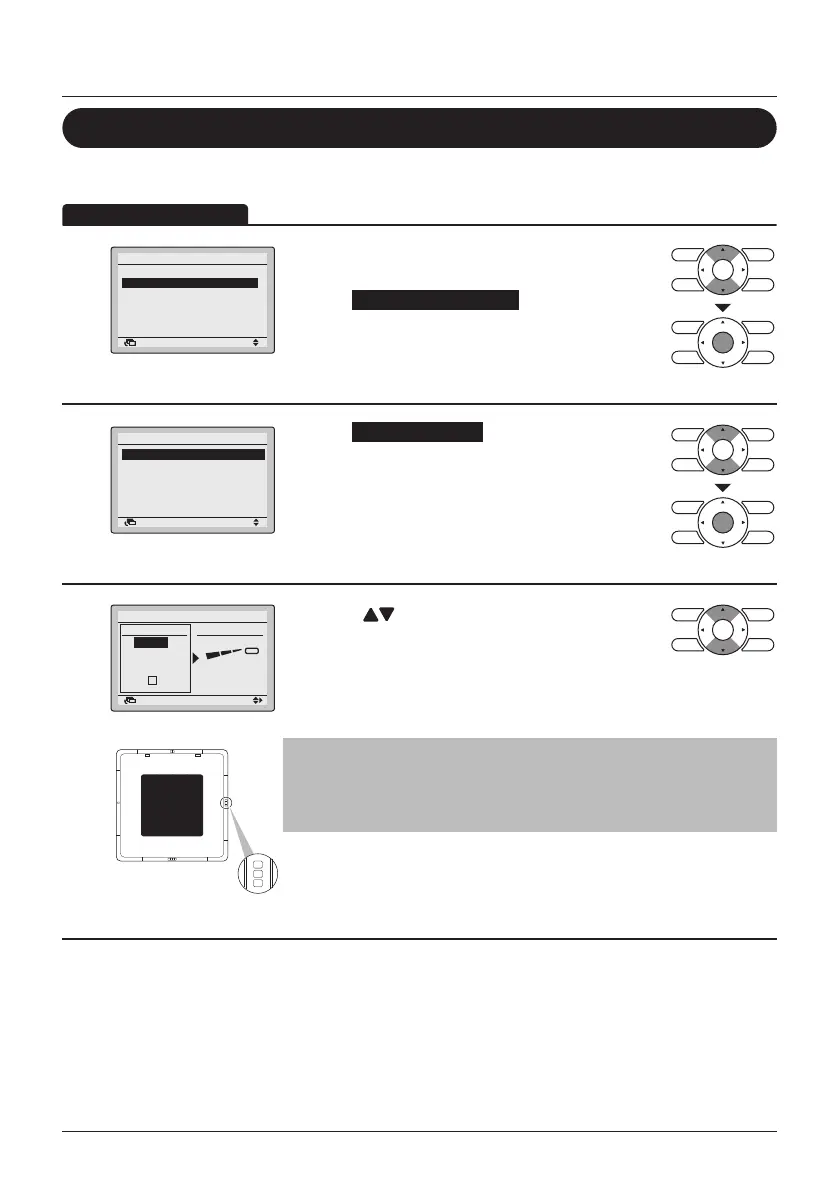
• Display the Main Menu (See "Manipulating the
Main Menu" on page 27).
• Select Individual Air Direction and press the
Menu/Enter button.
2
Individual Setting
Individual Setting List
Reset All Indivi Setting
Airflow Direction Range
Individual Air Direction
SettingReturn
• Select Individual Setting and press the Menu/
Enter button.
3
Return Setting
No Ind Set
Outletmark
Unit A
Individual Setting
Direction
Outlet
SettingReturn
• Use the (Up/Down) buttons to select the unit
and outlet mark.
• In case of SkyAir, maximum 4 units (unit
A, B, C, D) can be selected.
In case of VRV, maximum 16 units for each group
(unit 0 till 15) can be selected.
Note
In case of four outlets (cassette type), you can control each one of
the four aps individually (the following marks are beside each air
outlet: □, □□, □□□, □□□□).
(Only if the individual airow function is installed)



 To Next Page