BRC2E52C7 / BRC3E52C7 Operation manual
4P368042-1 - 2014.02
50
Menu Manipulation
Maintenance Information
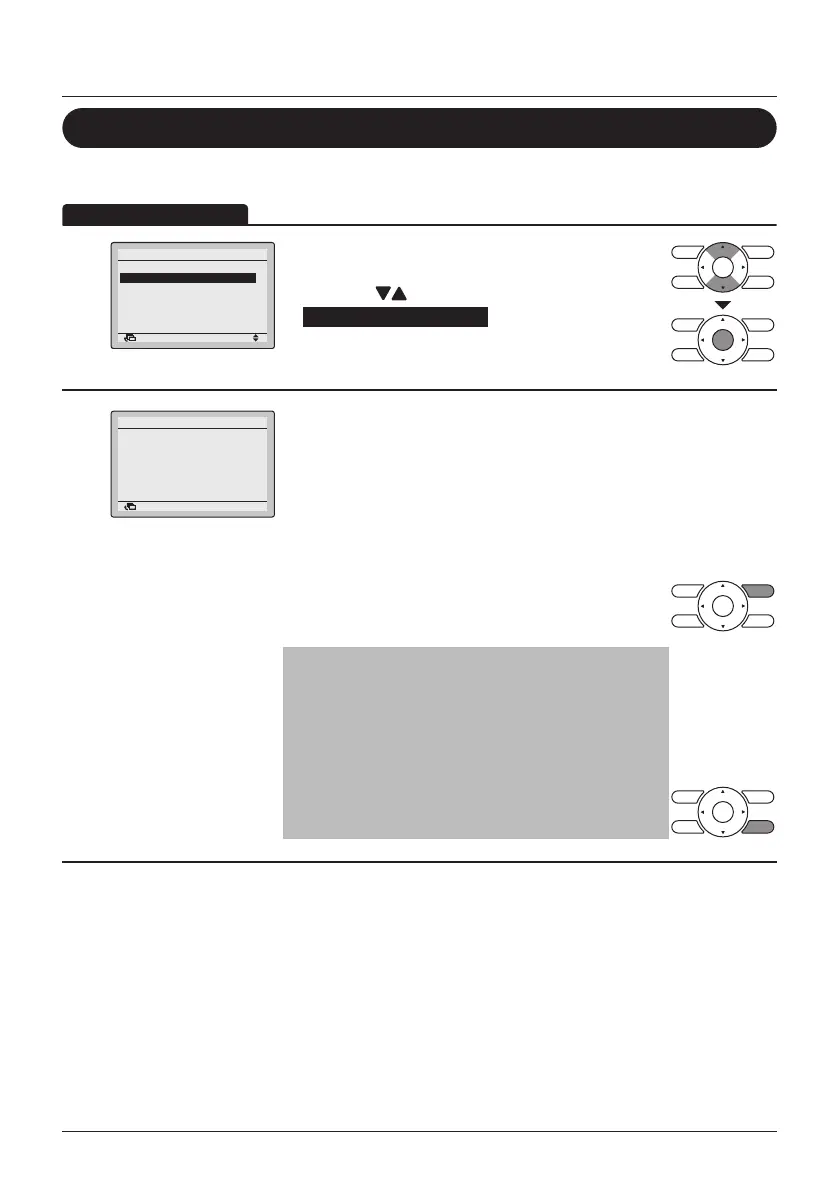
Display the Maintenance Information
1
SettingReturn
Filter Auto Clean
Maintenance Information
Configuration
Current Settings
Clock & Calendar
Language
2/2Main Menu
• Display the Main Menu. (See "Manipulating the
Main Menu" on page 27).
• Press the
(Up/Down) buttons to select
Maintenance Information and press the Menu/
Enter button.
2
Contact Info
0123
–
4567
–
8900
Indoor Model
–––
/000
Outdoor Model
–––
/000
Maintenance Information
Return
• The phone number for the contact address will
appear at the top of the screen.
(If you have not yet registered your product, it will
not appear).
• The model information of the indoor and outdoor
units of your product will appear on the bottom of
the screen.
(For some models the product code may appear).
• Press the Cancel button to return to the previous
screen.
Note
• The model name will not appear if you have had
the circuit board replaced.
• The error code may also appear.
If the operation lamp is not blinking, the unit is
working properly.
• The error code record will disappear if you press
the ON/OFF button for more than 4 seconds.



 To Next Page