BRC2E52C7 / BRC3E52C7 Operation manual
4P368042-1 - 2014.02
54
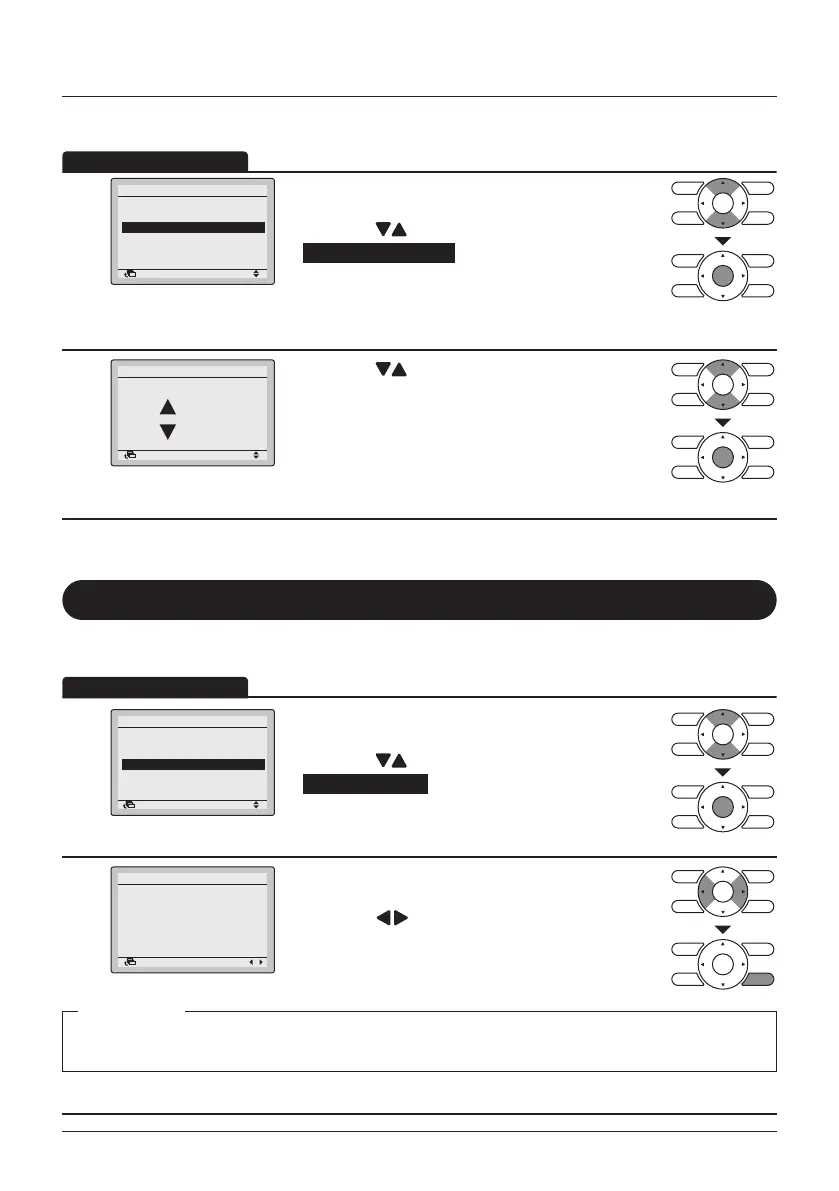
Menu Manipulation
Contrast Adjustment
1
Draft Prevention
Display
Contrast Adjustment
Configuration
SettingReturn
• Display the Conguration menu. (See "Draft
Prevention" on page 51).
• Press the
(Up/Down) buttons to select
Contrast adjustment and press the Menu/Enter
button.
2
Contrast Adjustment
Light
Dark
SettingReturn
• Press the (Up/Down) buttons until you reach
the desired contrast.
• Press the Menu/Enter button to conrm the setting
and to return to the Basic Screen.
Current Settings
Overview of the Current Settings
1
2/2
Filter Auto Clean
Maintenance Information
Configuration
Current Settings
Clock & Calendar
Language
Main Menu
SettingReturn
• Display the Main Menu. (See "Manipulating the
Main Menu" on page 27).
• Press the
(Up/Down) buttons to select
Current Settings and press the Menu/Enter
button.
2
Ventilation Rate
Ventilation Mode
Schedule
Quick Start
Display Mode
Display Item
Low
Auto
Disable
OFF
Standard
None
Current Settings
Return
1/2
• A list showing the status of the current settings will
appear.
• Press the
(Left/Right) buttons to go to the
next screen.
• Press the Cancel button to return to the Main
Menu.
Ventilation Rate Schedule Display Mode Filter Auto Clean
Ventilation Mode Quick Start Display Item
Display items
* Display items may differ depending on the model. Only the items that can be set are displayed.



 To Next Page