BRC2E52C7 / BRC3E52C7 Operation manual
4P368042-1 - 2014.02
28
Menu Manipulation
Airow Direction
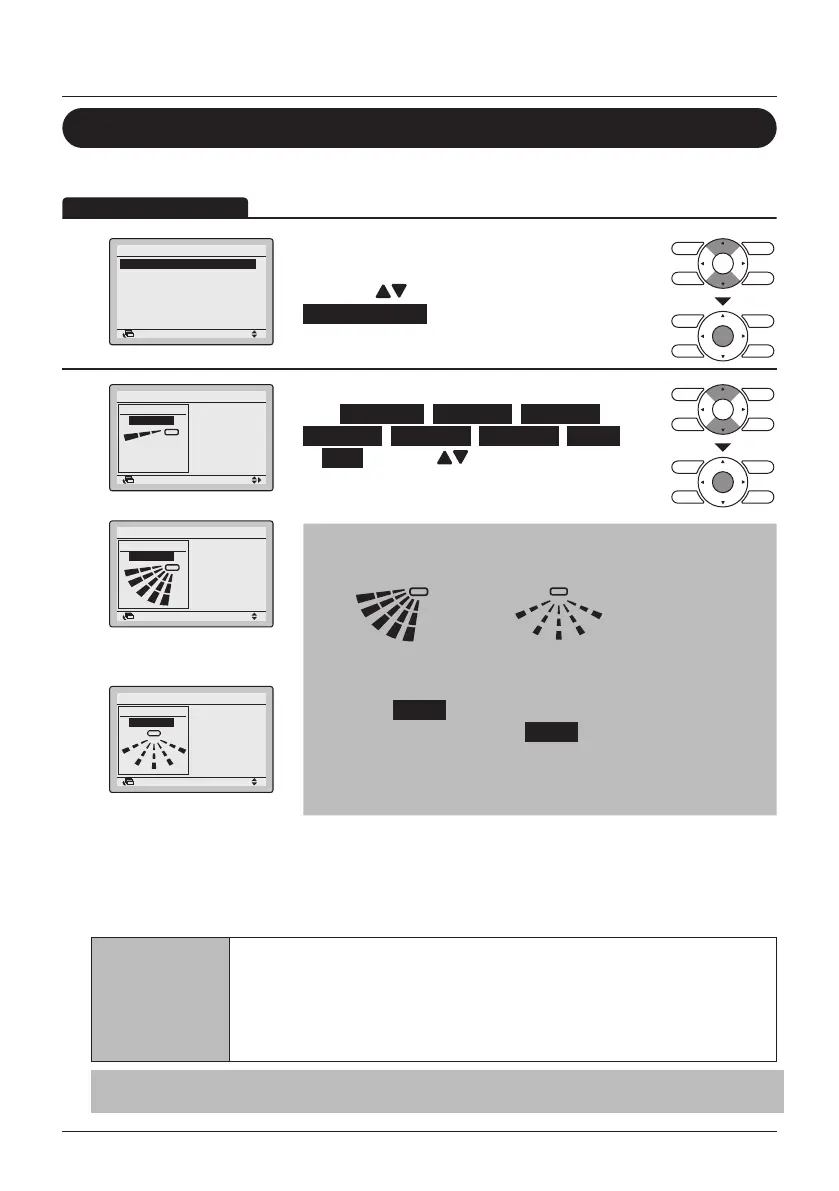
Change the Airow direction
1
SettingReturn
Airflow Direction
Individual Air Direction
Quick Start
Ventilation
Energy Saving Options
Schedule
1/2Main Menu
• Display the Main Menu (See "Manipulating the
Main Menu" on page 27)
• Press the
(Up/Down) buttons to select
Airow Direction and press the Menu/Enter
button.
2
Airflow Direction
Direction
Position 0
SettingReturn
Swing
SettingReturn
Direction
Airflow Direction
Airow direction
setting (up/down)
Swing
Direction
Airflow Direction
SettingReturn
Airow direction
setting (left/right)
• Select the desired airow direction
from No Ind Set , Position 0 , Position 1 ,
Position 2 , Position 3 , Position 4 , Swing
or Auto using the (Up/Down) buttons.
• Press the Menu/Enter button to conrm the
settings and to return to the Basic Screen
Note
• The airow directions appear on the screen as follows:
1
2
3
4
Up/down direction
1
3
Left/right direction
0 : Position 0
1 : Position 1
2 : Position 2
3 : Position 3
4 : Position 4
• Selecting Swing will cause the airow direction blades to
swing back and forth. When Swing is selected, all airow
directions will be visible at the same time.
• When you select one of the positions 0 to 4, the airow
direction blades stay in a xed position.
Movement of the airow direction blades
When the following operation conditions are active, the airow direction is controlled
automatically. Actual operation may thus be different than what is displayed on the remote
controller.
Operation
condition
• Room temperature is higher than the remote controller's set
temperature (in heating mode).
• When Defrost is active (in heating mode).
(The airow is blowing horizontally so that people in the room are not in
direct line of the cold air).
• Under continuous operation with the airow blowing horizontally.
Note
Heating mode includes automatic operation.



 To Next Page