BRC2E52C7 / BRC3E52C7 Operation manual
4P368042-1 - 2014.02
32
Menu Manipulation
2
0
Air range
Standard
Unit select
Unit No.
Airflow Direction Range
SettingReturn
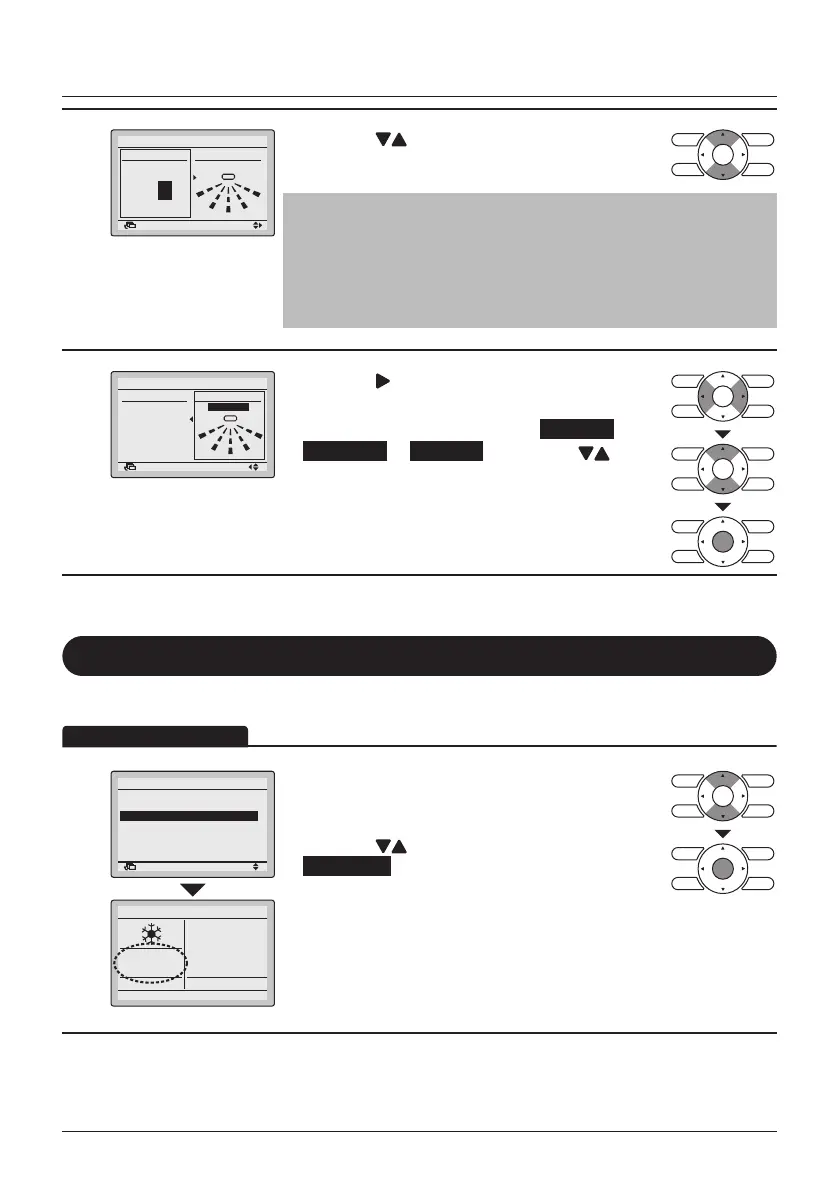
• Press the (Up/Down) buttons to select the
unit number.
Note
• For a simultaneous operation system, individual setup for each
indoor unit is possible by connecting the remote controller to
each unit when installing.
• For remote controllers connected in group, a maximum of 16
units (unit number 0-15) are congurable.
3
0
Air range
Standard
Unit select
Unit No.
Airflow Direction Range
SettingReturn
• Press the (Right) button to select the Air range
setting.
• Select the desired air range from Standard ,
Right blow or Left blow by using the
(Up/Down) buttons.
• Press the Menu/Enter button to conrm the
settings and to return to the Basic Screen.
Quick Start
Quick Start ON
1
1/2
Airflow Direction
Individual Air Direction
Quick Start
Ventilation
Energy Saving Options
Schedule
SettingReturn
Main Menu
28°C
• While operating in Cooling, Heating or Auto mode,
display the Main Menu (See "Manipulating the
Main Menu" on page 27).
• Press the
(Up/Down) buttons to select
Quick Start and press the Menu/Enter button to
return to the Basic Screen.
• Quick Start is now ON.
• When Quick Start is active, it is not possible to
change the fan speed. The fan speed icons will not
be displayed.
(SkyAir only)
Operation Method



 To Next Page