BRC2E52C7 / BRC3E52C7 Operation manual
4P368042-1 - 2014.02
58
Reset Filter Indication
1
28°C
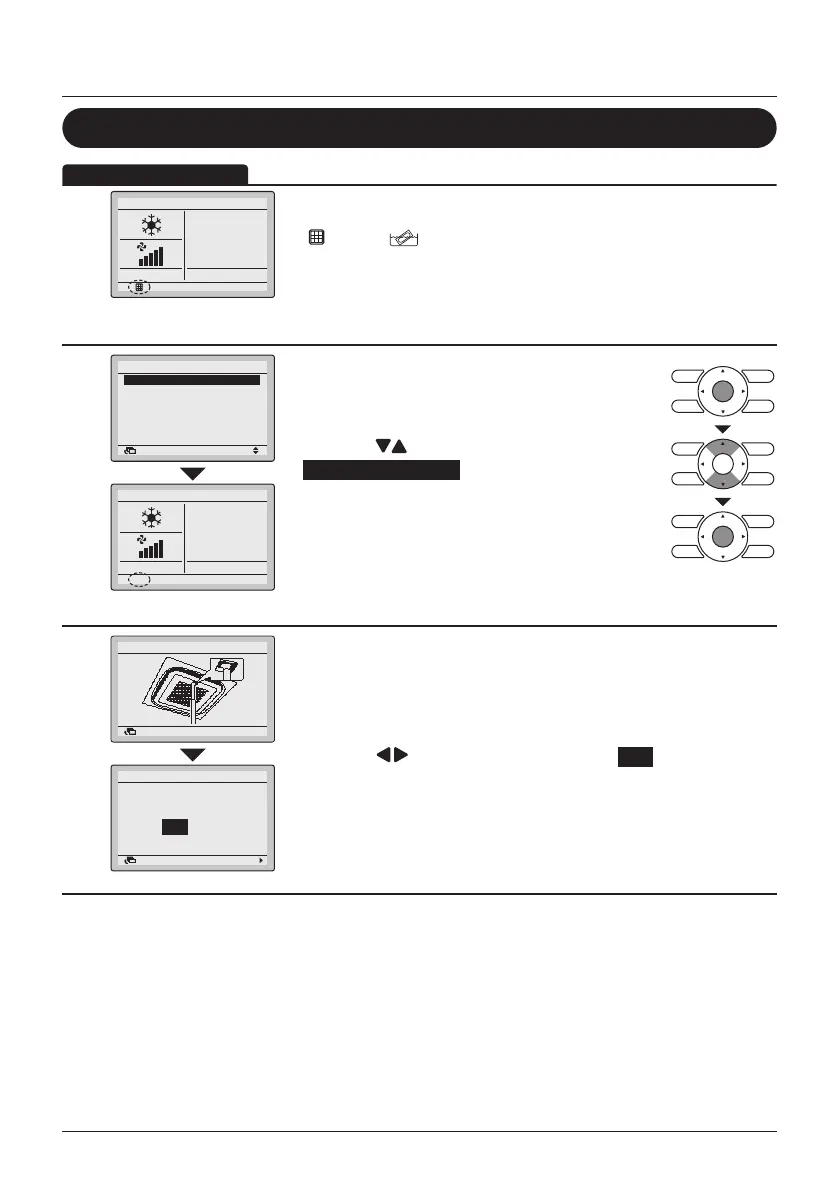
• When the time to clean the lter or element has come, one of the
following icons will appear on the bottom of the Basic Screen:
" " and/or " ".
• Wash, clean or replace the lter or element.
For details, refer to the Operation Manual of the indoor unit.
2
1/3
SettingReturn
Reset Filter Indicator
Airflow Direction
Individual Air Direction
Quick Start
Ventilation
Energy Saving Options
Main Menu
28°C
• To reset the lter sign when the lter or element is
washed, cleaned or replaced , display the Main
Menu (See "Manipulating the Main Menu" on
page 27 ).
• Press the
(Up/Down) buttons to select
Reset Filter Indicator .
• Press the Menu/Enter button to reset the lter
indicator and to return to the Basic Screen.
• The icon(s) shown in Step 1 will disappear from
the Basic Screen when the lter sign is reset.
3
Dust Collection Method
SettingReturn
NoYes
Dust Collection Method
Dust Collected?
SettingReturn
• When an indoor unit with a self cleaning casette is
installed, there will rst be prompted to collect the
dust from the dustbin in the unit.
• Press the Menu/Enter button to conrm and the
conrmation screen will appear.
• Press the
(Left/Right) buttons to select Yes .
Press the Menu/Enter button to conrm and to
return to the Basic Screen.
• Continue the normal procedure to reset the lter
indicator.
Maintenance



 To Next Page