Operation manual BRC2E52C7 / BRC3E52C7
19
4P368042-1 - 2014.02
Basic Operation Method
4
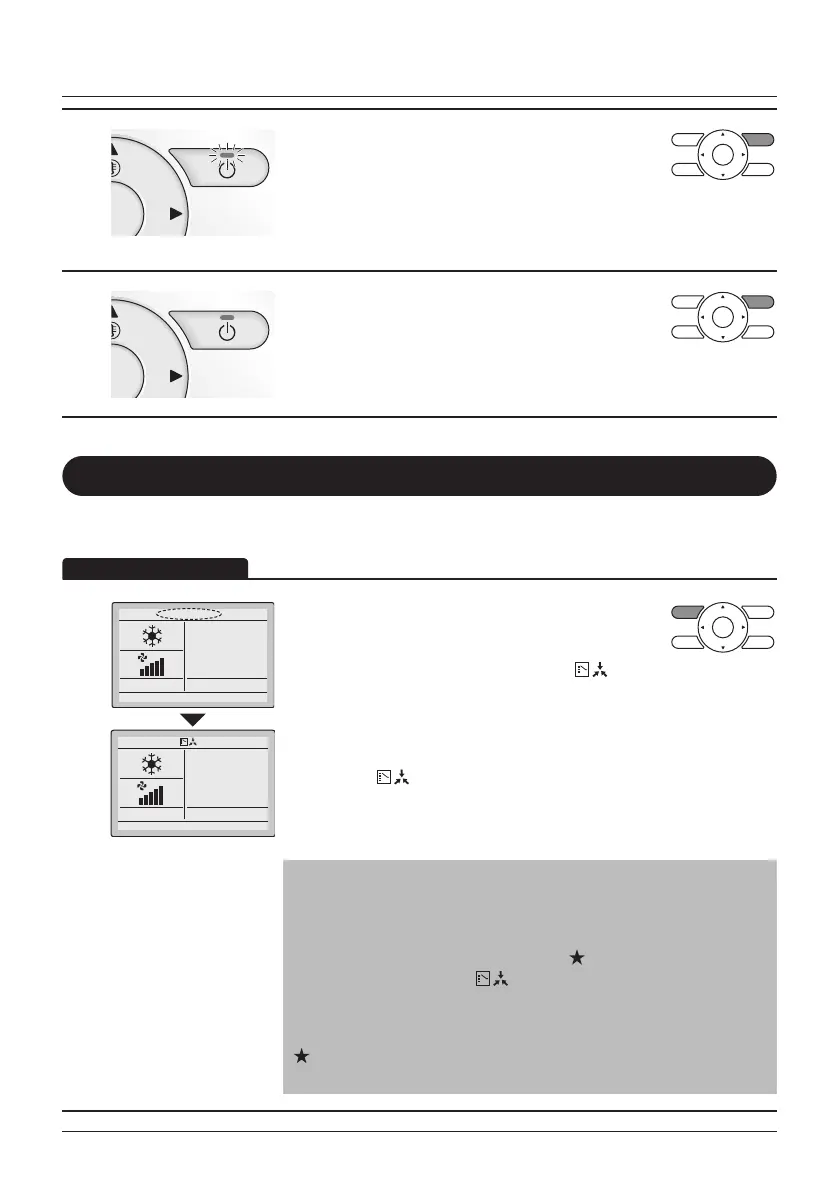
• Press the ON/OFF button.
The Operation lamp will be lit and the Heat
Reclaim Ventilation unit will start operating.
5
• When the ON/OFF button is pressed again the
Heat Reclaim Ventilation will stop operating and
the Operation lamp will turn OFF.
Setting the Cooling/Heating Selection Eligibility
(VRV only)
Setting Changes
See "Cool/Heat Selection Eligibility" on page 21 for an explanation of the
cooling/heating selection eglibility.
1
28°C
28°C
• Press the Operation Mode Selector button on the
remote controller for at least 4 seconds (during
backlight lit).
The remote controller will not display " "
(Changeover under control) if a cooling/heating
selection eligibility is granted to the remote
controller.
• The icon " " (Changeover under control) on each remote
controller of indoor units connected to the same outdoor unit or
BS (Branch Selection) box will start blinking.
• Set a cooling/heating selection eligibility as explained below.
Note
• Ventilation mode changes are possible regardless of the cooling/
heating selection eligibility.
• If a cooling/heating selection eligibility is set in the "cooling/
heating selection remote controller" (
), the other remote
controllers will display " " (Changeover under control). In this
case, the operation mode cannot be changed to respectively
cooling or heating when heating or cooling is set on the "cooling
or heating selection remote controller".
Refer to the Operation Manual provided to the outdoor unit for
the details on the "cooling/heating selection remote controller".



 To Next Page