BRC2E52C7 / BRC3E52C7 Operation manual
4P368042-1 - 2014.02
34
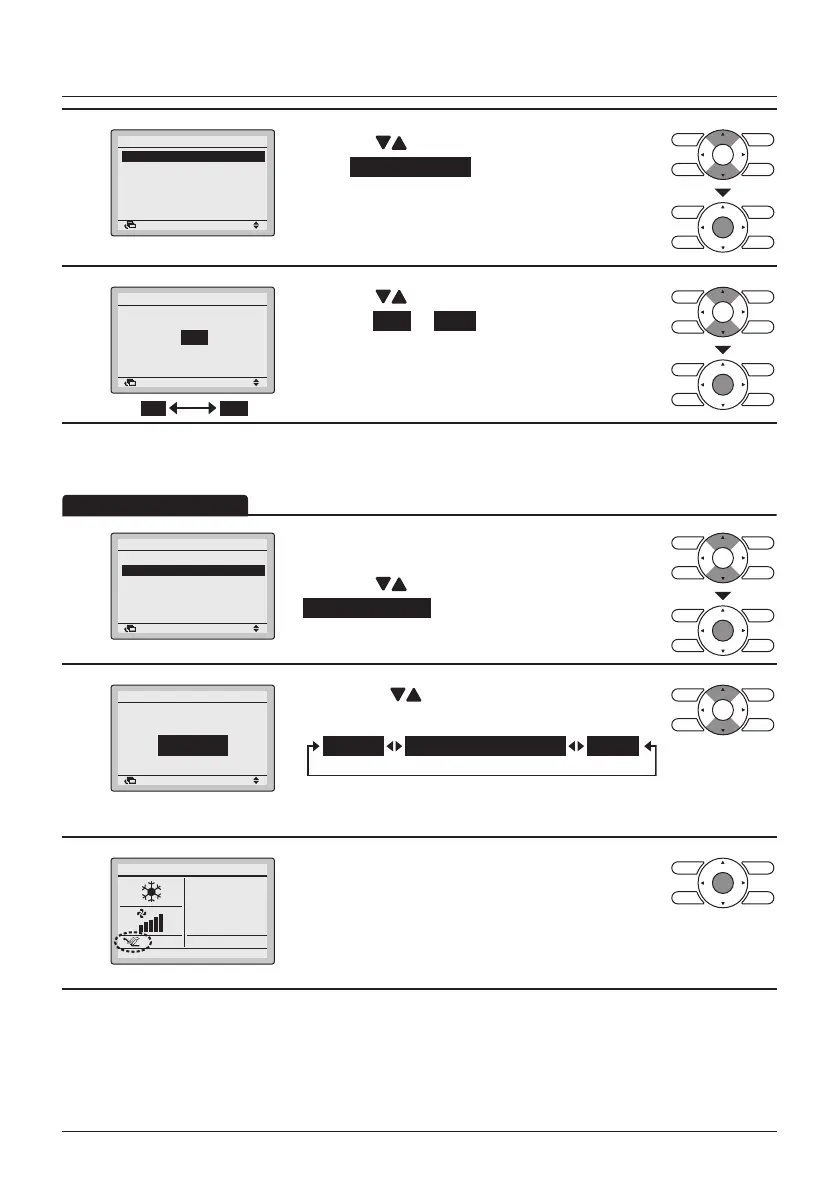
Menu Manipulation
2
2/2
Ventilation Rate
Ventilation Mode
Ventilation
SettingReturn
• Press the (Up/Down) buttons to
select Ventilation Rate and press the Menu/Enter
button.
3
Ventilation Rate
Ventilation
High
SettingReturn
HighLow
• Press the (Up/Down) buttons to change the
setting to Low or High .
• Press the Menu/Enter button to conrm the
settings and to return to the Basic Screen.
* Only modes that can be set are displayed.
Ventilation Mode
1
2/2
Ventilation Rate
Ventilation Mode
Ventilation
SettingReturn
• Display the Ventilation menu.
(See "Ventilation Rate" on page 33).
• Press the
(Up/Down) buttons to select
Ventilation Mode and press the Menu/Enter
button.
2
Bypass
2/2
Ventilation mode
Ventilation
SettingReturn
• Press the (Up/Down) buttons to change
the settings as shown below.
AutoEnergy Reclaim Vent.Bypass
* Only modes that can be set are displayed.
3
28°C
• Select the desired ventilation mode.
• Press the Menu/Enter button to conrm the
settings and to return to the Basic Screen.
• The corresponding mode is shown.



 To Next Page