BRC2E52C7 / BRC3E52C7 Operation manual
4P368042-1 - 2014.02
56
Menu Manipulation
12H/24H CLOCK
1
Date & Time
12H/24H Clock
Clock & Calendar
SettingReturn
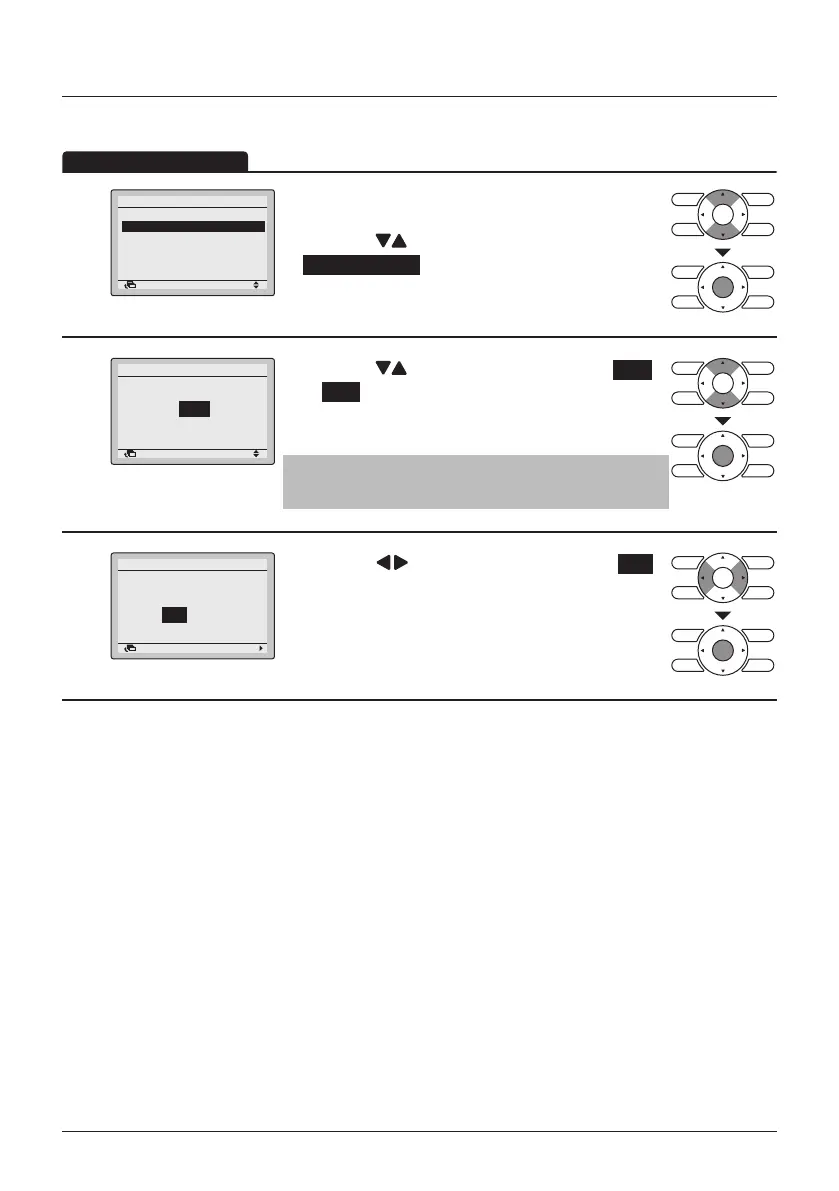
• Display the Clock & Calendar menu. (See "Date &
Time" on page 55).
• Press the
(Up/Down) buttons to select
12H/24H Clock and press the Menu/Enter button.
2
24H
12H/24H Clock
SettingReturn
• Press the (Up/Down) buttons to select 12H
or 24H .
• The conrmation screen will appear when the
Menu/Enter button is pressed.
Note
By default, the time display is set to the 24H format.
3
NoYes
12H/24H Clock
Save the settings?
SettingReturn
• Press the (Left/Right) buttons to select Yes .
• Press the Menu/Enter button to conrm the setting
and to return to the Main Menu.



 To Next Page