English 15
■
■■
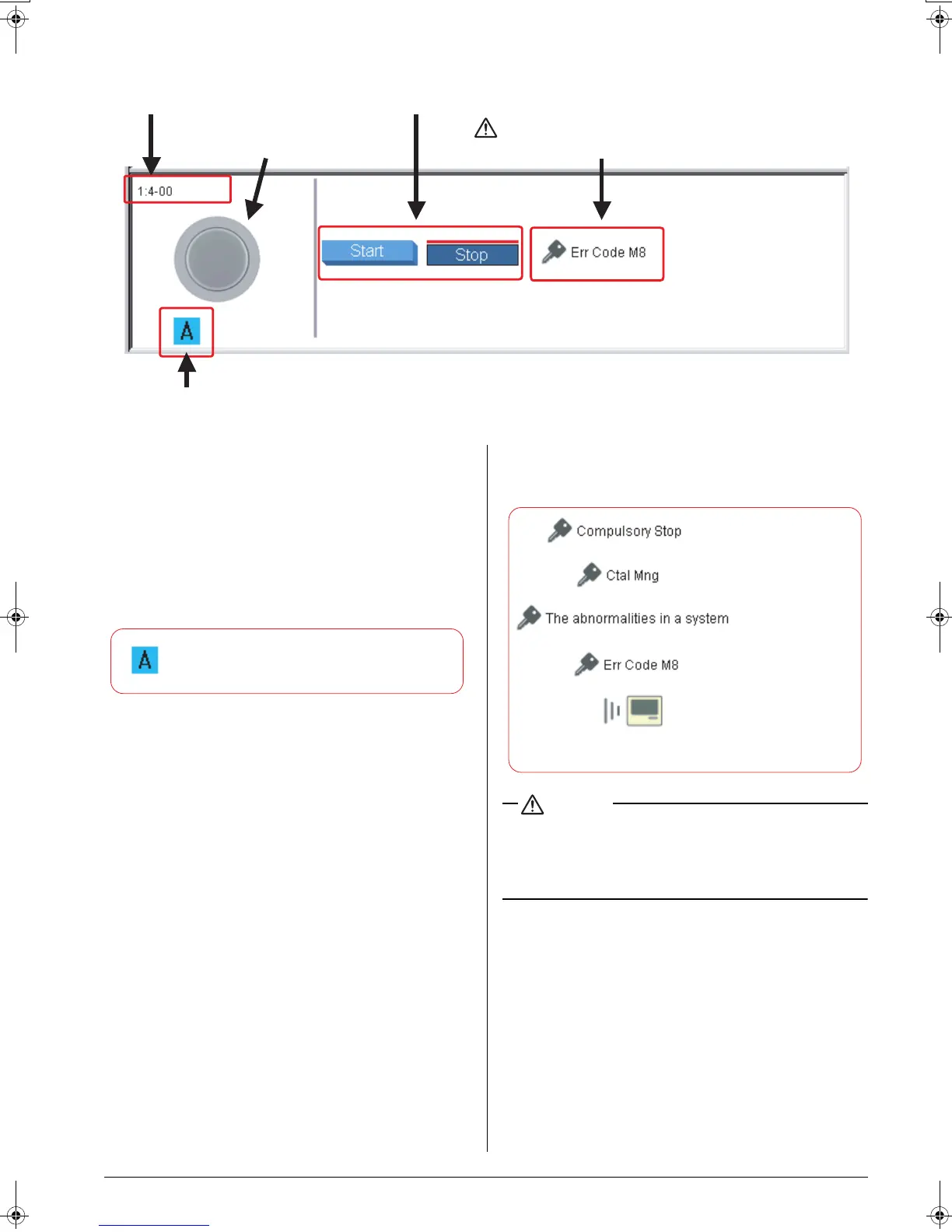
■ Universal Device Group:
(1) Group name
Displays the exact name of the selected group.
(2) Status icon
Displays the current status. (See page 11)
(3) Start / Stop
Displays the Start/Stop state of devices. You can start or
stop devices, if required. (See page 17)
(4) Sign display area
Provides information on schedule programs.
(5) System status display area
Displays the system status. One of the following five icons
may appear.
CAUTION
When lighting devices are connected via Dio units:
The Start/Stop buttons (3) can be used.
When lighting devices are connected via Di units:
The Start/Stop buttons (3) are not displayed.
(1) Group name
(2)
Status icon
(3) Start / Stop
(4)
Sign display area
(5)
System status display area
CAUTION
Note:
Indicates that the selected group is associated
with one or more schedule programs.
:Inter-central-device
communication error
:Indicates that transmission
to the intelligent Touch
Controller is in progress.
:Forced off
:Under centralized control
:Abnormal system
01_EM04A057_EN.fm Page 15 Tuesday, February 1, 2005 7:47 PM












 To Next Page