68 Installation Manual 3P581074-2D
DGE601A52
English
Setting outdoor unit Airnet addresses
This section describes how to set outdoor unit Airnet addresses.
In the following cases, refer to “4.3 Setting address on the outdoor unit” and set an
Airnet address for the outdoor unit.
• Multiple systems exist in 1 remote controller group.
• [Outdoor Unit Airnet Address] is not displayed on the service settings display.
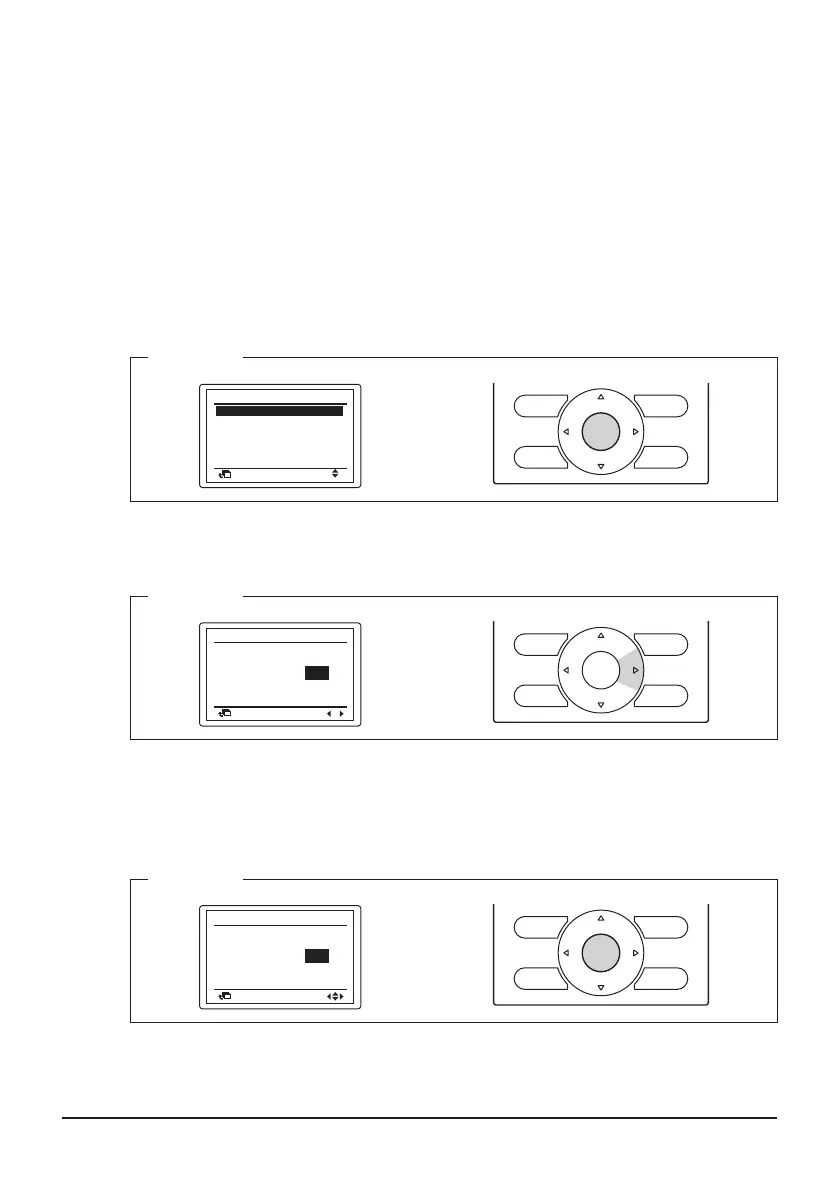
1. Using the Up/Down buttons, select [Outdoor Unit Airnet Address] and press the
Menu/OK button.
The current Airnet address setting is displayed.
<Step 1>
Outdoor Unit Airnet Address
Error History
Switch Main Sub Controller
Return
Setting
Service Settings
Indoor Unit Status
Outdoor
Unit Status
2/3
Forced Fan ON
2. Press the Right button, move to the [Address].
<Step 2>
Unit No.
Set
Address
Return
0
Outdoor Unit Airnet Address
Release
001
3. If an address is already [Set], press the Menu/OK button to release the current
address setting. The mode indication changes from [Set] to [Release], and you are
now ready to change the address.
<Step 3>
Unit No.
001
Release
Address
Return
Outdoor Unit Airnet Address
Change
0
01_EN_3P581074-2D.indd 68 2021/06/25 14:12:20



 To Next Page