5 | Before operation
User reference guide
19
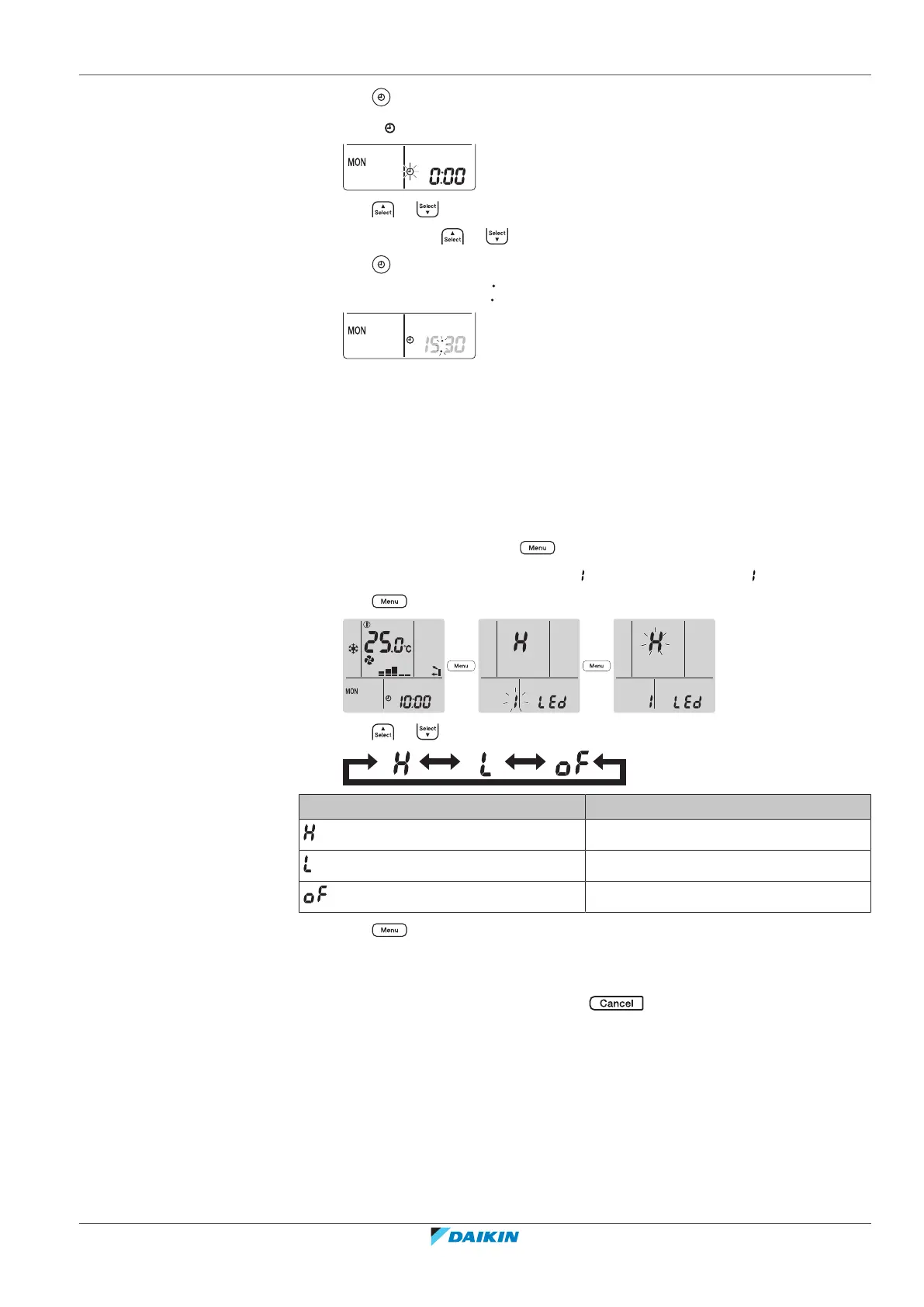
CVXM20+FVXM25~50A2V1B
Split system air conditioners
4P625990-1A – 2020.10
3 Press .
Result: blinks.
4 Press or to set the correct time.
Note: Holding down or increases or decreases the time setting rapidly.
5 Press .
Result: Setting is complete. blinks.
5.6 Brightness of the indoor unit display
Adjust the brightness of the indoor unit display as desired, or turn OFF the display.
5.6.1 To set the brightness of the indoor unit display
1 On the home screen, press for at least 2seconds.
Result: The selection menu number appears on the display. is blinking.
2 Press to enter the setting.
3 Press or to change the setting as follows:
Blinking Brightness
High
Low
Off
4 Press to confirm the selected setting.
Result: The brightness setting is changed.
Note: The display automatically returns to the default screen after 60seconds. To
return to the default screen sooner, press twice.





 To Next Page