6 | Operation
User reference guide
32
CVXM20+FVXM25~50A2V1B
Split system air conditioners
4P625990-1A – 2020.10
1 For setting, see "To start/stop OFF timer operation"[430], "To start/stop ON
timer operation" [4 30] and "To start/stop countdown OFF/ON timer
operation"[431].
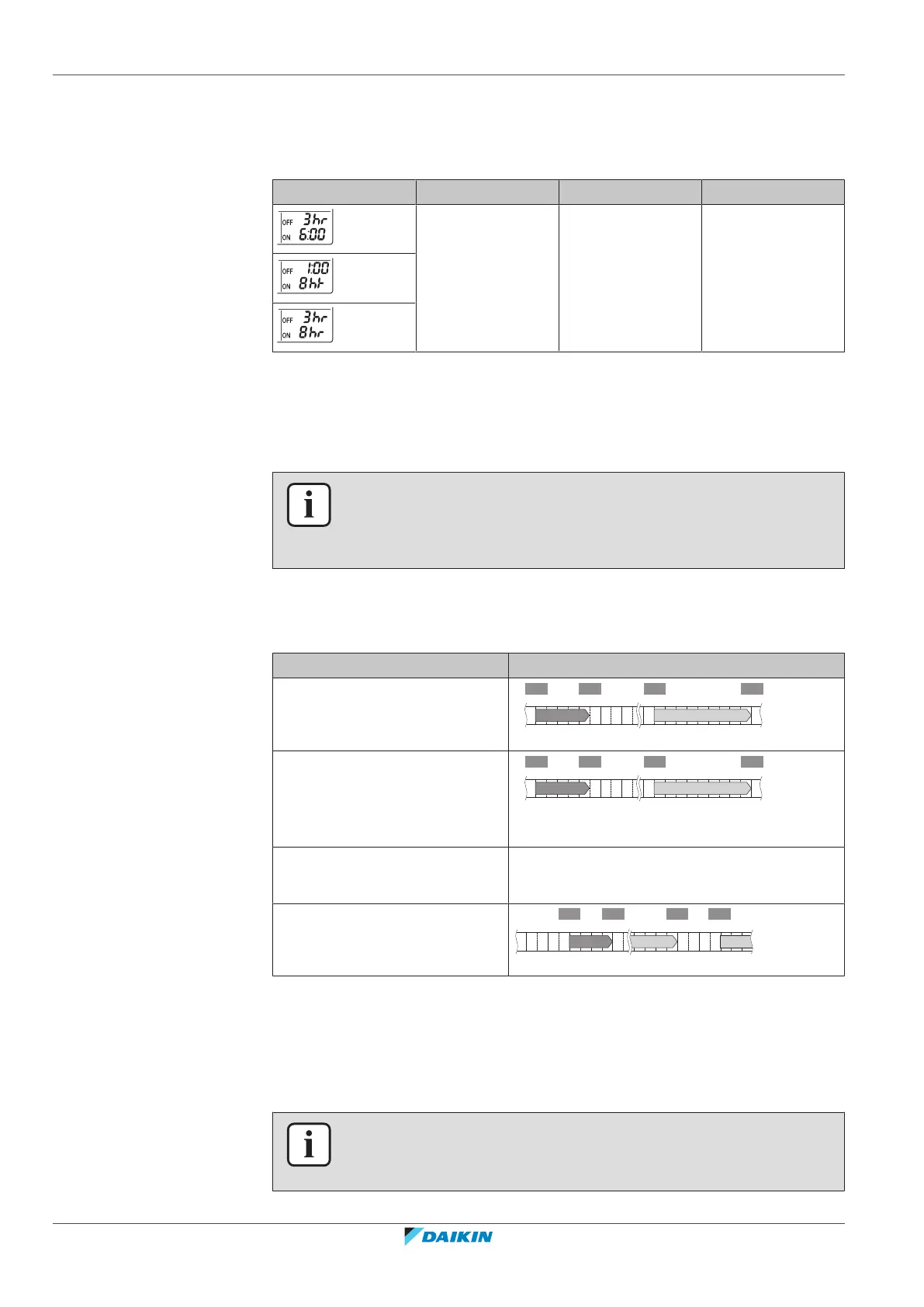
Example:
Display Current time Set while… Operation
22:00 the unit is
operating.
▪ Stops at 1:00
(3 hours after
present time)
▪ Starts at 6:00.
(8 hours after
present time)
Note: If the timer setting is active, the current time is NOT displayed on the LCD.
6.12 Weekly timer operation
INFORMATION
Do not use the Weekly timer setting simultaneously with the Daikin Residential
Controller app schedule timer. Both settings are independent of each other. Use only
one of them.
With this operation, you can save up to 4 timer settings for each day of the week.
Example: Create a different setting from Monday to Friday and a different setting
for weekends.
Day of the week Setting example
Monday
▪ Make up to 4settings.
6:00 8:30 17:30
25°C 27°C25°C
22:00
1 2 3 4
ON OFF ON OFF
Tuesday~Friday
▪ Use the copy mode if the
settings are the same as for
Monday.
6:00 8:30 17:30
25°C 27°C25°C
22:00
1 2 3 4
ON OFF ON OFF
Saturday
▪ No timer setting
—
Sunday
▪ Make up to 4settings.
27°C 27°C25°C
ON OFF OFF ON
▪ ON-ON-ON-ON setting. Enables scheduling the operation mode and set
temperature.
▪ OFF-OFF-OFF-OFF setting. Only the turn off time can be set for each day.
Note: Be sure to aim the user interface at the indoor unit and check for a receiving
tone when setting the Weekly timer operation.
INFORMATION
The clock MUST be set correctly before using any timer functions. Refer to "To set
the clock"[418].





 To Next Page