6 | Operation
User reference guide
26
CVXM20+FVXM25~50A2V1B
Split system air conditioners
4P625990-1A – 2020.10
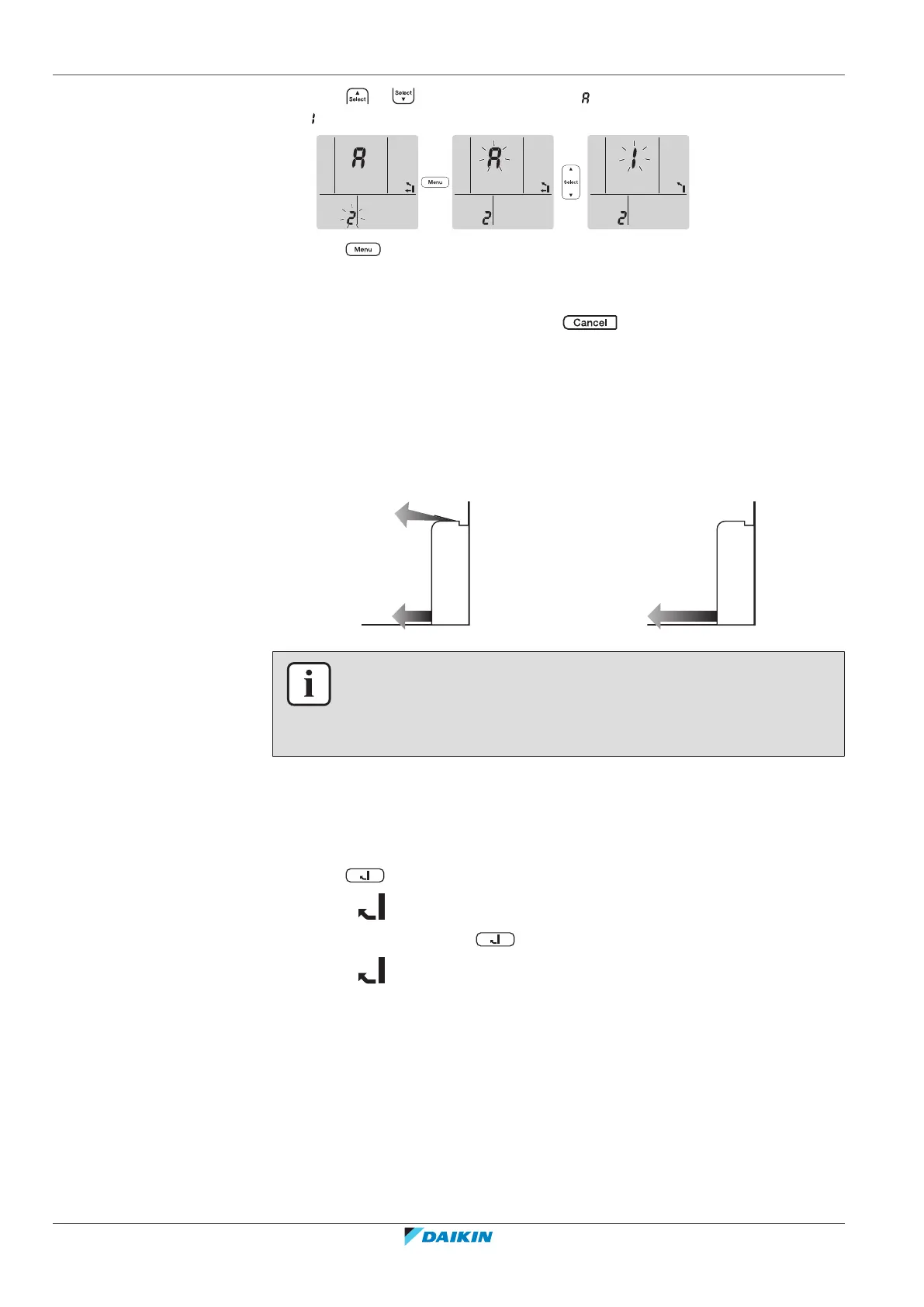
4 Press or to change the setting. " " = automatic air outlet selection or
" " = top air outlet only.
5 Press to confirm the selected setting.
Result: The setting is changed.
Note: The display automatically returns to the default screen after 1 minute. To
return to the default screen sooner, press twice.
6.7 Floor warming operation
This operation can effectively warm large floor areas by closing the top air outlet
and increasing the air velocity to reach distant floor surfaces.
Normal operation Floor warming operation
INFORMATION
▪ Floor warming operation can be used in heating operation mode only and with
the automatic air outlet selection setting.
▪ If the room temperature is low, the room may not get warm enough.
6.7.1 To start/stop Floor warming operation
Prerequisite: This operation can be set only in heating operation mode and with
the automatic air outlet selection setting.
1 Press .
Result: is displayed on the LCD and the operation starts.
2 To stop operation, press .
Result: disappears from the LCD and operation stops.
6.8 Powerful and Heat plus operation
6.8.1 Powerful operation
This operation quickly maximizes the cooling/heating effect in any operation mode.
You can get the maximum capacity.





 To Next Page