Installation and operation manual
8
FWEC2
Advanced electronic controller
FC66002764
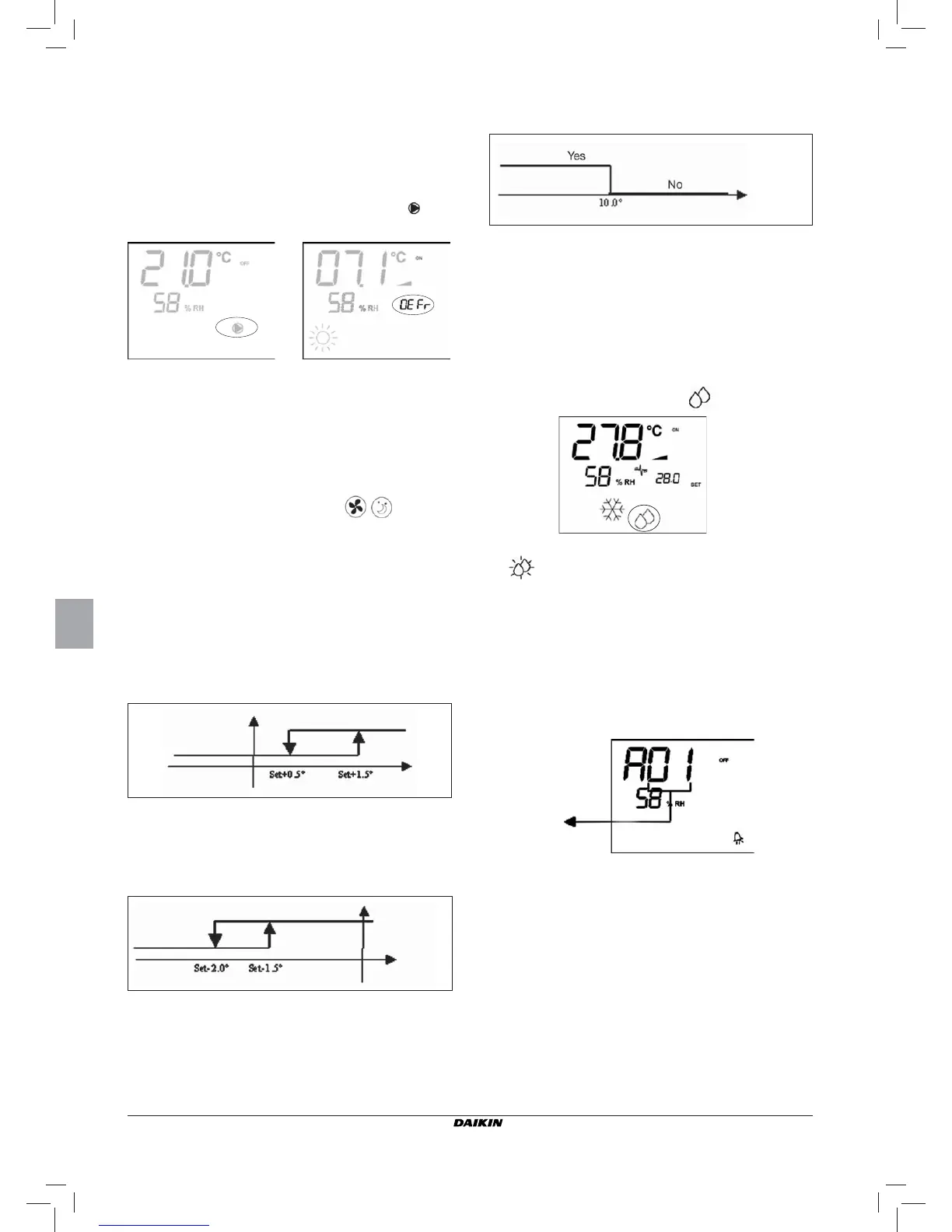
When temperature exceeds 10°C the thermostat will resume
the Off status.
N.B.: Any Off command from digital input will disable this
logic
DISPLAY
The display shows the following information
■ Minimum temperature control selected: symbol
■ Minimum temperature control enabled: DEFR
DEHUMIDIFICATION
The dehumidifi cation function, enabled only in the cooling
mode, activates operation of the indoor unit in order to achieve
a 10% reduction in the level of humidity present in the room
at the time the function itself was selected.
SELECTION
Dehumidifi cation can be selected/unselected in the Cooling
mode by simultaneously pressing the
buttons. If
the water probe (P04=0) or the remote humidity probe is not
available, in cases where the controller is installed directly
on the unit (P08=0), selection will not be enabled. If selected,
the dead band for automatic switching on the air side will be
brought to 5°
LOGIC
Once selected, the dehumidifi cation logic sets the target hu-
midity level as the humidity present at the time the function
was selected minus 10%. Where the room humidity is less
than 40% the target level will be set at 30%.
The fan will be forced to run at low speed or, if the temperature
is much higher than the setpoint, at medium speed.
In order to bring the humidity to the set value, the fan (and
valve, if present) will be activated even if the room temperature
has already reached the programmed setpoint (indicated on
the display by the symbol 3). Should the room temperature
fall too far below this threshold, the logic will be temporarily
inhibited.
WATER CONTROL
Enabling of the dehumidifi cation function is tied to the water
temperature. The related enabling logic is described below
If enabling conditions do not exist, the dehumidifi cation func-
tion will be temporarily inhibited.
The same will occur in the event that the probe is discon-
nected.
N.B.: once the target level of humidity is reached or the
controller is switched off, the dehumidify option will be
unselected
DISPLAY
The display shows the following information:
■ Dehumidifi cation ON: symbol lit
■ Dehumidifi cation temporarily inhibited: fl ashing symbol
ALARMS
This control manages two types of alarms:
■ Serious Alarms: cause the forced switching off of the
thermostat
■ Non-serious Alarms: do not cause the forced switching
off of the thermostat, but disable possible critical func-
tions
SERIOUS ALARMS
■ Code A01 = error of external air temperature sensor (in case
of on-board thermostat)
■ Code A02 = error of internal air temperature sensor (in case
of wall mounted thermostat and disconnected external air
temperature sensor)
Min. speed
Med. speed
Air temp.
Inhibited
Water temp.
Alarm code


 To Next Page