IV. Instructions before Use
Dakewe (Shenzhen) Medical Equipment Co., Ltd. 21
www.dakewemedical.com
3. Config Template-Type Correlation
In order to use different slides to print different templates or specify the template to be used when
adding the ID, the user can use “Config Template-Type Correlation” to bind the relationships among types,
channels and templates. The operation method is as follows:
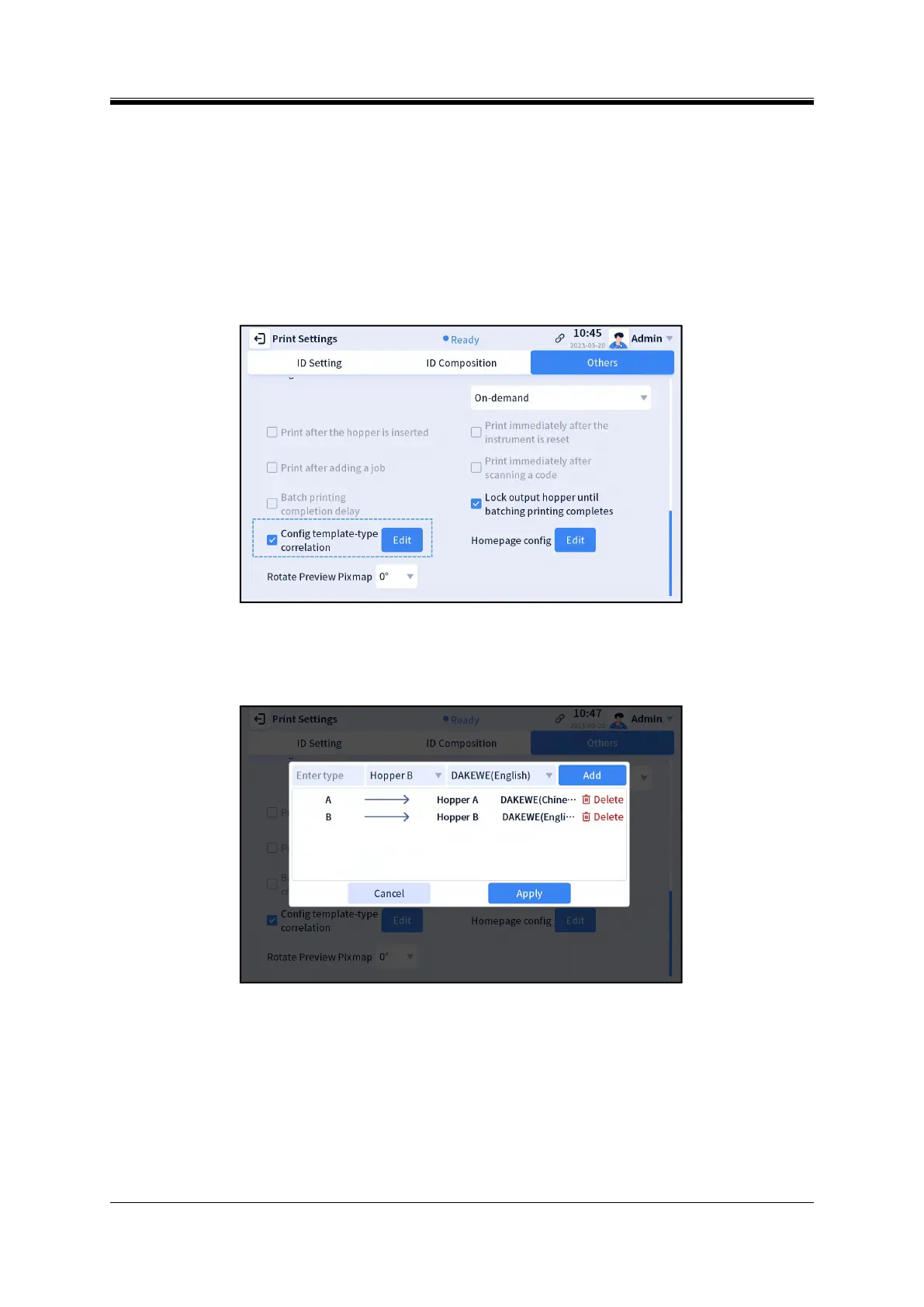
Step 1: Enter the [Menu] - [Print Settings] - [Others] interface (Figure 4-12), check “Config
Template-Type Correlation” in the Printing Rule section, and click the “Edit” button on the right;
Figure 4- 12 Config Template-Type Correlation
Step 2: Enter a type (the type is user-defined but cannot be repeated). The name of the type is used to
distinguish different types (Figure 4-13);
Figure 4- 13 Template-Type
Step 3: Select a print channel to determine the hopper slides that are used to print the marked ID of
this type;
Step 4: Select a template to determine the template that is used to print the marked ID of this type;
Step 5: Click “Add”, click “Apply”;
Step 6: Return to the homepage, select type, add ID, and print.



 To Next Page