V. Computer Software
52 Dakewe (Shenzhen) Medical Equipment Co., Ltd.
www.dakewemedical.com
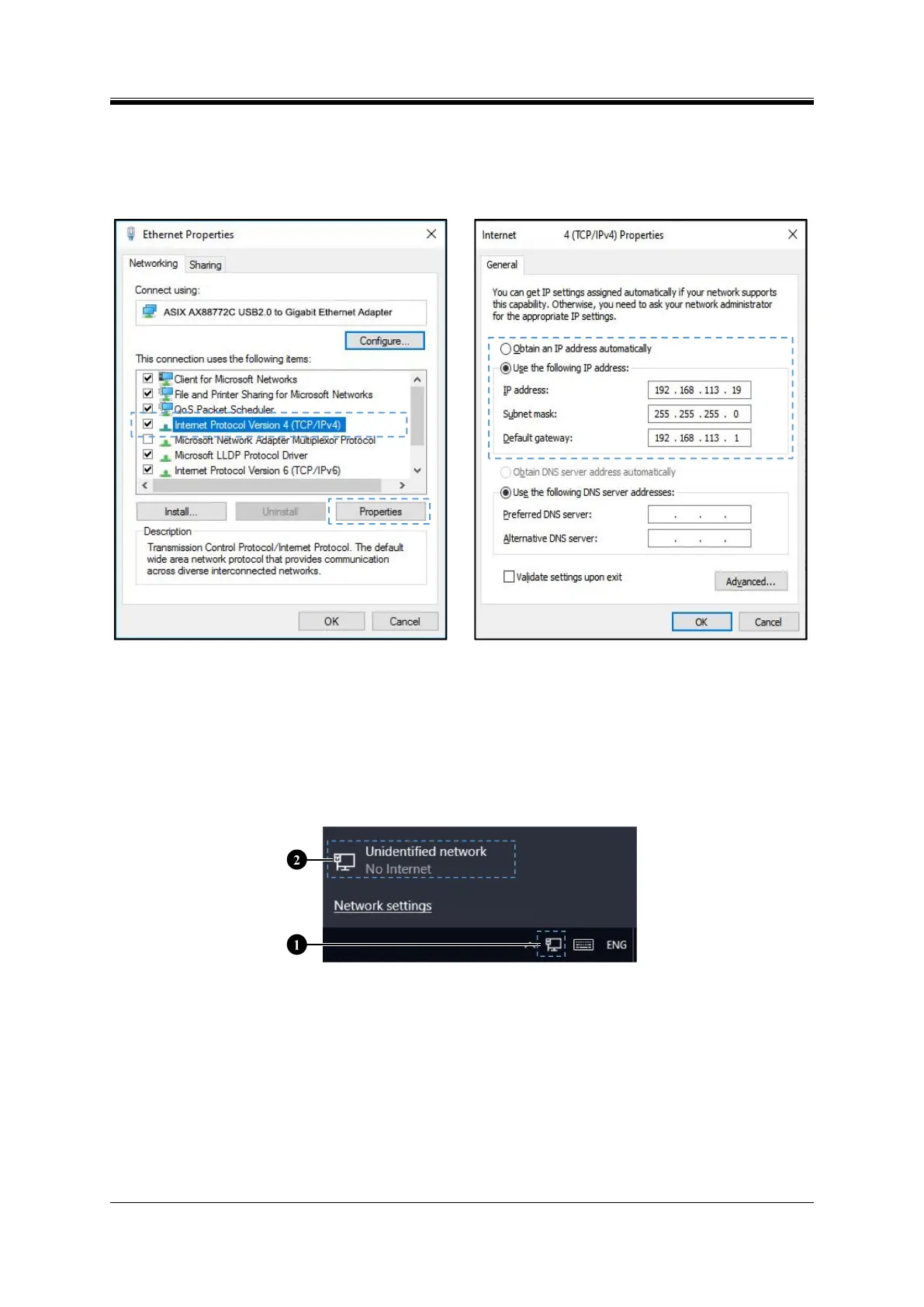
After entering the IP address data, click the "OK" button. The IP address data can be changed
according to the actual need, but it must be ensured that the IP address of the device and the computer are
in the same network segment.
Figure 5- 5 Ethernet Properties
Figure 5- 6 Internet Protocol Version 4 (TCP/Ipv4)
Properties
2. Setting the IP address on your computer
Set the device IP address in the properties window of Internet Protocol Version 4 (TCP/Ipv4):
Step 1: Click the network icon ① in the taskbar of the device, and select "Network and Internet
Settings" ② (Figure 5-7);
Figure 5- 7 Network and Internet Settings
Step 2: In the "Network Status" window (Figure 5-8), select "Change Adapter Options" in the
advanced network settings;
Step 3: Select the "…AX88772C…" network in the "Network Connection" window (Figure 5-9);
Note: AX88772C_Win... is the name of the USB Ethernet Adapter Driver, and the name will be
displayed only when it is used. Before setting "Ethernet Properties", it should be confirmed that the
network is the same network that the device is connected to .



 To Next Page