MANUALE INSTALLATORE RELEASE 00.1 PAG. 7
Push again to highlight the value, then use or to
choose the desired option and push to confirm it.
Push to go back to previous menu.
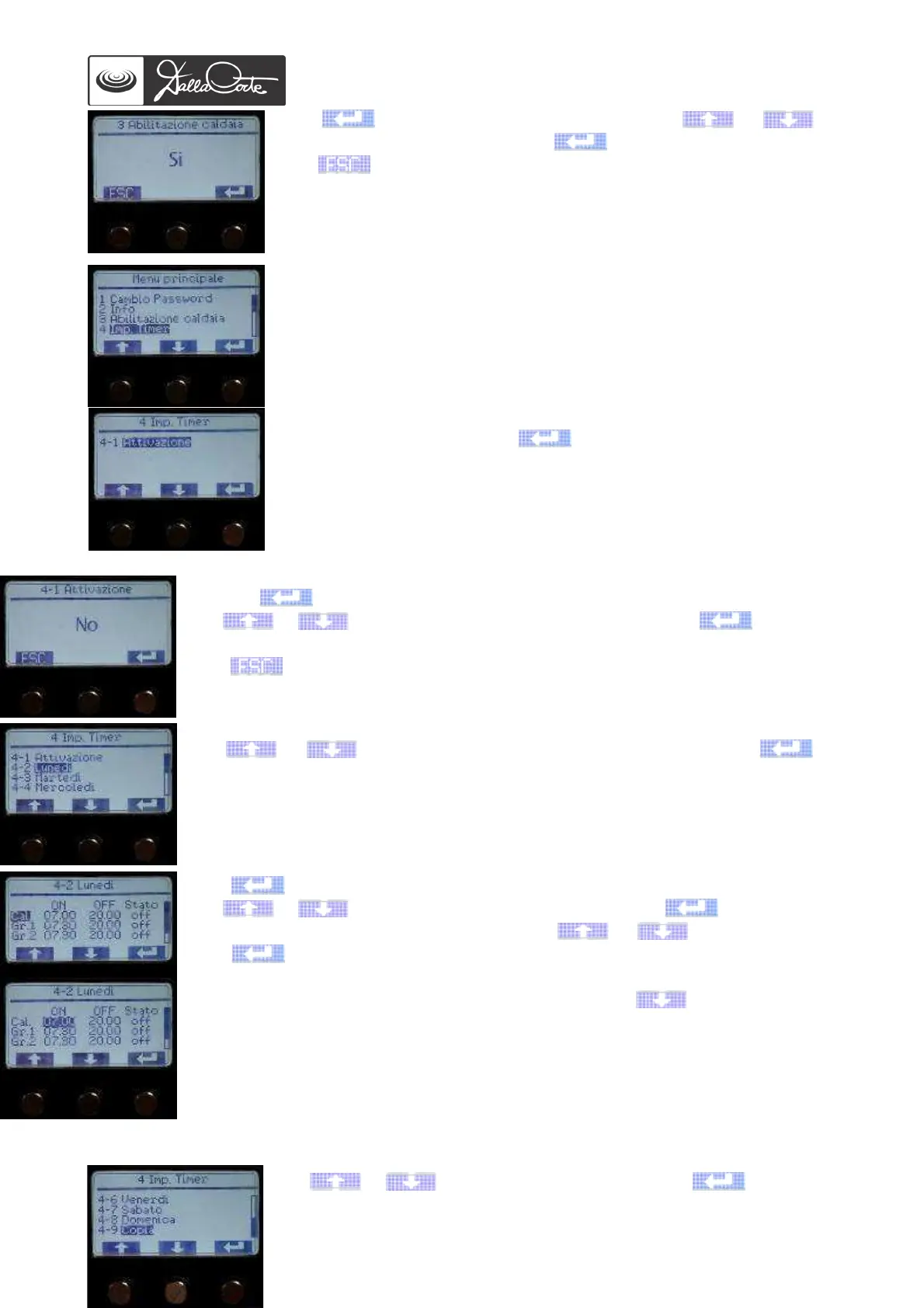
4- TIMER SET UP
This menu allows to enable, disable and program the weekly timer for
each unit. It is also possible to choose between 2 modes:
- OFF mode – the unit is turned off completely at the desired time and
will therefore cool off.
- SAFETY mode – the unit reaches a safety temperature at the desired
time. Since it does not cool off completely, it will heat up more quickly.
Select the menu item and push to enter.
4-1 Push again to highlight the mode.
Use or to choose YES to enable the timer, then push to confirm
it.
Push to go back to previous menu.
Use or to choose the day to be programmed, then push to
access the programming:
Push to start timer programming for each unit, starting from steam boiler.
Use or to change boiler turn-on time, then push to confirm.
By confirming, you get to the next value. Use or to change it, then
push to confirm it.
Once the programming of all units has been finished, push until you get to the
previous menu to program the other days of the week.
Use
or to choose “Copy” and then push to copy the
Monday program to the other days of the week. The display will show:














 To Next Page