EasyManua.ls Logo

Datalogic Gryphom 4500 Series - User Manual

Datalogic Gryphom 4500 Series
356 pages
Print Icon
To Next Page IconTo Next Page
Loading...
L
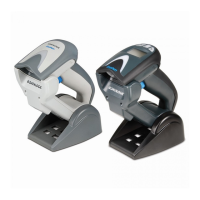
Gryphon™ 2D Family
Gryphon I GD/GBT/GM4500
PRODUCT REFERENCE GUIDE
General Purpose Handheld
Area Imager Bar Code Reader

Table of Contents

Questions and Answers

  • M
    Margaret WatsonAug 5, 2025
    What to do if Datalogic Barcode Reader LED is on but barcode doesn't decode?
    • E
      Elaine ReyesAug 6, 2025
      If the LED is on, but the bar code doesn't decode, it could be due to several reasons: * The reader might not be programmed for the correct bar code type. In this case, ensure the reader is programmed to read the type of bar code scanned. * The bar code label may be unreadable. Check the label to ensure it is not defaced. You can also try scanning another bar code type. * The distance between the reader and the bar code might be incorrect. Try moving the reader closer to or further from the bar code.
  • E
    Erika CastanedaAug 14, 2025
    Why Datalogic Barcode Reader does nothing when I pull the scan button?
    • N
      Nicole AndersonAug 14, 2025
      If nothing happens when you pull the scan button on your Datalogic Barcode Reader, the issue might be due to: * No power to the reader. Check the system power and ensure the power supply is connected. * Loose interface or power cables. Make sure all cable connections are secure.
  • M
    Mr. Edward SmithAug 26, 2025
    How to fix Datalogic Gryphom 4500 Barcode Reader that decodes but doesn't transmit to host?
    • R
      Ronald SloanAug 26, 2025
      If the bar code is decoded but not transmitted to the host, the Datalogic Barcode Reader may not be programmed for the correct host type. To resolve this, scan the appropriate host type bar code.

Summary

Preface

About This Manual

Provides information on the manual's purpose, structure, and content.

Technical Support

Details how to obtain assistance and support for the product.

Chapter 1 Introduction

About the Reader

Overview of the Gryphon product series and its capabilities.

Battery Safety

Crucial safety instructions for handling and using the battery pack.

Chapter 2 Setup

Unpacking and Initial Setup

Instructions for unpacking and preparing the reader for use.

Connecting Host Interface

Details on establishing physical connections via various interfaces.

Base Station Setup and Positioning

Information on setting up and positioning the base station for wireless models.

Interface Selection and Configuration

Steps to select and configure the reader's interface for communication.

Chapter 3 Configuration

Configuration Parameters Overview

Overview of parameters configurable via bar codes.

Interface-Specific Configuration

Settings for RS-232, USB, Keyboard, and other interfaces.

Symbology Configuration

Options for enabling/disabling and configuring bar code symbologies.

Chapter 4 References

Parameter Details

Detailed explanation of various configuration parameters.

Scanning Features Details

In-depth look at reader scanning modes and their settings.

Symbologies Details

Comprehensive information on bar code symbology settings.

Appendix A Technical Specifications

GD4500 Specifications

Physical, electrical, optical, and environmental characteristics.

GBT;GM4500 Specifications

Electrical, optical, environmental, and radio characteristics.

Decoding Capabilities

Lists all supported 1D and 2D bar code symbologies.

Appendix B Standard Defaults

Default Configuration Settings

Table of default parameters for reader settings.

Appendix C Sample Barcodes

1 D Barcodes

Provides visual examples of common 1D bar code symbologies.

Appendix F ASCII Chart

ASCII Chart

A reference table mapping ASCII characters to hexadecimal values.

Datalogic Gryphom 4500 Series Specifications

General IconGeneral
TypeHandheld Barcode Reader
ConnectivityBluetooth
Decode Capability1D and 2D barcodes
Operating Temperature0°C to 50°C
InterfacesUSB, RS-232, Keyboard Wedge
Ambient Light ImmunityUp to 100, 000 lux
Storage Temperature-20 to 70 °C / -4 to 158 °F
Humidity5 to 95% (Non-condensing)

Related product manuals