Programming Guide 11
IBM 4682/92 Port E Interface Selection
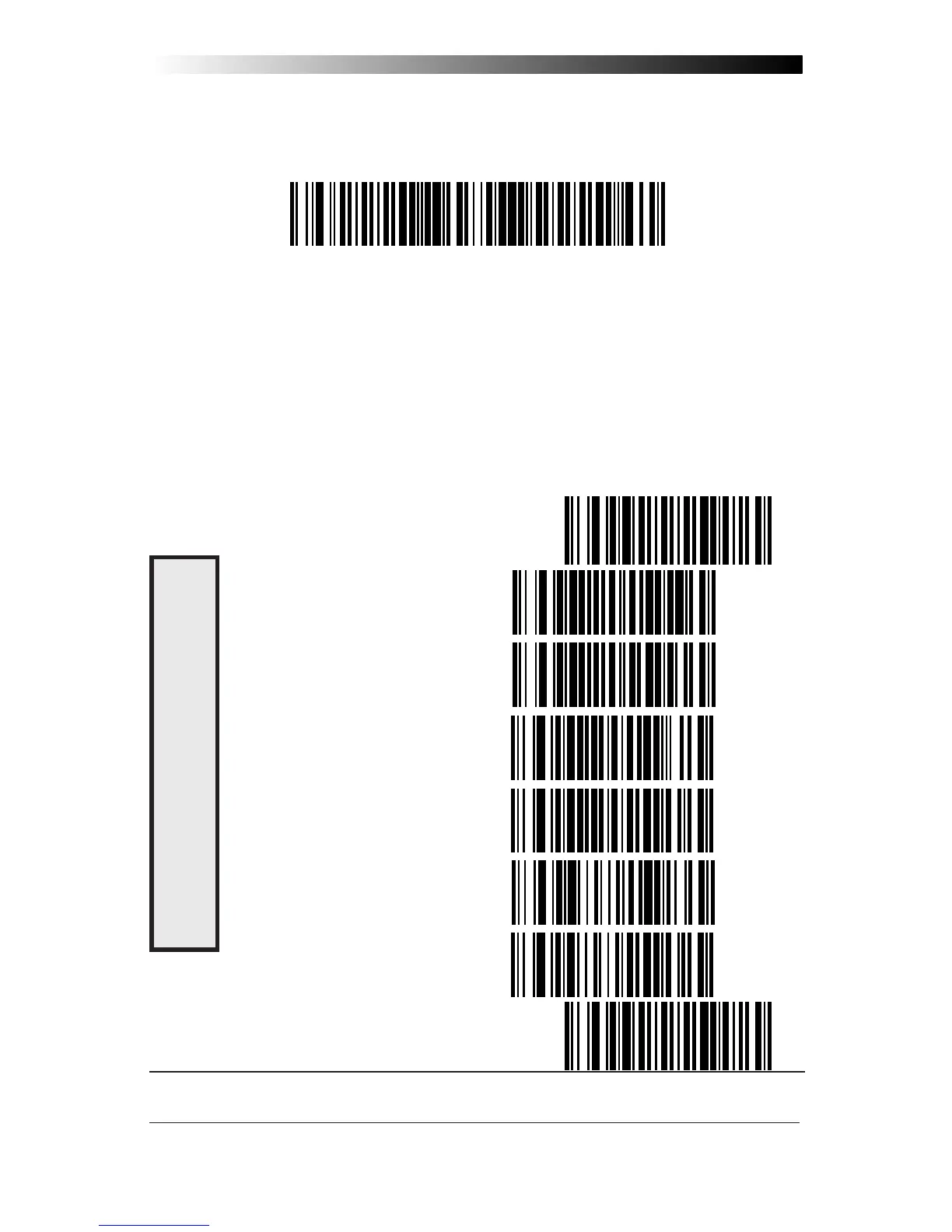
Scan this label to enable the IBM 468x/9x Port E interface.
IBM 4682/92 Port E Settings
Data Format: Send As Code 39 — converts bar code data (UPC/EAN,
add-ons, Code 93, Codabar, MSI/Plessey and Code 128) into Code 39
format before sending the data to the host.
These settings are for IBM 4682/92 Port E interface ONLY.
Limit Command Set — is an option that causes the scanner to ignore
'enable scanner' and 'disable scanner' commands sent from the host.
Transmit Unsolicited Status
1
— when enabled, this option causes the scanner
to transmit a status message to the host upon receipt of an "SNRM"
.
SET ----------------------------------------------
SEND AS CODE 39 ----------------
DON'T SEND AS CODE 39 --------
ENABLE LIMIT COMMAND SET -----
DISABLE LIMIT COMMAND SET -----
TRANSMIT UNSOLICITED STATUS ---
DON'T TRANSMIT UNSOLICITED STATUS ---
END ----------------------------------------------
1 For this IBM interface, the setting for Unsolicited Status is normally Disabled.
D
ATA
F
ORMAT











 To Next Page