26
QuickScan 6000/6000 Plus
PC Keyboard Wedge –
Connect to a Laptop/No Keyboard Attached
If no keyboard is attached, the scanner must provide the acknowledge
signal to the PC. In this case, enable the "Laptop/No External Keyboard"
mode. If a keyboard is attached, enable "Keyboard Attached".
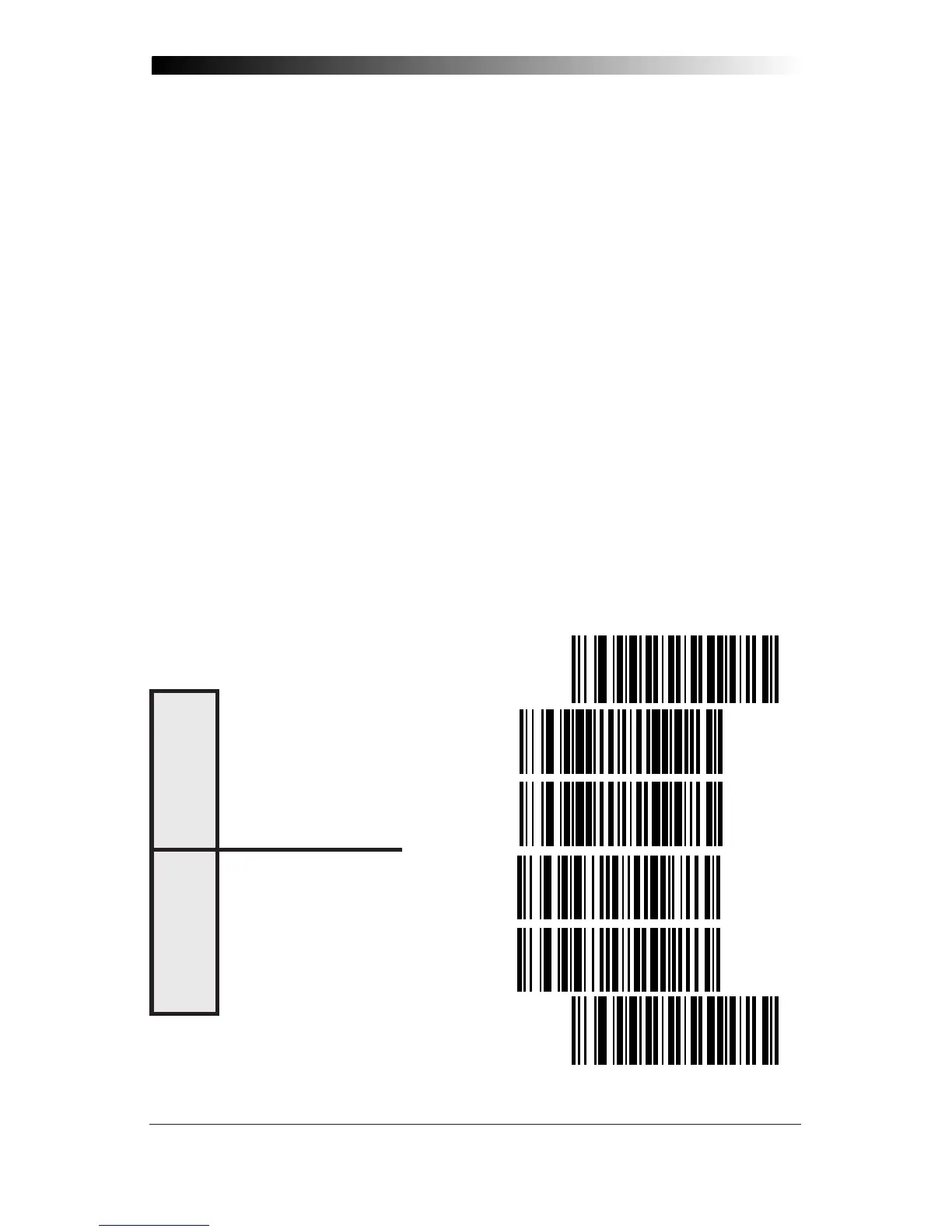
Laptop (integrated keyboard) — scan the "Laptop/No External Key-
board" label below when the scanner is connected to a laptop computer
or when the scanner is operated with no external keyboard attached.
PC (external keyboard) — if you move the scanner to a standard PC,
change the setting to "Keyboard Attached".
Send Control Characters — when this feature is disabled, all ASCII
characters except NUL (00h) are transmitted. Enabling this feature limits
transmission of ASCII characters to the following:
• Only ASCII characters between 20h..127h, plus…
- Carriage Return (CR=0Dh)
- BackSpace (BS=08h)
- Right Tab (HT=09h)
- Left Tab (0Bh)
- Esc (1Bh)
SET ----------------------------------------------
LAPTOP/NO EXTERNAL KEYBOARD -
KEYBOARD ATTACHED --------------
ENABLE -----------------------------
DISABLE -----------------------------
END ----------------------------------------------
C
ONNECT
TO
L
APTOP
OR
PC
S
END
C
ONTROL
C
HARACTERS










 To Next Page