74
QuickScan 6000/6000 Plus
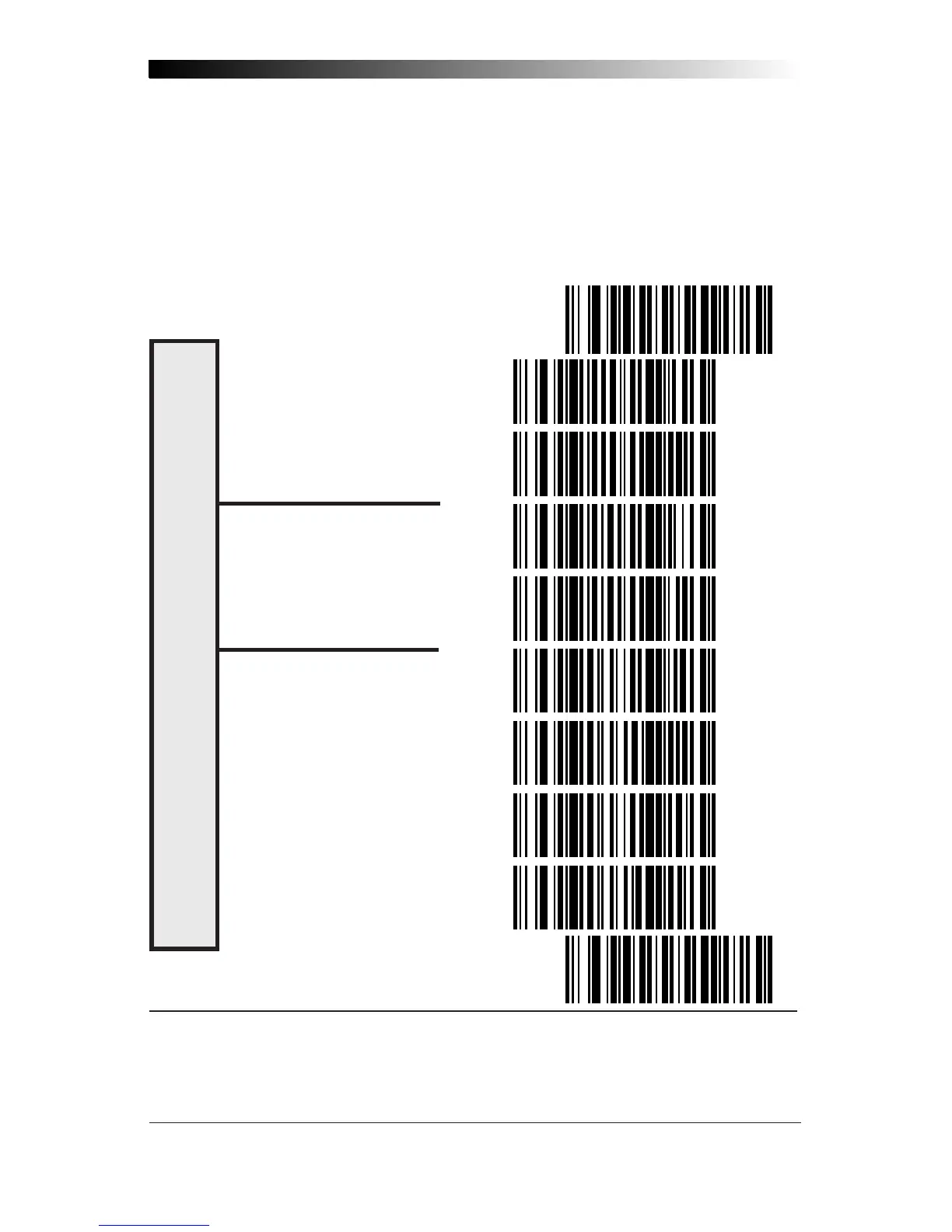
Codabar Start/Stop Character
These bar codes allow you to set the Start/Stop character format and trans-
mission. Refer to your host user's manual to identify your system require-
ments, then use these labels to select which characters are transmitted.
SET ----------------------------------------------
MATCH NOT REQUIRED -------------
MATCH REQUIRED ------------------
DON'T TRANSMIT -------------------
TRANSMIT
1
--------------------------
FORMAT = ABCD/TN*E --------
FORMAT = abcd/tn*e ------------
FORMAT = ABCD/ABCD -------
FORMAT = abcd/abcd-----------
END ----------------------------------------------
S
TART
/S
TOP
F
ORMAT
& T
RANSMISSION
S
PECIFICATIONS
1
Choosing Transmit
Start/Stop
characters requires selecting one of these four data format
selections: ABCD/TN*E, abcd, tn*e, ABCD/ABCD, or abcd/abcd. Refer to Appendix A,
Standard Factory Settings
, to identify the default setting for your scanner's interface type.










 To Next Page