Programming Guide 27
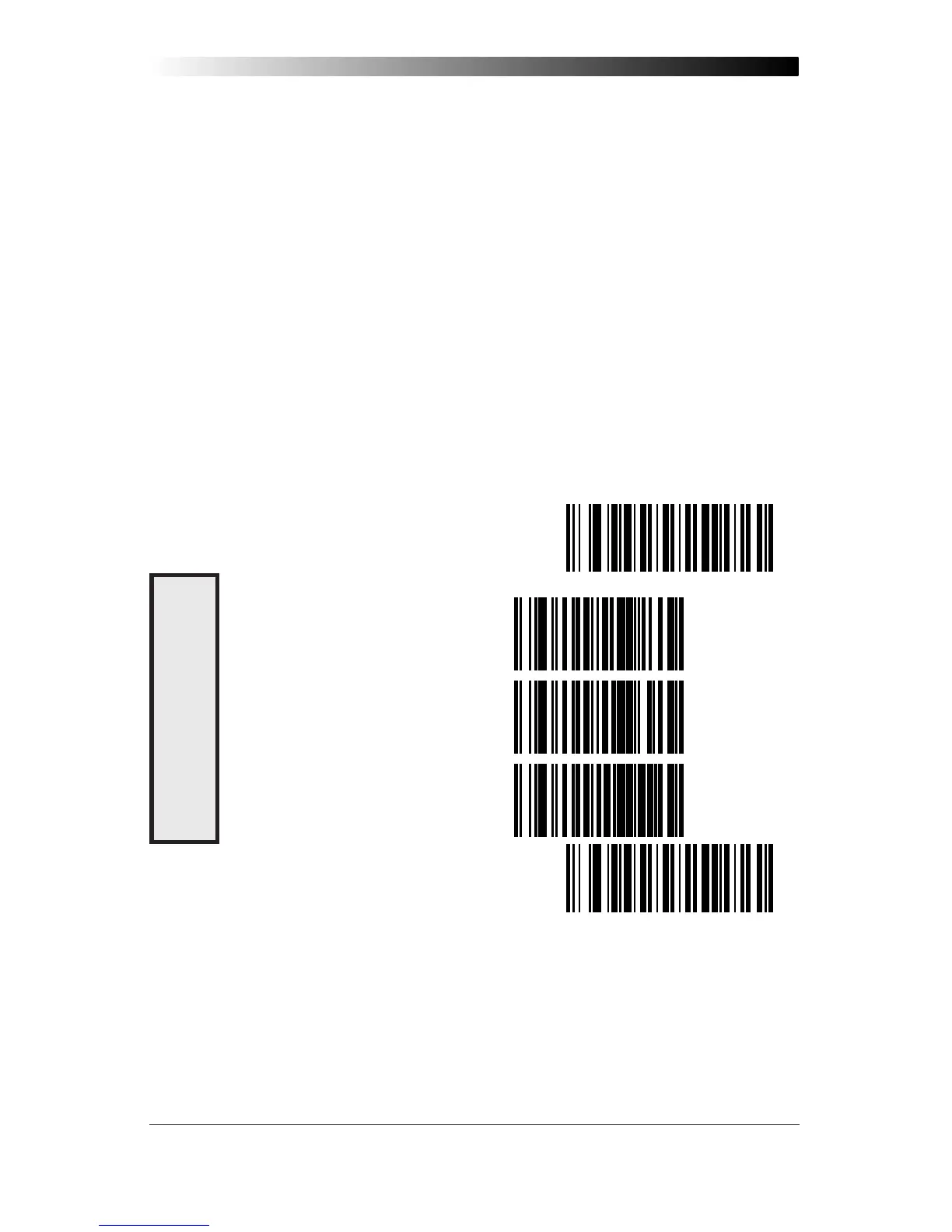
Caps Lock (QuickScan 6000 Plus ONLY)
Three caps lock settings are available for the QuickScan 6000 Plus
scanner. These are:
• Caps Lock Off — to send character data (to the host)in normal
format.
• Caps Lock On — to send character data (to the host) in reverse
case:
(a…z) = (A…Z)
(A…Z) = (a…z)
Use this feature if your caps lock is on.
• Caps Lock = Shift-Lock — to send character data (to the host) in
shifted case. Use this feature if your shift lock is on. For use with
interface type G (122-keyboard) ONLY.
SET ----------------------------------------------
CAPS LOCK OFF ------------------
CAPS LOCK ON -------------------
CAPS LOCK = SHIFT-LOCK --------
END ----------------------------------------------
C
APS
L
OCK
O
PTIONS










 To Next Page