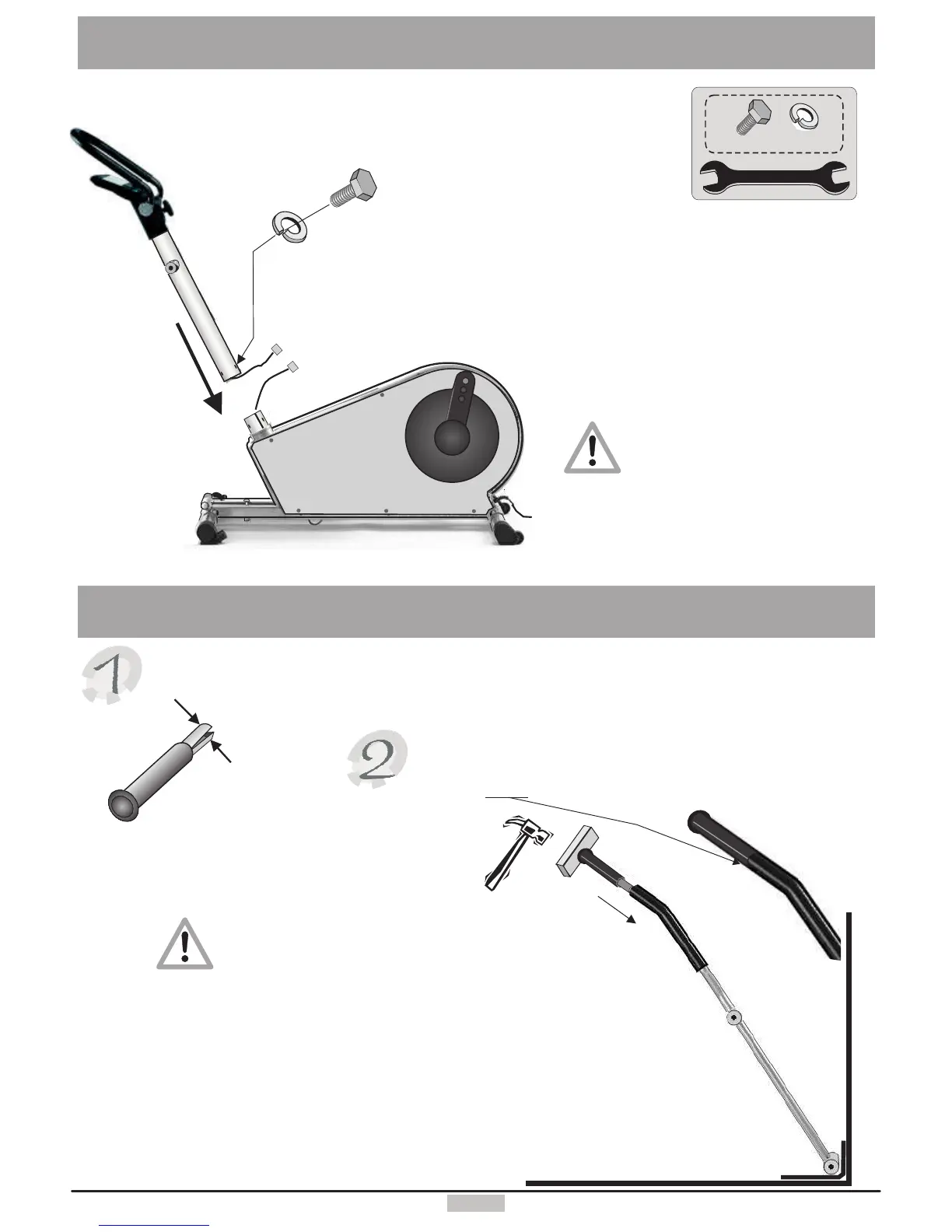
Installingthedashboard
Assemblingthehandles
Useahammer,withashockabsorber(apieceofsoftwoodor
plastic)betweenthehandleandthehammer,toinsertthehandle
intotheoscillatingpoleuntilthepole'ssleeveisevenwiththe
handle'sextension.Repeattheprocedurewiththeotherhandle.
Youshouldleantheoscillatingpolesagainstawallorany
cornertokeepthemfromslippingwhilehammeringthe
handlesinplace.Tofurtherprotectthepolesandthewall
youshouldplaceasoftmateriallikee.g.acarpetora
pieceofclothbetweenthepoleandthewall.
Pulltogetherthetwohalvesofthehandle'sextensionsandinserttheextensionintheoscillatingpoles.
Becarefultohammerthehandleinaperpendicular
directiontothepole!
Itismandatorytouseashockabsorbingstructureora
plasticorrubberhammertohammerthehandle's
extensioninplace.
45
X
Y
ConnectthetwocablesXandY bymeanoftheconnector.Thenraisethedashboard
intoposition.Takecareindoingsonotogetthecablesjammedorevensevered.This
assemblystepismoreeasilyexecutedwiththehelpofasecondpersonsincethe
dashboardsupportcolumnisheavy.
Screwinthescrewswiththewasherswithout
tighteningthemfornow.
C/3x
D/3x
13
17
Becarefultoavoidjammingor
separatingthedashboardcable
X/Y inthereceptacle.


 To Next Page