DVD Connections
Playing the DVD
1 7
Connection
1. Turn on the PDP TV and press on the remote controller.
2. Use to move to "Component
1 or 2
".
·If S-Video has been connected, select S-Video.
·If DVI-D has been connected, select “DVI”
3. Turn on the DVD, insert the DVD and press Play button.
※ Connection terminals of other appliances differ by manufacturer and model.
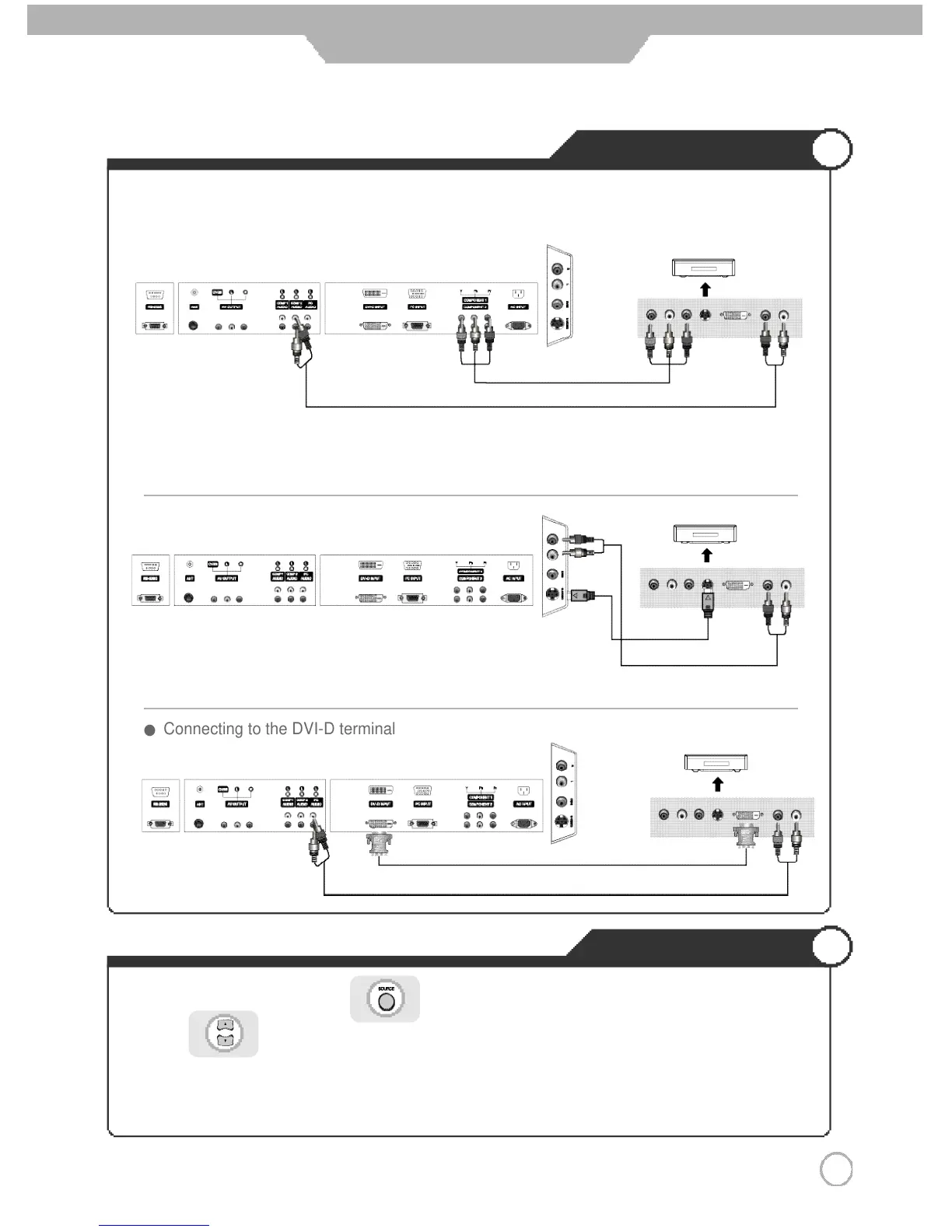
< PDP TV Back view >
Component connection c
a
bl
e
Component Audio cable
S-Video Cable
1. Connect PDP TV's Y, PB
,
PR terminal in Component 1 or 2 to DVD's Video Out terminal using the external cable.
2. Connect PDP TV's
Audio terminals (lef
t
&
right) in Component 1 or 2 to DVD's Audio Ou
t
terminal using the Audio
cable.
3. It musts agree Component's number of Y, PB ,PR terminal and Audio terminal.
※ S-Video cable can be used if there is an S-Video terminal.
● Connecting to the component terminal
● Connecting to the S-Video terminal
● Connecting to the DVI-D terminal
( R )
( L )
< DVD >
PRPBY
( R )
( L )
< DVD >
PRPBY
< PDP TV Back view >
DVI-D Cable
< PDP TV Back view >
( R )
( L )
< DVD >
PRPBY



 To Next Page